> ## Documentation Index
> Fetch the complete documentation index at: https://help.weavely.ai/llms.txt
> Use this file to discover all available pages before exploring further.
# Accessing your Invoices in Weavely.ai
> Learn where to access your Weavely.ai pro subscription invoices.
{`{
"@context": "https://schema.org",
"@graph": [
{
"@type": "WebPage",
"@id": "https://help.weavely.ai/accounts/invoices",
"url": "https://help.weavely.ai/accounts/invoices",
"name": "Accessing your Invoices in Weavely.ai",
"description": "Learn where to access your Weavely.ai pro subscription invoices.",
"inLanguage": "en",
"isPartOf": {
"@type": "WebSite",
"@id": "https://help.weavely.ai/#website",
"name": "Weavely Help Center"
},
"breadcrumb": {
"@type": "BreadcrumbList",
"itemListElement": [
{ "@type": "ListItem", "position": 1, "name": "Accounts", "item": "https://help.weavely.ai/accounts" },
{ "@type": "ListItem", "position": 2, "name": "Invoices", "item": "https://help.weavely.ai/accounts/invoices" }
]
},
"publisher": { "@id": "https://www.weavely.ai/#org" }
},
{
"@type": "TechArticle",
"headline": "Accessing your Invoices in Weavely.ai",
"description": "Learn where to access your Weavely.ai pro subscription invoices.",
"inLanguage": "en",
"mainEntityOfPage": { "@id": "https://help.weavely.ai/accounts/invoices" },
"author": { "@id": "https://www.weavely.ai/#org" },
"publisher": { "@id": "https://www.weavely.ai/#org" }
},
{
"@type": "Organization",
"@id": "https://www.weavely.ai/#org",
"name": "WEAVE.LY BV",
"url": "https://www.weavely.ai",
"address": {
"@type": "PostalAddress",
"streetAddress": "Herbert Hooverlaan 141",
"addressLocality": "Schaarbeek",
"postalCode": "1030",
"addressCountry": "BE"
},
"identifier": "BE0773.878.569",
"sameAs": [
"https://www.instagram.com/weavely.ai/",
"https://www.linkedin.com/company/weave-ly/",
"https://www.youtube.com/@weavely"
]
}
]
}`}
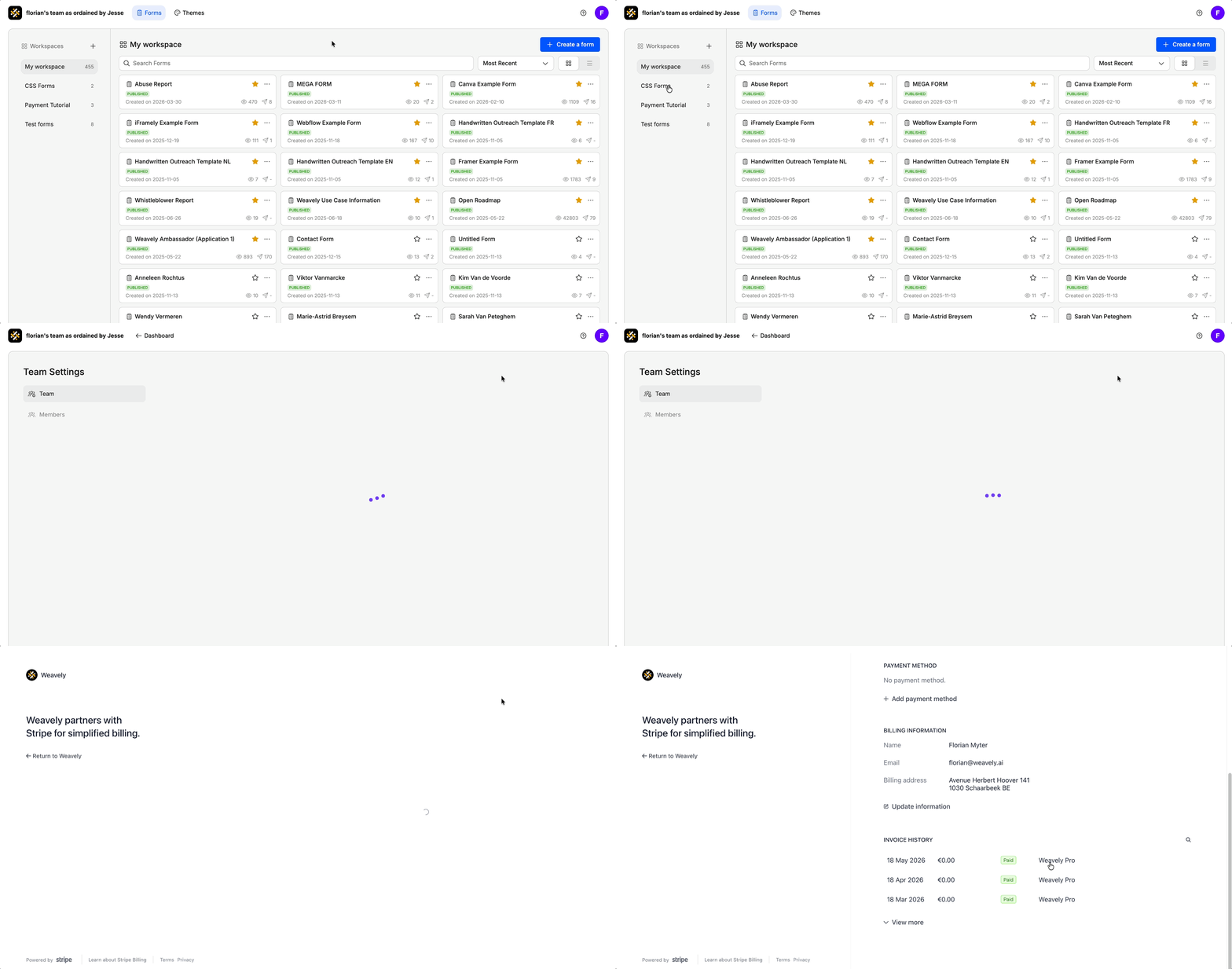
When you upgrade your Weavely subscription, you won't automatically receive invoices by email from us. However, you can easily access invoices for all your payments inside our platform.
Inside the dashboard navigate to **Settings → Team Settings** and click the "*Billing & Invoices*" button. You'll be redirected to a Stripe portal which contains all your details.