> ## Documentation Index
> Fetch the complete documentation index at: https://help.weavely.ai/llms.txt
> Use this file to discover all available pages before exploring further.
# Using Answer Piping in Weavely
> Learn how to use answer piping in AI forms and surveys with Weavely. Create dynamic fields for personalized, custom user experiences.
{`{
"@context": "https://schema.org",
"@graph": [
{
"@type": "WebPage",
"@id": "https://help.weavely.ai/features/answer-piping",
"url": "https://help.weavely.ai/features/answer-piping",
"name": "Using Answer Piping in Weavely",
"description": "Learn how to use answer piping in AI forms and surveys with Weavely. Create dynamic fields for personalized, custom user experiences.",
"inLanguage": "en",
"isPartOf": {
"@type": "WebSite",
"@id": "https://help.weavely.ai/#website",
"name": "Weavely Help Center"
},
"breadcrumb": {
"@type": "BreadcrumbList",
"itemListElement": [
{ "@type": "ListItem", "position": 1, "name": "Features", "item": "https://help.weavely.ai/features" },
{ "@type": "ListItem", "position": 2, "name": "Answer Piping", "item": "https://help.weavely.ai/features/answer-piping" }
]
},
"publisher": { "@id": "https://www.weavely.ai/#org" }
},
{
"@type": "TechArticle",
"headline": "Using Answer Piping in Weavely",
"description": "Discover how to use answer piping to create dynamic, personalized AI forms and surveys in Weavely. Learn setup steps, quiz mode behavior, and real-time response updates.",
"inLanguage": "en",
"mainEntityOfPage": { "@id": "https://help.weavely.ai/features/answer-piping" },
"author": { "@id": "https://www.weavely.ai/#org" },
"publisher": { "@id": "https://www.weavely.ai/#org" }
},
{
"@type": "VideoObject",
"@id": "https://www.youtube.com/watch?v=ZT33SfJvvNk",
"url": "https://www.youtube.com/watch?v=ZT33SfJvvNk",
"embedUrl": "https://www.youtube.com/embed/ZT33SfJvvNk",
"name": "How to Use Answer Piping in Weavely AI (Dynamic Fields Made Easy)",
"description": "Make your forms feel more personal and dynamic with answer piping. In this tutorial, I’ll show you how to use Weavely AI’s answer piping feature to carry user responses from one question into the next.",
"thumbnailUrl": ["https://i.ytimg.com/vi/ZT33SfJvvNk/maxresdefault.jpg"],
"uploadDate": "2025-10-24T12:00:00Z",
"inLanguage": "en",
"publisher": { "@id": "https://www.weavely.ai/#org" },
"potentialAction": {
"@type": "WatchAction",
"target": {
"@type": "EntryPoint",
"urlTemplate": "https://www.youtube.com/watch?v=ZT33SfJvvNk"
}
}
},
{
"@type": "Organization",
"@id": "https://www.weavely.ai/#org",
"name": "WEAVE.LY BV",
"url": "https://www.weavely.ai",
"address": {
"@type": "PostalAddress",
"streetAddress": "Herbert Hooverlaan 141",
"addressLocality": "Schaarbeek",
"postalCode": "1030",
"addressCountry": "BE"
},
"identifier": "BE0773.878.569",
"sameAs": [
"https://www.instagram.com/weavely.ai/",
"https://www.linkedin.com/company/weave-ly/",
"https://www.youtube.com/@weavely"
]
}
]
}`}
Answer piping, also known as dynamic fields or response piping, lets you reuse answers from earlier questions in your form. This makes your surveys feel more personal and dynamic, and it works seamlessly across both standard forms and quiz mode in Weavely. Here's how to use this feature in your forms.
## What Is Answer Piping?
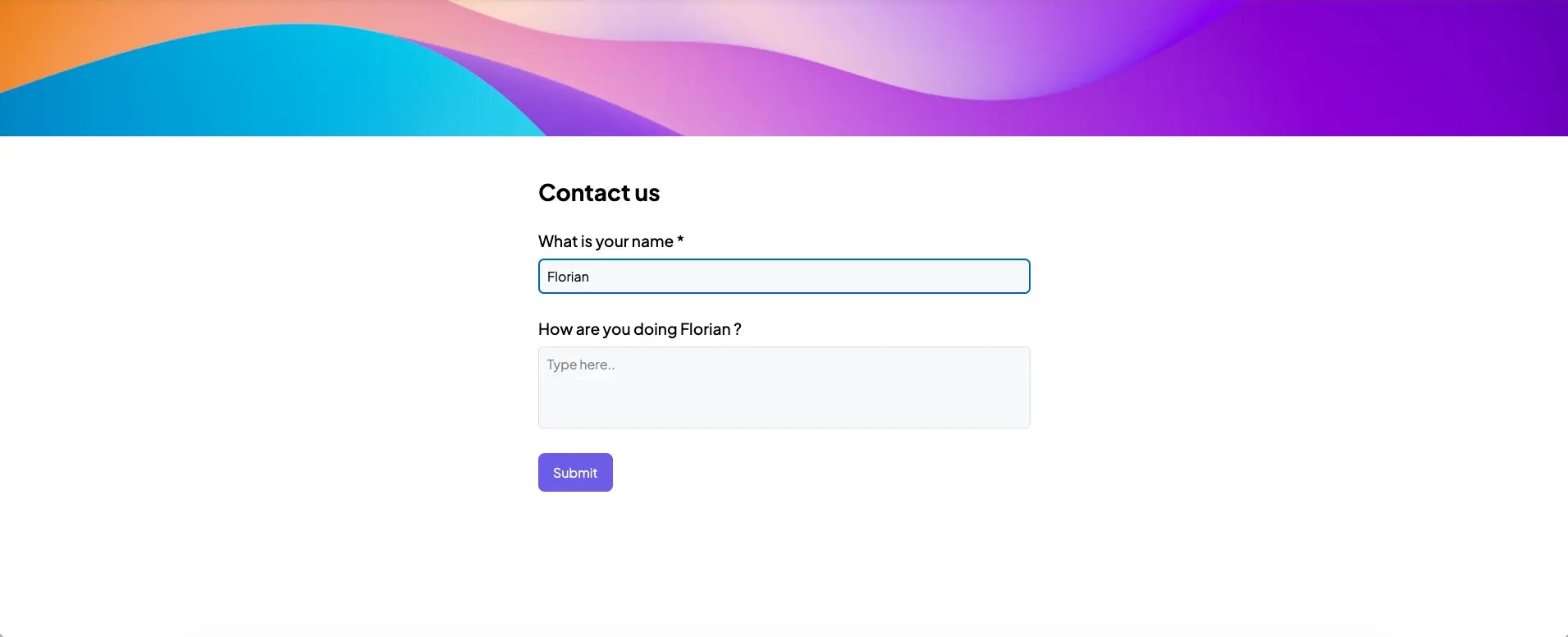
Answer piping allows you to insert a previous answer into another question or block of text. For example, if your form asks a user for their name, you can reference that name in later questions or confirmation messages like:
> “How are you doing, *\[Name]*?”
In quiz mode, you can also pipe dynamic quiz scores into your final screen or custom messages.
## How to Set It Up
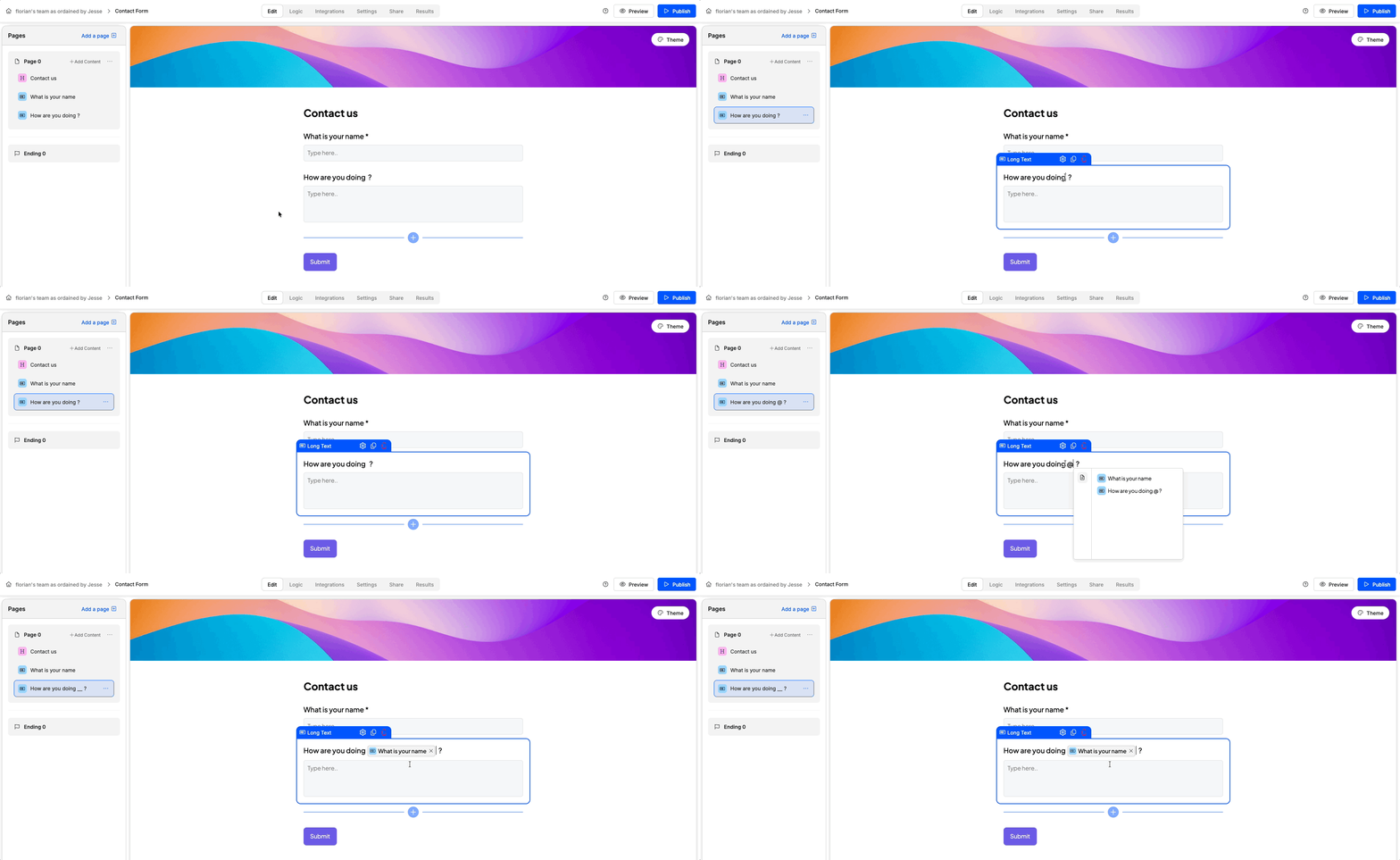
1. **Add your questions** to the form as usual.
2. In any subsequent question or text block where you want to reuse an answer, type the `@` symbol.
3. A dropdown will appear with all previous questions and (if quiz mode is enabled) quiz score variables.
4. Select the field you want to reference.
That’s it! Weavely will automatically update the placeholder with the actual response provided by the user.
## Real-Time Behavior
* If the referenced answer is on the **same screen**, an underscore placeholder (`_`) is shown initially and is updated in real-time as the user types.
* If the referenced answer is on a **previous screen**, users will immediately see the filled-in response.
## Quiz Mode Compatibility
In [**quiz mode**](/features/quizzes), you can also pipe dynamic quiz scores into later messages or questions. After enabling quiz mode in the form settings, additional variables like `@QuizScore` will appear in the dropdown.
## Example
* **Question 1**: “What’s your name?”
* **Question 2**: “How are you doing, `@What’s your name?`?”
If the respondent types “Alex” in Q1, Q2 will display: “How are you doing, Alex?”
## Final Notes
Answer piping works in:
* Questions
* Descriptive text blocks
* [Email notifications](/integrations/email-notifications)
 In quiz mode, you can also pipe dynamic quiz scores into your final screen or custom messages.
## How to Set It Up
1. **Add your questions** to the form as usual.
2. In any subsequent question or text block where you want to reuse an answer, type the `@` symbol.
3. A dropdown will appear with all previous questions and (if quiz mode is enabled) quiz score variables.
4. Select the field you want to reference.
In quiz mode, you can also pipe dynamic quiz scores into your final screen or custom messages.
## How to Set It Up
1. **Add your questions** to the form as usual.
2. In any subsequent question or text block where you want to reuse an answer, type the `@` symbol.
3. A dropdown will appear with all previous questions and (if quiz mode is enabled) quiz score variables.
4. Select the field you want to reference.
 That’s it! Weavely will automatically update the placeholder with the actual response provided by the user.
## Real-Time Behavior
* If the referenced answer is on the **same screen**, an underscore placeholder (`_`) is shown initially and is updated in real-time as the user types.
* If the referenced answer is on a **previous screen**, users will immediately see the filled-in response.
## Quiz Mode Compatibility
In [**quiz mode**](/features/quizzes), you can also pipe dynamic quiz scores into later messages or questions. After enabling quiz mode in the form settings, additional variables like `@QuizScore` will appear in the dropdown.
## Example
* **Question 1**: “What’s your name?”
* **Question 2**: “How are you doing, `@What’s your name?`?”
If the respondent types “Alex” in Q1, Q2 will display: “How are you doing, Alex?”
## Final Notes
Answer piping works in:
* Questions
* Descriptive text blocks
* [Email notifications](/integrations/email-notifications)
That’s it! Weavely will automatically update the placeholder with the actual response provided by the user.
## Real-Time Behavior
* If the referenced answer is on the **same screen**, an underscore placeholder (`_`) is shown initially and is updated in real-time as the user types.
* If the referenced answer is on a **previous screen**, users will immediately see the filled-in response.
## Quiz Mode Compatibility
In [**quiz mode**](/features/quizzes), you can also pipe dynamic quiz scores into later messages or questions. After enabling quiz mode in the form settings, additional variables like `@QuizScore` will appear in the dropdown.
## Example
* **Question 1**: “What’s your name?”
* **Question 2**: “How are you doing, `@What’s your name?`?”
If the respondent types “Alex” in Q1, Q2 will display: “How are you doing, Alex?”
## Final Notes
Answer piping works in:
* Questions
* Descriptive text blocks
* [Email notifications](/integrations/email-notifications)