> ## Documentation Index
> Fetch the complete documentation index at: https://help.weavely.ai/llms.txt
> Use this file to discover all available pages before exploring further.
# Embedding Your Form on a Website
> Need your form to be integrated into a website? Here's how!
{`{
"@context": "https://schema.org",
"@graph": [
{
"@type": "WebPage",
"@id": "https://help.weavely.ai/features/embeddings",
"url": "https://help.weavely.ai/features/embeddings",
"name": "Embedding Your Form on a Website",
"description": "Need your form to be integrated into a website? Here's how!",
"inLanguage": "en",
"isPartOf": {
"@type": "WebSite",
"@id": "https://help.weavely.ai/#website",
"name": "Weavely Help Center"
},
"breadcrumb": {
"@type": "BreadcrumbList",
"itemListElement": [
{ "@type": "ListItem", "position": 1, "name": "Features", "item": "https://help.weavely.ai/features" },
{ "@type": "ListItem", "position": 2, "name": "Embedding Your Form on a Website", "item": "https://help.weavely.ai/features/embeddings" }
]
},
"publisher": { "@id": "https://www.weavely.ai/#org" }
},
{
"@type": "TechArticle",
"headline": "Embedding Your Form on a Website",
"description": "Need your form to be integrated into a website? Here's how!",
"inLanguage": "en",
"mainEntityOfPage": { "@id": "https://help.weavely.ai/features/embeddings" },
"author": { "@id": "https://www.weavely.ai/#org" },
"publisher": { "@id": "https://www.weavely.ai/#org" }
},
{
"@type": "VideoObject",
"@id": "https://help.weavely.ai/features/embeddings#video",
"name": "Embedded Vs. Pop-up AI Forms, Weavely.ai Tutorial",
"description": "In under four minutes I show you two simple ways to drop a Weavely.ai form into any site: either sitting neatly inside the page or popping up on cue. No frameworks, no magic incantations, just two copy-paste snippets and a chill vibe.",
"inLanguage": "en",
"thumbnailUrl": [
"https://i.ytimg.com/vi/95JoC34l_Q8/maxresdefault.jpg",
"https://i.ytimg.com/vi/95JoC34l_Q8/hqdefault.jpg"
],
"uploadDate": "2025-05-07T00:00:00Z",
"duration": "PT3M29S",
"embedUrl": "https://www.youtube.com/embed/95JoC34l_Q8",
"contentUrl": "https://youtu.be/95JoC34l_Q8",
"publisher": { "@id": "https://www.weavely.ai/#org" },
"potentialAction": {
"@type": "WatchAction",
"target": "https://www.youtube.com/watch?v=95JoC34l_Q8"
}
},
{
"@type": "Organization",
"@id": "https://www.weavely.ai/#org",
"name": "WEAVE.LY BV",
"url": "https://www.weavely.ai",
"address": {
"@type": "PostalAddress",
"streetAddress": "Herbert Hooverlaan 141",
"addressLocality": "Schaarbeek",
"postalCode": "1030",
"addressCountry": "BE"
},
"identifier": "BE0773.878.569",
"sameAs": [
"https://www.instagram.com/weavely.ai/",
"https://www.linkedin.com/company/weave-ly/",
"https://www.youtube.com/@weavely"
]
}
]
}`}
So you’ve crafted the perfect Weavely form and now you want to drop it into your website.
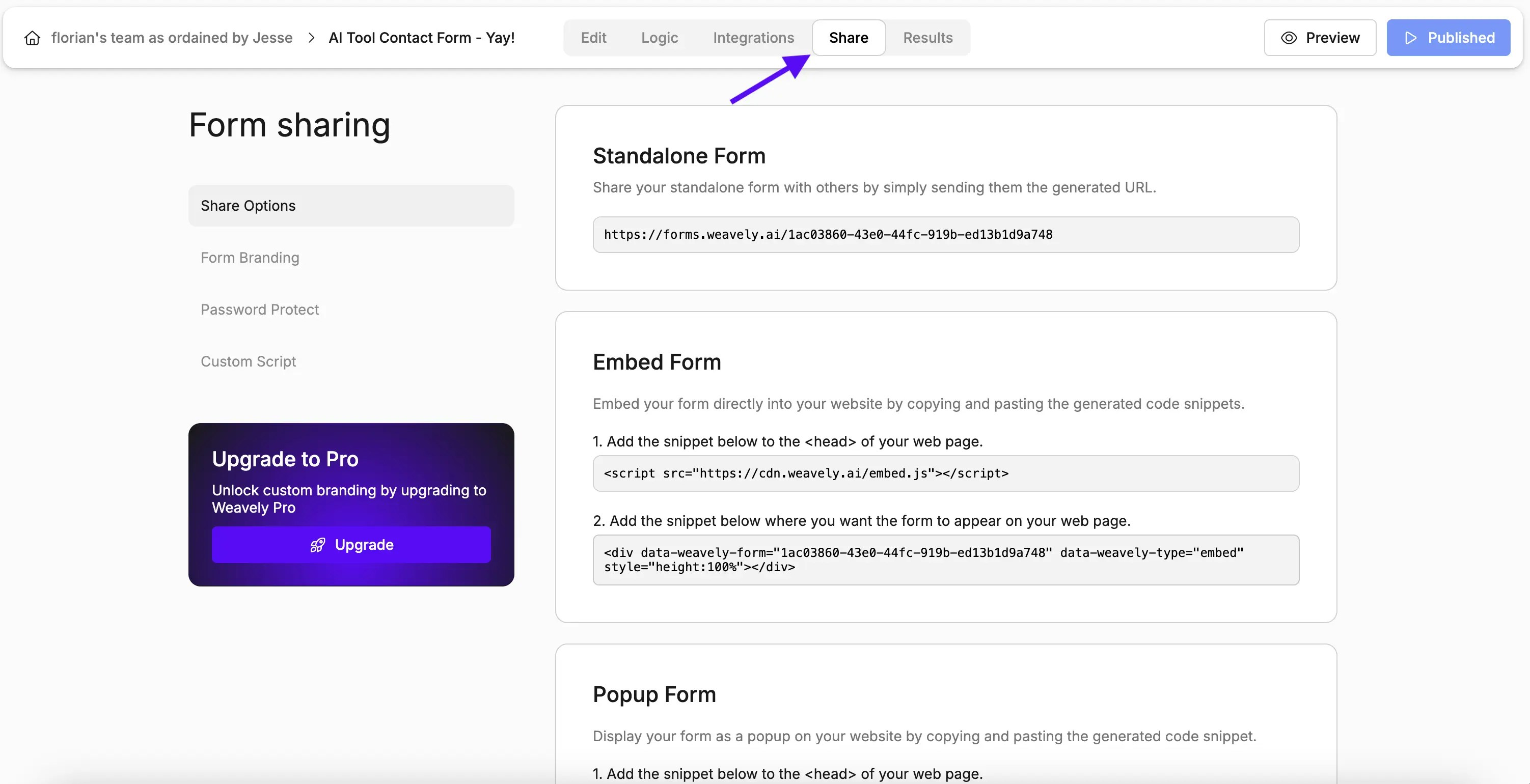
Good news: it takes *two* tiny snippets and about 90 seconds of effort,whether you want the form **embedded right in the page** or **popping up on cue**. You'll find both options under the *Share* tab while editing your form.
## Option 1: Embedded Form
**What is it:** The form lives *inside* the page layout. Like a regular section, card, or sidebar.
**Why you'd use it:** Great for contact pages, product wait-lists, or anywhere you want the form to feel native to the flow of the content.
To embed a form into a website you'll need to complete two steps. First, paste the Weavely.ai *\
 ## Option 1: Embedded Form
**What is it:** The form lives *inside* the page layout. Like a regular section, card, or sidebar.
**Why you'd use it:** Great for contact pages, product wait-lists, or anywhere you want the form to feel native to the flow of the content.
To embed a form into a website you'll need to complete two steps. First, paste the Weavely.ai *\
## Option 1: Embedded Form
**What is it:** The form lives *inside* the page layout. Like a regular section, card, or sidebar.
**Why you'd use it:** Great for contact pages, product wait-lists, or anywhere you want the form to feel native to the flow of the content.
To embed a form into a website you'll need to complete two steps. First, paste the Weavely.ai *\