> ## Documentation Index
> Fetch the complete documentation index at: https://help.weavely.ai/llms.txt
> Use this file to discover all available pages before exploring further.
# Event Triggers: Reload or Redirect a Form After Submission
> Learn how to automatically reload your form or redirect respondents to a custom URL after submission. Perfect for kiosks, landing pages, post-survey workflows.
{`{
"@context": "https://schema.org",
"@graph": [
{
"@type": "WebPage",
"@id": "https://help.weavely.ai/features/event-trigger",
"url": "https://help.weavely.ai/features/event-trigger",
"name": "Event Triggers: Reload or Redirect a Form After Submission",
"description": "Learn how to automatically reload your form or redirect respondents to a custom URL after submission. Perfect for kiosks, landing pages, post-survey workflows.",
"inLanguage": "en",
"isPartOf": {
"@type": "WebSite",
"@id": "https://help.weavely.ai/#website",
"name": "Weavely Help Center"
},
"breadcrumb": {
"@type": "BreadcrumbList",
"itemListElement": [
{ "@type": "ListItem", "position": 1, "name": "Features", "item": "https://help.weavely.ai/features" },
{ "@type": "ListItem", "position": 2, "name": "Event Triggers", "item": "https://help.weavely.ai/features/event-trigger" }
]
},
"publisher": { "@id": "https://www.weavely.ai/#org" }
},
{
"@type": "TechArticle",
"headline": "Event Triggers: Reload or Redirect a Form After Submission",
"description": "Learn how to automatically reload your form or redirect respondents to a custom URL after submission in Weavely. Perfect for kiosks, landing pages, and post-survey workflows.",
"inLanguage": "en",
"mainEntityOfPage": { "@id": "https://help.weavely.ai/features/event-trigger" },
"author": { "@id": "https://www.weavely.ai/#org" },
"publisher": { "@id": "https://www.weavely.ai/#org" }
},
{
"@type": "VideoObject",
"@id": "https://help.weavely.ai/features/event-trigger#video",
"name": "How to Set Up AI Form Redirects and Resets (Event Triggers in Weavely.ai)",
"description": "Want to control what happens after a form is submitted? In this tutorial, I’ll show you how to use event triggers in Weavely.ai to automatically redirect users to another page or reset the form for another submission. All in an AI-powered form builder.",
"inLanguage": "en",
"thumbnailUrl": [
"https://i.ytimg.com/vi/Ll9nYwJspsA/maxresdefault.jpg",
"https://i.ytimg.com/vi/Ll9nYwJspsA/hqdefault.jpg"
],
"uploadDate": "2025-07-10T00:00:00Z",
"duration": "PT1M52S",
"embedUrl": "https://www.youtube.com/embed/Ll9nYwJspsA",
"contentUrl": "https://youtu.be/Ll9nYwJspsA",
"publisher": { "@id": "https://www.weavely.ai/#org" },
"potentialAction": {
"@type": "WatchAction",
"target": "https://www.youtube.com/watch?v=Ll9nYwJspsA"
}
},
{
"@type": "Organization",
"@id": "https://www.weavely.ai/#org",
"name": "WEAVE.LY BV",
"url": "https://www.weavely.ai",
"address": {
"@type": "PostalAddress",
"streetAddress": "Herbert Hooverlaan 141",
"addressLocality": "Schaarbeek",
"postalCode": "1030",
"addressCountry": "BE"
},
"identifier": "BE0773.878.569",
"sameAs": [
"https://www.instagram.com/weavely.ai/",
"https://www.linkedin.com/company/weave-ly/",
"https://www.youtube.com/@weavely"
]
}
]
}`}
Weavely makes it easy to define what happens after someone submits your form. Whether you want the form to reset for the next respondent (like in a kiosk setup) or redirect users to a specific URL (such as a thank-you page or your website), you can configure this using **Event Triggers** in the Logic tab.
This guide walks you through both options.
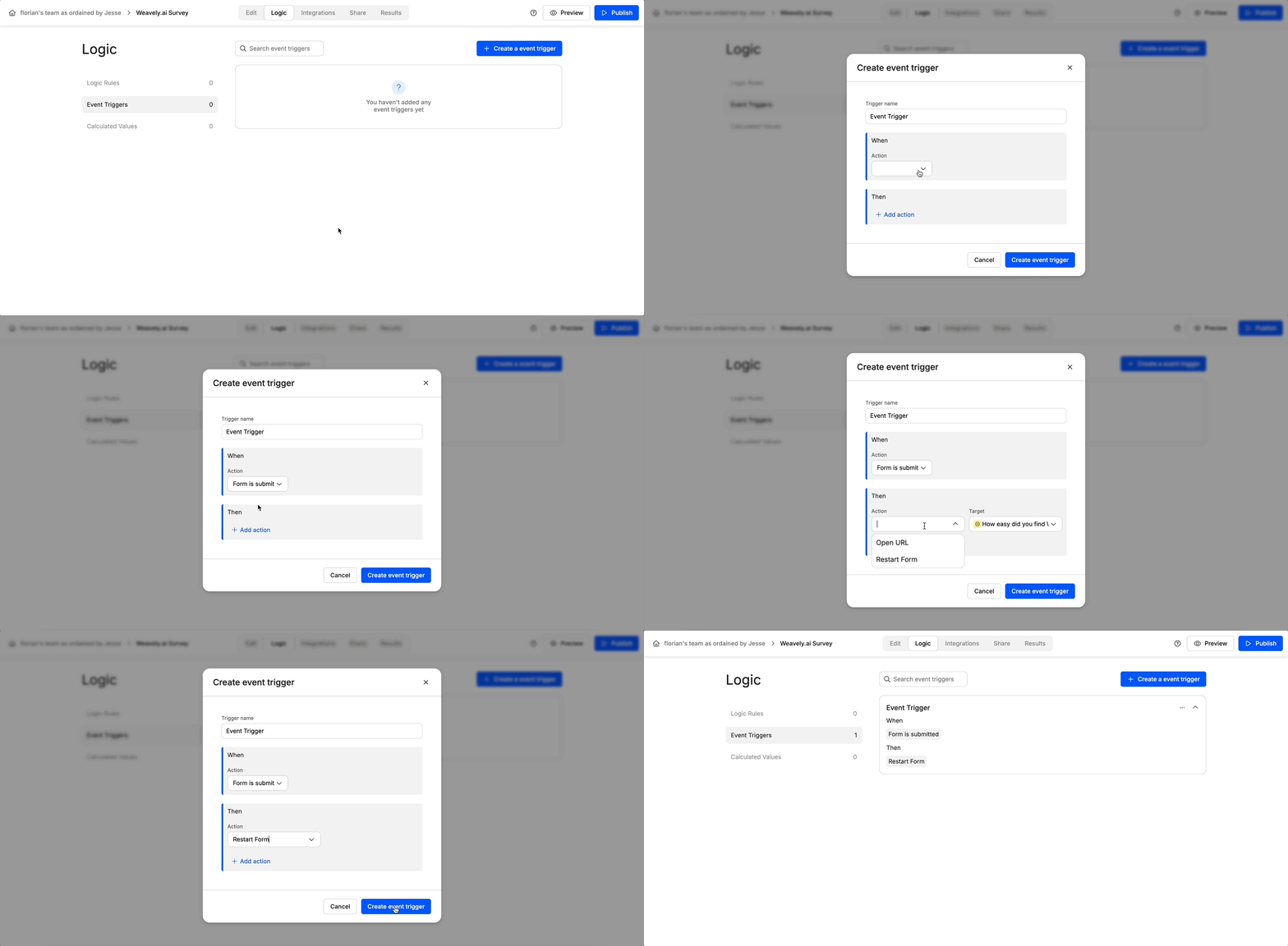
## Reloading the Form After Submission
This is useful for public kiosks, feedback stations, or in-person setups where the form should reset automatically for the next user.
### Steps:
1. Open your form in the editor.
2. Navigate to the **Logic** tab at the top.
3. Scroll down to **Event Triggers** and click **+ Create Event Trigger**.
4. In the first dropdown ("When..."), select `Form is submitted`.
5. In the second dropdown ("Then..."), choose `Restart form`.
6. Click **Create Event Trigger** and **Publish**.
Now, when someone submits the form, it will reload to its initial state immediately.
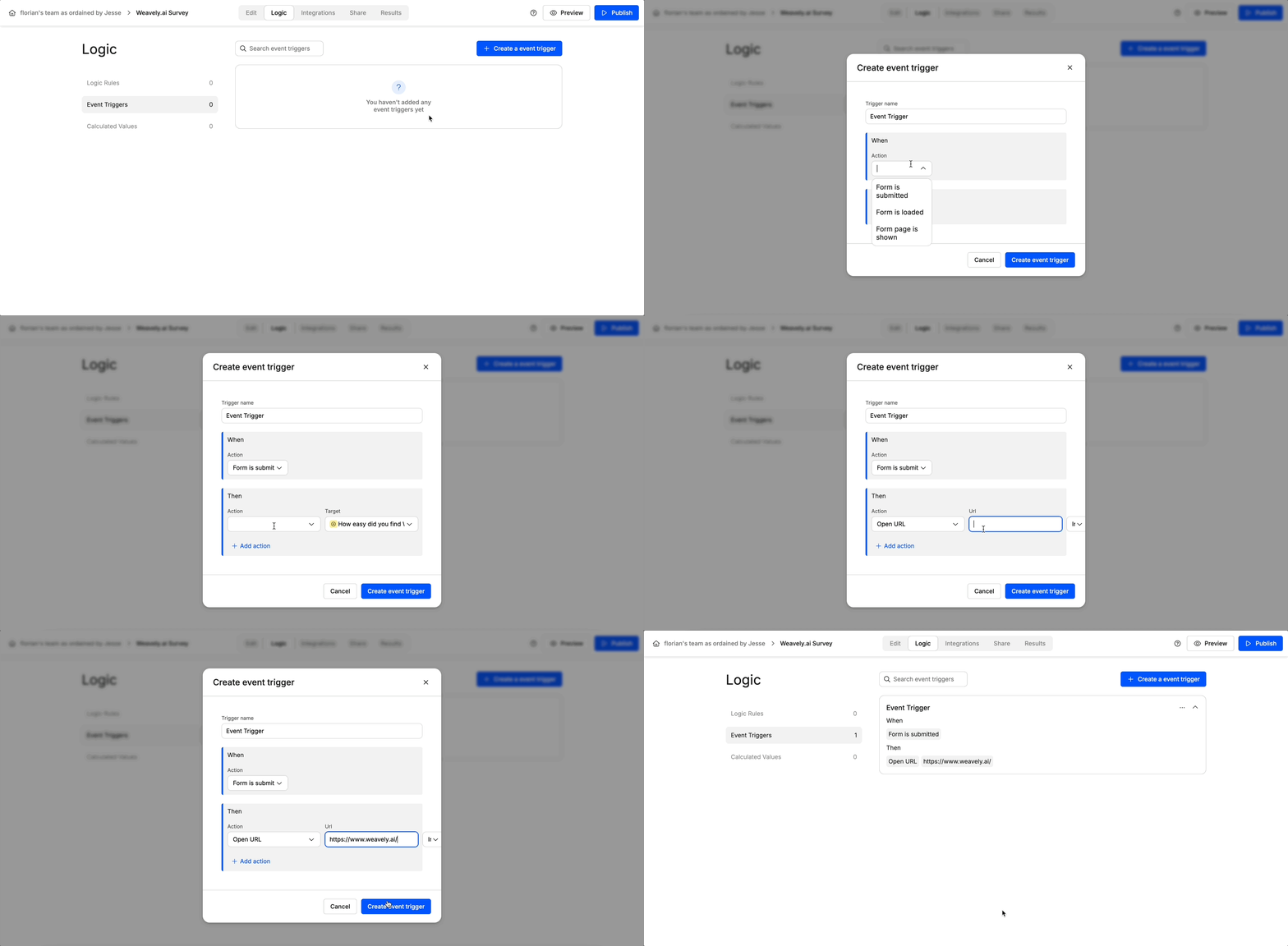
## Redirecting to a URL After Submission
You can also send respondents to another page—perfect for thank-you messages, next steps, or even special offers.
### Steps:
1. Head to the **Logic** tab of your form.
2. Under **Event Triggers**, create a new trigger.
3. Set the trigger condition to `Form is submitted`.
4. Choose the action `Open URL`.
5. Enter the destination URL (e.g. `https://yourdomain.com/thank-you`).
6. Select whether the redirect should happen in the same tab or a new one.
7. Click **Create Event Trigger** and **Publish**.
When users complete the form, they'll be redirected automatically to the URL you provided.
## Other Events
Any of the two aforementioned actions can also be triggered whenever:
* The form is loaded
* A specific page in the form is shown
 Now, when someone submits the form, it will reload to its initial state immediately.
## Redirecting to a URL After Submission
You can also send respondents to another page—perfect for thank-you messages, next steps, or even special offers.
### Steps:
1. Head to the **Logic** tab of your form.
2. Under **Event Triggers**, create a new trigger.
3. Set the trigger condition to `Form is submitted`.
4. Choose the action `Open URL`.
5. Enter the destination URL (e.g. `https://yourdomain.com/thank-you`).
6. Select whether the redirect should happen in the same tab or a new one.
7. Click **Create Event Trigger** and **Publish**.
Now, when someone submits the form, it will reload to its initial state immediately.
## Redirecting to a URL After Submission
You can also send respondents to another page—perfect for thank-you messages, next steps, or even special offers.
### Steps:
1. Head to the **Logic** tab of your form.
2. Under **Event Triggers**, create a new trigger.
3. Set the trigger condition to `Form is submitted`.
4. Choose the action `Open URL`.
5. Enter the destination URL (e.g. `https://yourdomain.com/thank-you`).
6. Select whether the redirect should happen in the same tab or a new one.
7. Click **Create Event Trigger** and **Publish**.
 When users complete the form, they'll be redirected automatically to the URL you provided.
## Other Events
Any of the two aforementioned actions can also be triggered whenever:
* The form is loaded
* A specific page in the form is shown
When users complete the form, they'll be redirected automatically to the URL you provided.
## Other Events
Any of the two aforementioned actions can also be triggered whenever:
* The form is loaded
* A specific page in the form is shown