> ## Documentation Index
> Fetch the complete documentation index at: https://help.weavely.ai/llms.txt
> Use this file to discover all available pages before exploring further.
# Match Quiz
> Use Weavely's AI to build a quiz that weights each answer and sorts respondents into categories. Ideal for personality quizzes and product-match finders.
{`{
"@context": "https://schema.org",
"@graph": [
{
"@type": "WebPage",
"@id": "https://help.weavely.ai/features/match-quiz",
"url": "https://help.weavely.ai/features/match-quiz",
"name": "Match Quiz",
"description": "Use Weavely's AI to build a quiz that weights each answer and sorts respondents into categories. Ideal for personality quizzes and product-match finders.",
"inLanguage": "en",
"publisher": { "@id": "https://www.weavely.ai/#org" }
},
{
"@type": "TechArticle",
"@id": "https://help.weavely.ai/features/match-quiz#article",
"headline": "Match Quiz",
"description": "Use Weavely's AI to build a quiz that weights each answer and sorts respondents into categories. Ideal for personality quizzes and product-match finders.",
"inLanguage": "en",
"mainEntityOfPage": { "@id": "https://help.weavely.ai/features/match-quiz" },
"author": { "@id": "https://www.weavely.ai/#org" },
"publisher": { "@id": "https://www.weavely.ai/#org" }
},
{
"@type": "VideoObject",
"@id": "https://help.weavely.ai/features/match-quiz#video",
"name": "How to Build Lead Generation Quizzes & Assessments in Weavely (Full Walkthrough)",
"description": "How to build a lead qualification form and a match quiz with AI, start to finish, using Weavely. In this walkthrough I build two kinds of scored forms from a single prompt, no manual setup: Lead qualification form: respondents answer a few questions, each gets a single score, and they're sorted into cold, warm, or hot leads with a different ending depending on the score. I build it around a sandal-shop example and capture the respondent's email too. Match quiz: instead of one score, each answer carries weights that assign people to a category based on how they respond think personality quizzes or 'which product should you buy' finders for an e-commerce store. (Yes, there's a Harry Potter houses demo.) You'll also see how Weavely's AI writes the questions and wires up all the scoring automatically, how to fine-tune the scores, outcomes and endings by hand, and how to collapse outcome-based endings into a single score when that's all you need.",
"url": "https://youtu.be/BcgQHVZDkcA",
"contentUrl": "https://www.youtube.com/watch?v=BcgQHVZDkcA",
"embedUrl": "https://www.youtube.com/embed/BcgQHVZDkcA",
"duration": "PT7M5S",
"uploadDate": "2026-06-02",
"thumbnailUrl": [
"https://i.ytimg.com/vi/BcgQHVZDkcA/maxresdefault.jpg"
],
"publisher": { "@id": "https://www.weavely.ai/#org" },
"potentialAction": {
"@type": "WatchAction",
"target": "https://youtu.be/BcgQHVZDkcA"
}
},
{
"@type": "Organization",
"@id": "https://www.weavely.ai/#org",
"name": "Weavely",
"url": "https://www.weavely.ai"
}
]
}`}
A match quiz sorts respondents into **categories** based on their answers. Instead of one score, each answer carries **weights** toward different outcomes, and the outcome with the most points is the one the respondent sees. It's the format behind personality quizzes and "which product should you buy" finders.
Want a single score per respondent instead (e.g. cold, warm, hot leads)? See [Build a lead qualification form](/features/lead-qualification).
## Steps
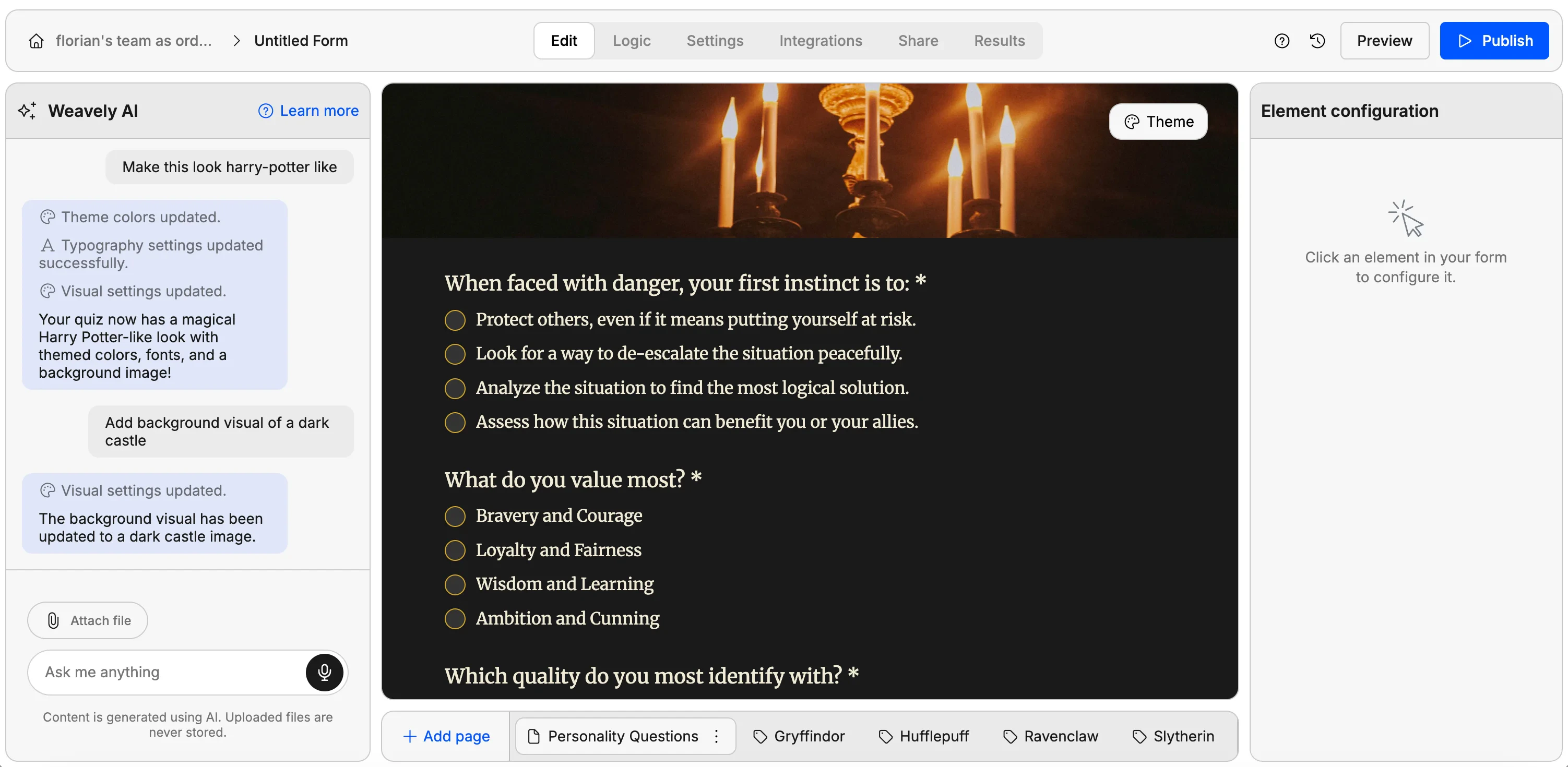
Describe the quiz and the categories people should be sorted into. The more specific the prompt, the better the questions and outcomes.
```text theme={null}
I want a personality quiz which assigns people to one of the
four Harry Potter houses based on their traits.
```
Another common use is an e-commerce product finder that recommends a different product depending on the answers. Press **Generate form**.
Weavely generates the questions *and* the outcomes, in this case, one outcome per Harry Potter house, then wires up the weighting.
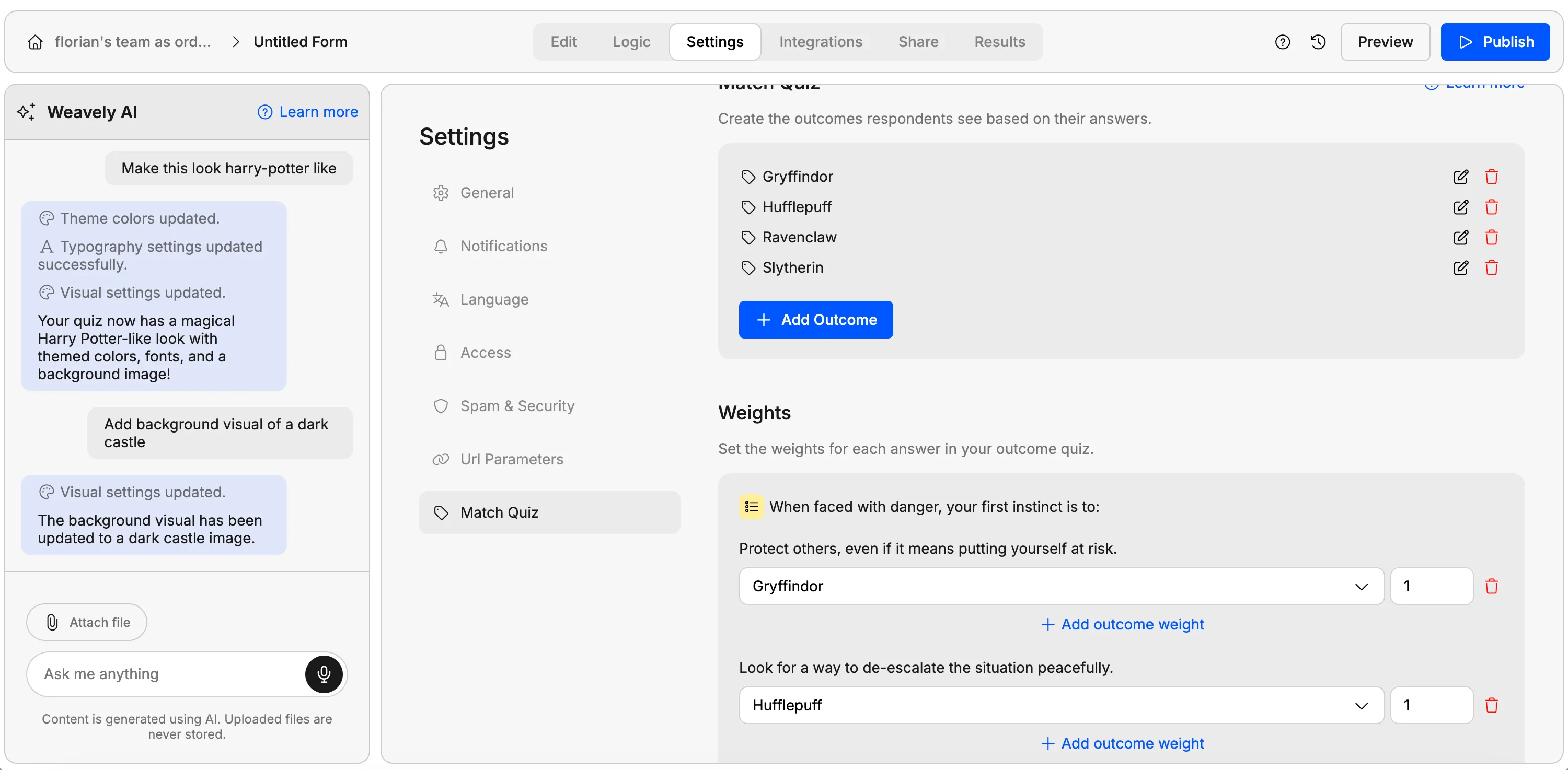
Open **Settings → Match quiz**. Unlike a lead qualification form, there's no single score per answer. Instead, each answer carries a **weight** toward one or more outcomes. For example, "bravery" might be a point for Gryffindor, while "ambition" is a point for Slytherin. A single answer can carry weight toward several outcomes at once, bravery could add a point to both Gryffindor *and* Hufflepuff.
Weavely's AI assigns weights for every question and answer automatically. Adjust or add weights to fine-tune which answers point to which outcome.
Publish the form and fill it in. As a respondent moves through the quiz, they accumulate points toward each outcome, and the highest-scoring outcome is shown at the end.
In **Results**, you'll see each respondent's answers and the outcome they were matched to.
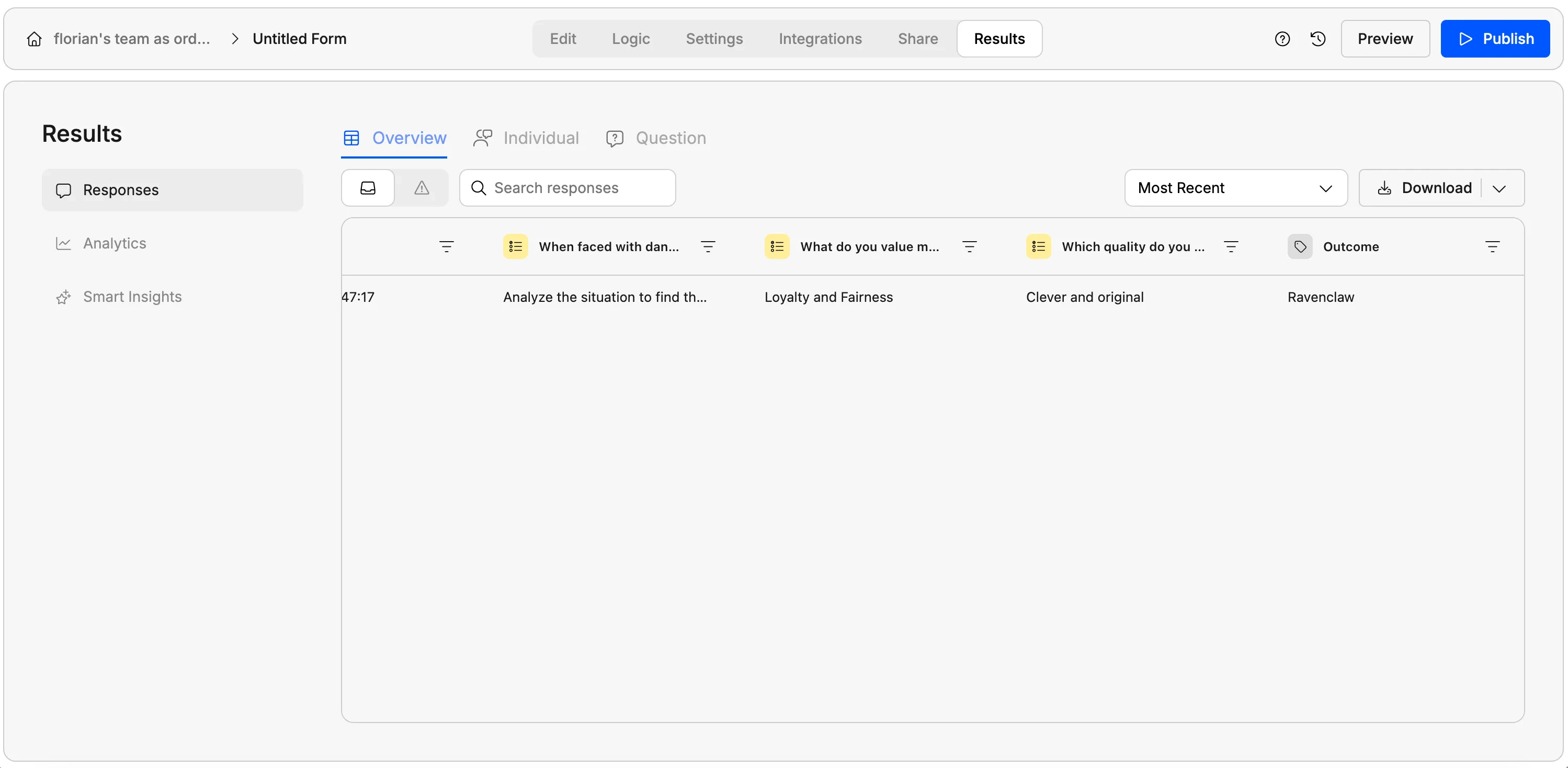 In **Results**, you'll see each respondent's answers and the outcome they were matched to.