> ## Documentation Index
> Fetch the complete documentation index at: https://help.weavely.ai/llms.txt
> Use this file to discover all available pages before exploring further.
# Skip-Page Logic
> Learn how to use conditional logic in Weavely to skip pages, hide or show form elements based on responses, and create dynamic, personalized surveys and forms.
{`{
"@context": "https://schema.org",
"@graph": [
{
"@type": "WebPage",
"@id": "https://help.weavely.ai/features/skip-logic",
"url": "https://help.weavely.ai/features/skip-logic",
"name": "Skip-Page Logic",
"description": "Learn how to use conditional logic in Weavely to skip pages, hide or show form elements based on responses, and create dynamic, personalized surveys and forms.",
"inLanguage": "en",
"isPartOf": {
"@type": "WebSite",
"@id": "https://help.weavely.ai/#website",
"name": "Weavely Help Center"
},
"breadcrumb": {
"@type": "BreadcrumbList",
"itemListElement": [
{ "@type": "ListItem", "position": 1, "name": "Features", "item": "https://help.weavely.ai/features" },
{ "@type": "ListItem", "position": 2, "name": "Skip-Page Logic", "item": "https://help.weavely.ai/features/skip-logic" }
]
},
"publisher": { "@id": "https://www.weavely.ai/#org" }
},
{
"@type": "TechArticle",
"headline": "Skip-Page Logic",
"description": "Learn how to use conditional logic in Weavely to skip pages, hide or show form elements based on responses, and create dynamic, personalized surveys and forms.",
"inLanguage": "en",
"mainEntityOfPage": { "@id": "https://help.weavely.ai/features/skip-logic" },
"author": { "@id": "https://www.weavely.ai/#org" },
"publisher": { "@id": "https://www.weavely.ai/#org" }
},
{
"@type": "VideoObject",
"@id": "https://help.weavely.ai/features/skip-logic#video",
"name": "How to Add Skip Logic to AI Forms (Dynamic Page Routing in Weavely.ai)",
"description": "Want to build smarter, dynamic forms that adapt to your users? In this tutorial, I’ll show you how to use skip-page logic in Weavely to create AI-powered forms with conditional page flows. Perfect for surveys, lead routing, and more.",
"inLanguage": "en",
"thumbnailUrl": [
"https://i.ytimg.com/vi/4kK37SBw8Wg/maxresdefault.jpg",
"https://i.ytimg.com/vi/4kK37SBw8Wg/hqdefault.jpg"
],
"uploadDate": "2025-07-10T00:00:00Z",
"duration": "PT2M50S",
"embedUrl": "https://www.youtube.com/embed/4kK37SBw8Wg",
"contentUrl": "https://youtu.be/4kK37SBw8Wg",
"publisher": { "@id": "https://www.weavely.ai/#org" },
"potentialAction": {
"@type": "WatchAction",
"target": "https://www.youtube.com/watch?v=4kK37SBw8Wg"
}
},
{
"@type": "Organization",
"@id": "https://www.weavely.ai/#org",
"name": "WEAVE.LY BV",
"url": "https://www.weavely.ai",
"address": {
"@type": "PostalAddress",
"streetAddress": "Herbert Hooverlaan 141",
"addressLocality": "Schaarbeek",
"postalCode": "1030",
"addressCountry": "BE"
},
"identifier": "BE0773.878.569",
"sameAs": [
"https://www.instagram.com/weavely.ai/",
"https://www.linkedin.com/company/weave-ly/",
"https://www.youtube.com/@weavely"
]
}
]
}`}
Weavely's powerful logic engine lets you dynamically control the flow of your forms and surveys. Whether you want to **skip pages**, **hide irrelevant questions**, or **only show certain elements based on previous answers**, Weavely makes it easy to build intelligent, responsive forms without writing code.
In this guide, we’ll walk through the basics of using **logic rules** in Weavely to create smarter form flows.
## Accessing the Logic Tab
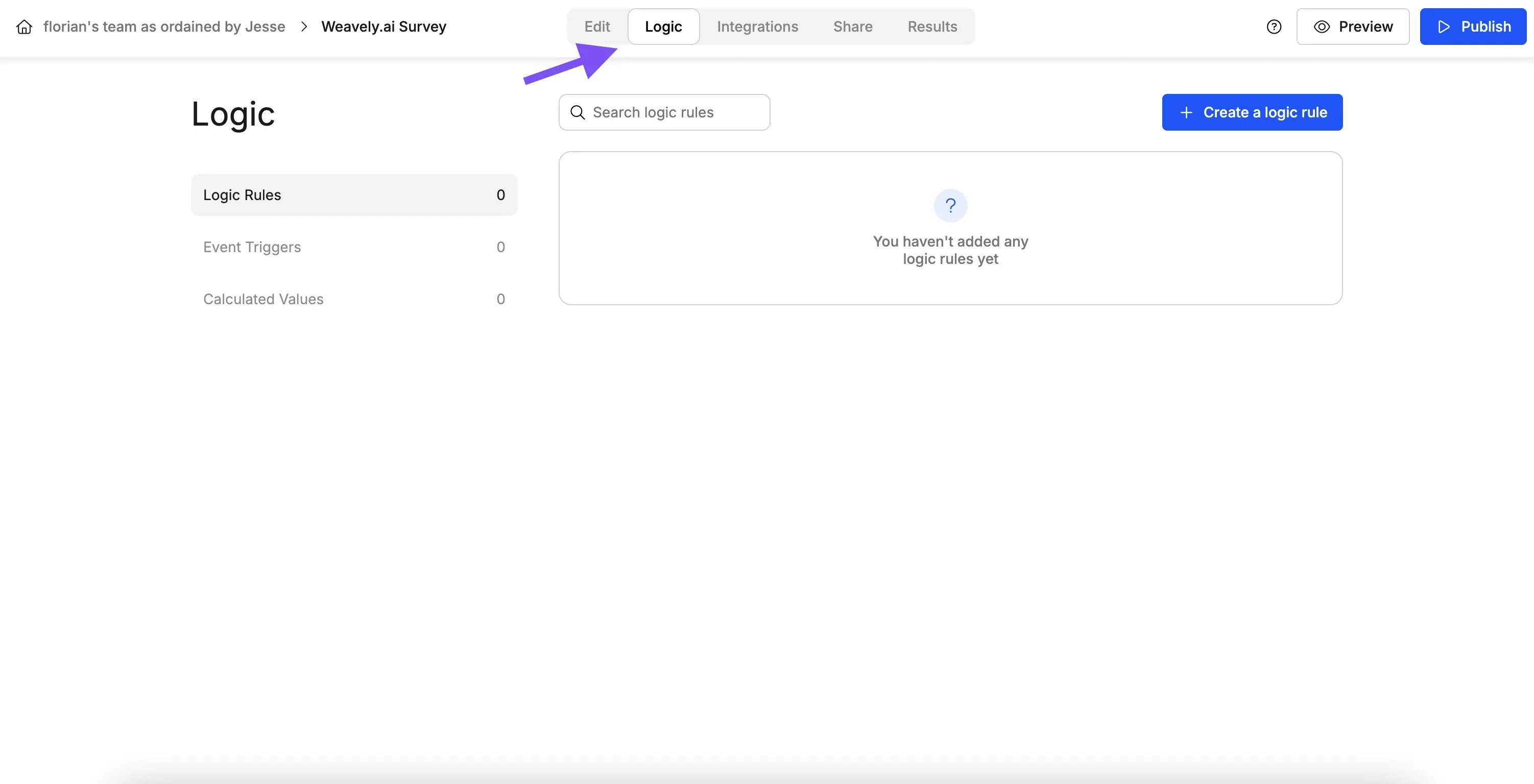
Start by opening the form or survey you want to enhance. Once you're in the form editor, click on the **Logic** tab. This is where you’ll define all your conditional behavior.
Click **“Create Logic Rule”** to begin. Each logic rule follows an **IF → THEN** structure:
> *If certain conditions are met, then take a specific action.*
## Example: Skip to Page
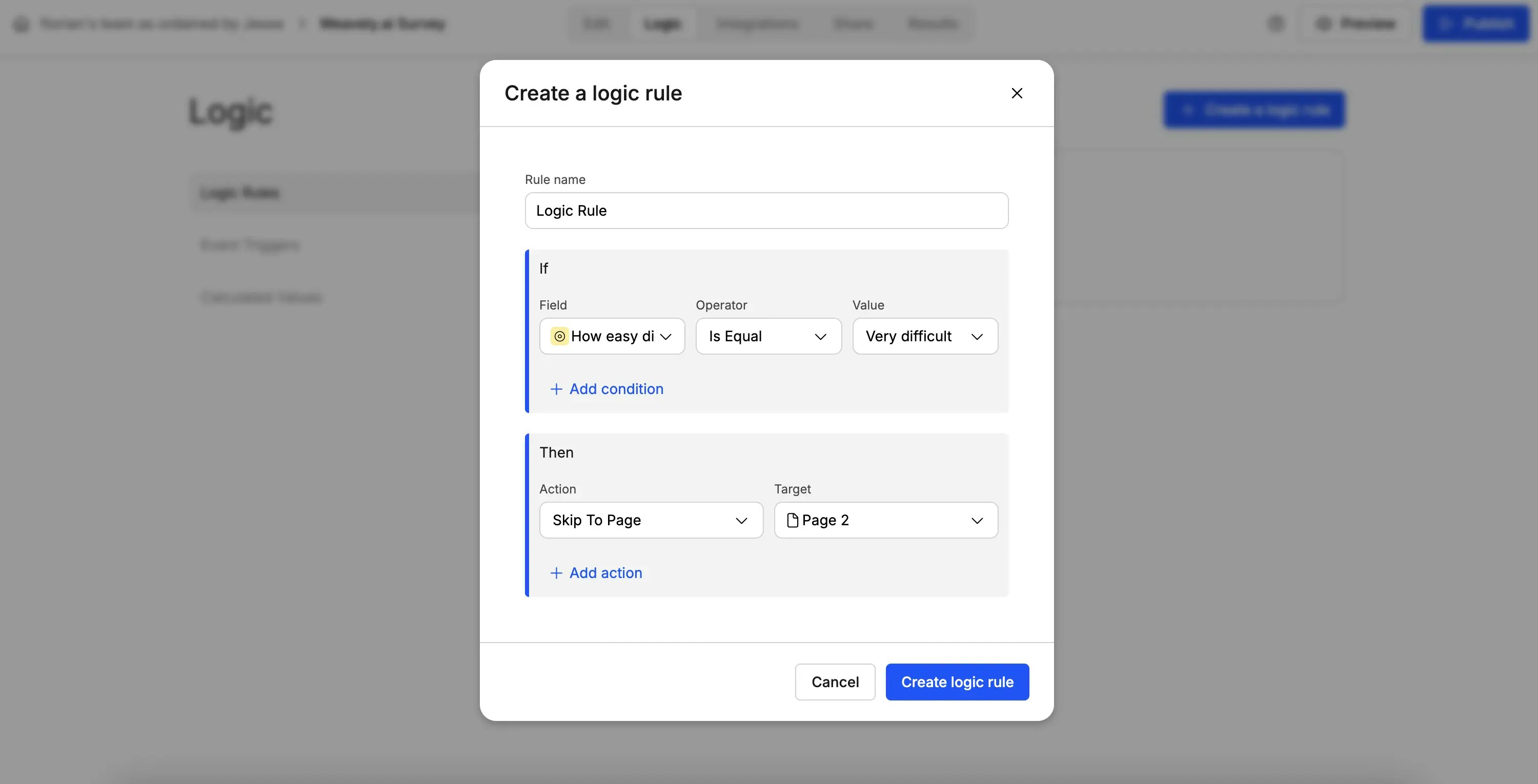
Let’s say you want to route a respondent to a different page based on how they answered a question.
For example:
* **Question:** How easy did you find it to navigate with the AI?
* **Condition:** If the answer is **“Very difficult”**
* **Action:** Skip directly to **Page 2**
## Hiding Pages
If you don’t want to just skip ahead but want to **completely remove a page from the flow**, use the **“Hide Page”** action instead.
This is useful when a specific set of questions becomes irrelevant based on earlier answers.
## Showing or Hiding Specific Elements
Logic rules aren’t limited to full pages, you can also show or hide **individual questions**.
For example:
* You might want to hide the question **“How intuitive was the interface?”** if a user answered negatively to a previous question.
* Or only show a follow-up question if the user answered **“Very easy.”**
Simply:
* Create a new logic rule.
* Choose **“Show Element”** or **“Hide Element”** as the action.
* Set your condition (e.g., a specific response to a previous question).
## Advanced Logic (Multiple Conditions and Actions)
Each logic rule can have:
* **Multiple conditions** (use “ANY” or “ALL” logic)
* **Multiple actions** (hide multiple questions, skip pages, etc.)
You can name your logic rules for clarity, and create **as many rules as needed** for one form. All active logic rules will work together to create a tailored, responsive experience for your respondents.
 Click **“Create Logic Rule”** to begin. Each logic rule follows an **IF → THEN** structure:
> *If certain conditions are met, then take a specific action.*
## Example: Skip to Page
Let’s say you want to route a respondent to a different page based on how they answered a question.
For example:
* **Question:** How easy did you find it to navigate with the AI?
* **Condition:** If the answer is **“Very difficult”**
* **Action:** Skip directly to **Page 2**
Click **“Create Logic Rule”** to begin. Each logic rule follows an **IF → THEN** structure:
> *If certain conditions are met, then take a specific action.*
## Example: Skip to Page
Let’s say you want to route a respondent to a different page based on how they answered a question.
For example:
* **Question:** How easy did you find it to navigate with the AI?
* **Condition:** If the answer is **“Very difficult”**
* **Action:** Skip directly to **Page 2**
 ## Hiding Pages
If you don’t want to just skip ahead but want to **completely remove a page from the flow**, use the **“Hide Page”** action instead.
This is useful when a specific set of questions becomes irrelevant based on earlier answers.
## Showing or Hiding Specific Elements
Logic rules aren’t limited to full pages, you can also show or hide **individual questions**.
For example:
* You might want to hide the question **“How intuitive was the interface?”** if a user answered negatively to a previous question.
* Or only show a follow-up question if the user answered **“Very easy.”**
Simply:
* Create a new logic rule.
* Choose **“Show Element”** or **“Hide Element”** as the action.
* Set your condition (e.g., a specific response to a previous question).
## Hiding Pages
If you don’t want to just skip ahead but want to **completely remove a page from the flow**, use the **“Hide Page”** action instead.
This is useful when a specific set of questions becomes irrelevant based on earlier answers.
## Showing or Hiding Specific Elements
Logic rules aren’t limited to full pages, you can also show or hide **individual questions**.
For example:
* You might want to hide the question **“How intuitive was the interface?”** if a user answered negatively to a previous question.
* Or only show a follow-up question if the user answered **“Very easy.”**
Simply:
* Create a new logic rule.
* Choose **“Show Element”** or **“Hide Element”** as the action.
* Set your condition (e.g., a specific response to a previous question).
 ## Advanced Logic (Multiple Conditions and Actions)
Each logic rule can have:
* **Multiple conditions** (use “ANY” or “ALL” logic)
* **Multiple actions** (hide multiple questions, skip pages, etc.)
You can name your logic rules for clarity, and create **as many rules as needed** for one form. All active logic rules will work together to create a tailored, responsive experience for your respondents.
## Advanced Logic (Multiple Conditions and Actions)
Each logic rule can have:
* **Multiple conditions** (use “ANY” or “ALL” logic)
* **Multiple actions** (hide multiple questions, skip pages, etc.)
You can name your logic rules for clarity, and create **as many rules as needed** for one form. All active logic rules will work together to create a tailored, responsive experience for your respondents.