> ## Documentation Index
> Fetch the complete documentation index at: https://help.weavely.ai/llms.txt
> Use this file to discover all available pages before exploring further.
# Version History
> Roll back to any previously published version of your form using Weavely's version control.
```html theme={null}
{`{
"@context": "https://schema.org",
"@graph": [
{
"@type": "WebPage",
"@id": "https://help.weavely.ai/features/version-history",
"url": "https://help.weavely.ai/features/version-history",
"name": "Version History",
"description": "Weavely keeps a history of every published version of your form, so you can roll back to any earlier version in a couple of clicks without losing the responses you've already collected.",
"inLanguage": "en",
"publisher": {
"@id": "https://www.weavely.ai/#org"
}
},
{
"@type": "TechArticle",
"@id": "https://help.weavely.ai/features/version-history#article",
"headline": "Version History",
"description": "Weavely keeps a history of every published version of your form, so you can roll back to any earlier version in a couple of clicks without losing the responses you've already collected.",
"inLanguage": "en",
"mainEntityOfPage": {
"@id": "https://help.weavely.ai/features/version-history"
},
"author": {
"@id": "https://www.weavely.ai/#org"
},
"publisher": {
"@id": "https://www.weavely.ai/#org"
}
},
{
"@type": "VideoObject",
"@id": "https://help.weavely.ai/features/version-history#video",
"name": "Restoring previous versions of your form using Weavely AI",
"description": "In this tutorial we walk you through the version control functionality in Weavely AI. It allows you to restore previously published version of your form.",
"url": "https://youtu.be/5Ghh65J_tHs",
"contentUrl": "https://youtu.be/5Ghh65J_tHs",
"embedUrl": "https://www.youtube.com/embed/5Ghh65J_tHs",
"duration": "PT3M3S",
"uploadDate": "2026-05-07T00:00:00+00:00",
"thumbnailUrl": [
"https://img.youtube.com/vi/5Ghh65J_tHs/maxresdefault.jpg",
"https://img.youtube.com/vi/5Ghh65J_tHs/hqdefault.jpg"
],
"publisher": {
"@id": "https://www.weavely.ai/#org"
},
"potentialAction": {
"@type": "WatchAction",
"target": "https://youtu.be/5Ghh65J_tHs"
}
},
{
"@type": "Organization",
"@id": "https://www.weavely.ai/#org",
"name": "Weavely",
"url": "https://www.weavely.ai"
}
]
}`}
```
Made a change you regret? Weavely keeps a history of every published version of your form, so you can roll back to any earlier version in a couple of clicks. Without losing the responses you've already collected!
Version control only tracks **published** versions. Unpublished edits to the current draft are not saved as restorable versions. If you want a version to be available in your history later, publish it.
## How version control works
Every time you publish your form, Weavely saves that exact state as a version you can return to. Older versions move into your archive as you publish new ones. You can switch between any of them at any time, and switch back again if you change your mind.
A typical workflow looks like this:
Open your form and click **Publish**. This first published version becomes the baseline you can always return to.
Add pages, change questions, update styling, whatever you need. When you're ready, publish again. Weavely automatically archives the previous published version.
In the editor, open the **Version Control** panel. You'll see your current published version at the top and any earlier versions in the archive below.
Click the version you'd like to restore. Your form instantly reverts to that state — pages, questions, styling and all.
Changed your mind? Just open Version Control again and click a different version. You can move freely between any published versions.
## What happens to your form responses
This is the part most people worry about, and the good news is: **your response data is preserved across versions.**
Here's how it behaves:
* If you restore an older version that **doesn't include a field** that exists in your current version, the answers for that field temporarily disappear from your results view.
* If you then switch **back** to the version that does include that field, the answers reappear automatically. They were never deleted, just hidden.
* The same logic applies to entire pages or new questions added in later versions.
In short: switching versions changes what you see in the results, not what's stored in the database.
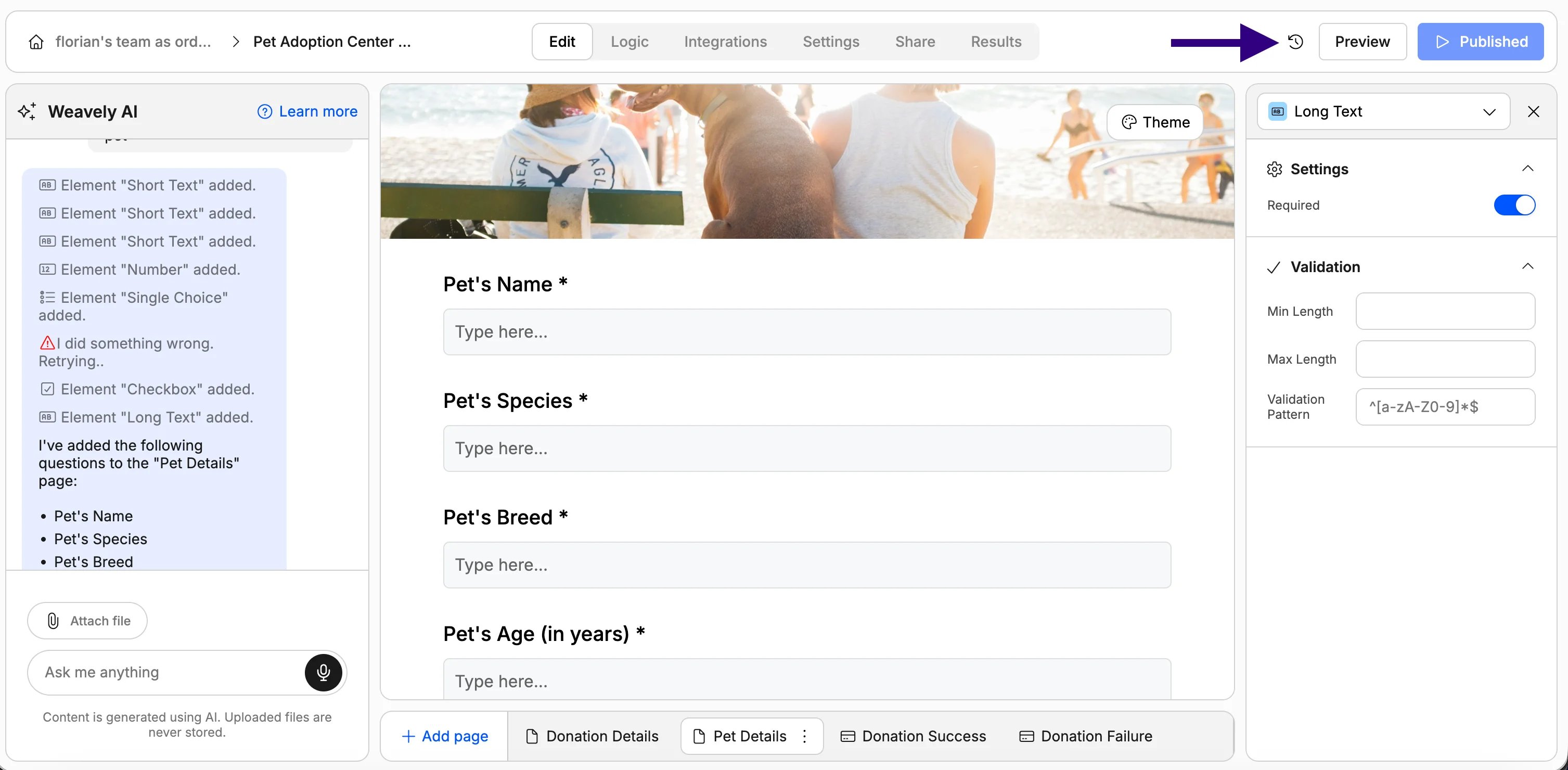 In the editor, open the **Version Control** panel. You'll see your current published version at the top and any earlier versions in the archive below.
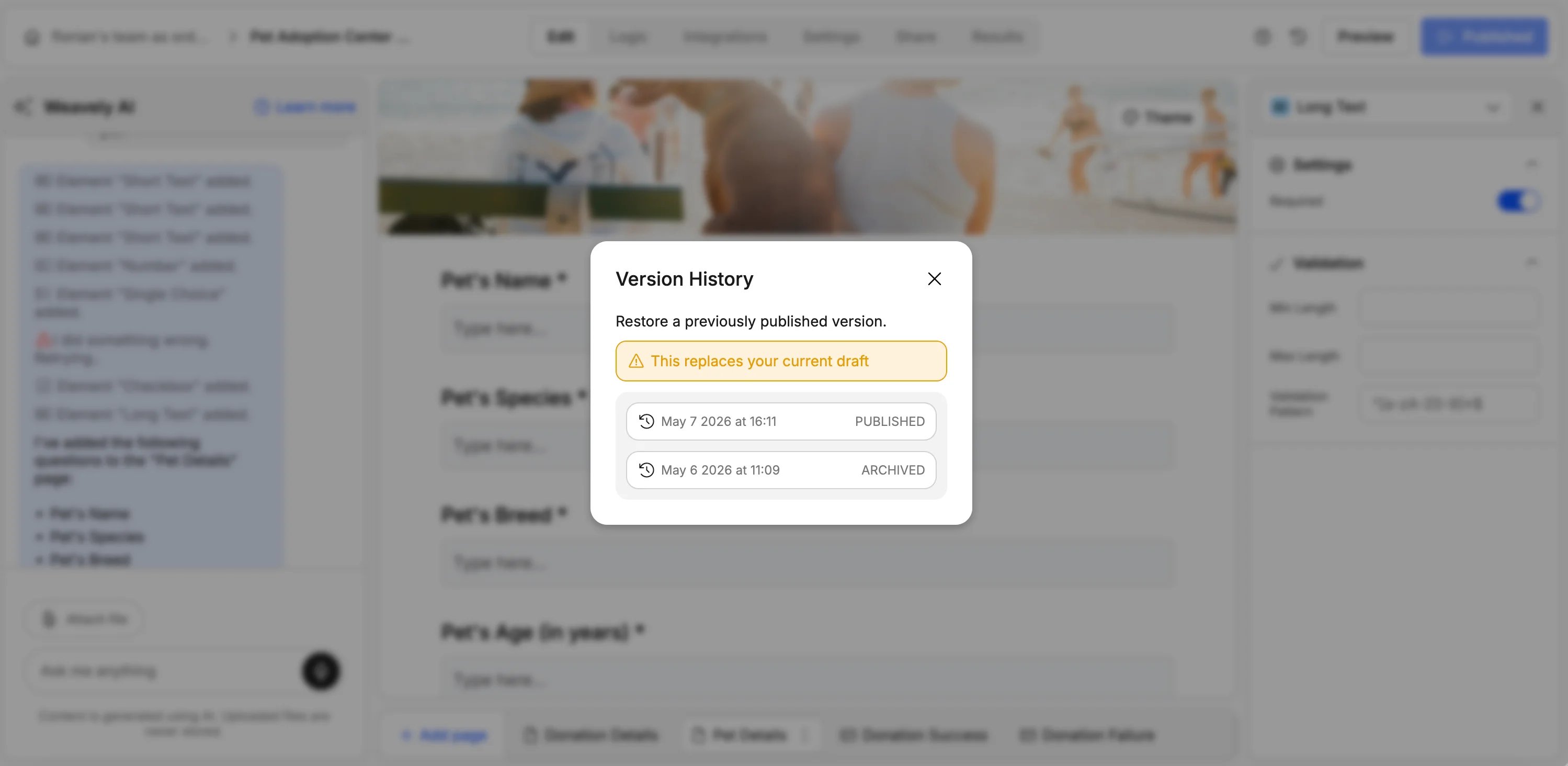 Click the version you'd like to restore. Your form instantly reverts to that state — pages, questions, styling and all.