> ## Documentation Index
> Fetch the complete documentation index at: https://help.weavely.ai/llms.txt
> Use this file to discover all available pages before exploring further.

# Add a Popup Form to Your Figma Site

> Learn how to embed a functional popup form into your Figma site using Weavely

<span className="weavely-jsonld" hidden>
  {`{
    "@context": "https://schema.org",
    "@graph": [
    {
    "@type": "WebPage",
    "@id": "https://help.weavely.ai/guides/figma-sites-popup",
    "url": "https://help.weavely.ai/guides/figma-sites-popup",
    "name": "Add a Popup Form to Your Figma Site",
    "description": "Learn how to embed a functional popup form into your Figma site using Weavely",
    "inLanguage": "en",
    "isPartOf": {
    "@type": "WebSite",
    "@id": "https://help.weavely.ai/#website",
    "name": "Weavely Help Center"
    },
    "breadcrumb": {
    "@type": "BreadcrumbList",
    "itemListElement": [
    { "@type": "ListItem", "position": 1, "name": "Guides", "item": "https://help.weavely.ai/guides" },
    { "@type": "ListItem", "position": 2, "name": "Add a Popup Form to Your Figma Site", "item": "https://help.weavely.ai/guides/figma-sites-popup" }
    ]
    },
    "publisher": { "@id": "https://www.weavely.ai/#org" }
    },
    {
    "@type": "TechArticle",
    "headline": "Add a Popup Form to Your Figma Site",
    "description": "Learn how to embed a functional popup form into your Figma site using Weavely",
    "author": { "@id": "https://www.weavely.ai/#org" },
    "publisher": { "@id": "https://www.weavely.ai/#org" },
    "inLanguage": "en",
    "mainEntityOfPage": { "@id": "https://help.weavely.ai/guides/figma-sites-popup" }
    },
    {
    "@type": "VideoObject",
    "@id": "https://help.weavely.ai/guides/figma-sites-popup#video",
    "name": "How to Add Popup Forms to Figma Sites (Step-by-Step)",
    "description": "Want to capture more leads or feedback directly on your Figma Site? In this tutorial, I’ll show you how to build and embed a popup form using Weavely (the AI form builder) and connect it seamlessly to your Figma Site.",
    "thumbnailUrl": [
    "https://i.ytimg.com/vi/Ml5EkwuJNBw/hqdefault.jpg",
    "https://i.ytimg.com/vi/Ml5EkwuJNBw/sddefault.jpg"
    ],
    "uploadDate": "2025-10-03T00:00:00Z",
    "duration": "PT4M17S",
    "embedUrl": "https://www.youtube.com/embed/Ml5EkwuJNBw",
    "contentUrl": "https://www.youtube.com/watch?v=Ml5EkwuJNBw",
    "potentialAction": {
    "@type": "WatchAction",
    "target": "https://www.youtube.com/watch?v=Ml5EkwuJNBw"
    },
    "publisher": { "@id": "https://www.weavely.ai/#org" },
    "author": { "@id": "https://www.weavely.ai/#org" }
    },
    {
    "@type": "Organization",
    "@id": "https://www.weavely.ai/#org",
    "name": "WEAVE.LY BV",
    "url": "https://www.weavely.ai",
    "address": {
    "@type": "PostalAddress",
    "streetAddress": "Herbert Hooverlaan 141",
    "addressLocality": "Schaarbeek",
    "postalCode": "1030",
    "addressCountry": "BE"
    },
    "identifier": "BE0773.878.569",
    "sameAs": [
    "https://www.instagram.com/weavely.ai/",
    "https://www.linkedin.com/company/weave-ly/",
    "https://www.youtube.com/@weavely"
    ]
    }
    ]
    }`}
</span>

# Add a Pop-Up Form to Your Figma Site

Figma’s new Sites feature lets you publish websites directly from your designs, but it currently lacks native form functionality. With Weavely, you can bridge that gap and embed functional, styled pop-up forms into any Figma site using just a few lines of code.

This guide walks you through how to integrate a Weavely pop-up form without modifying your site’s layout or structure.

<iframe src="https://www.youtube.com/embed/Ml5EkwuJNBw" title="YouTube video player" frameborder="0" className="w-full aspect-video rounded-xl" allow="accelerometer; autoplay; clipboard-write; encrypted-media; gyroscope; picture-in-picture; web-share" allowfullscreen />

<Steps>
  <Step title="Build Your Form in Weavely" icon="hammer">
    Start by creating a form in [Weavely.ai](https://weavely.ai). You can use AI to generate the questions, theme the form to match your Figma design, and preview how it looks. We have a [dedicated "getting started"](https://help.weavely.ai/get-started/the-basics) guide on that, although to be honest it's pretty self-explanatory.

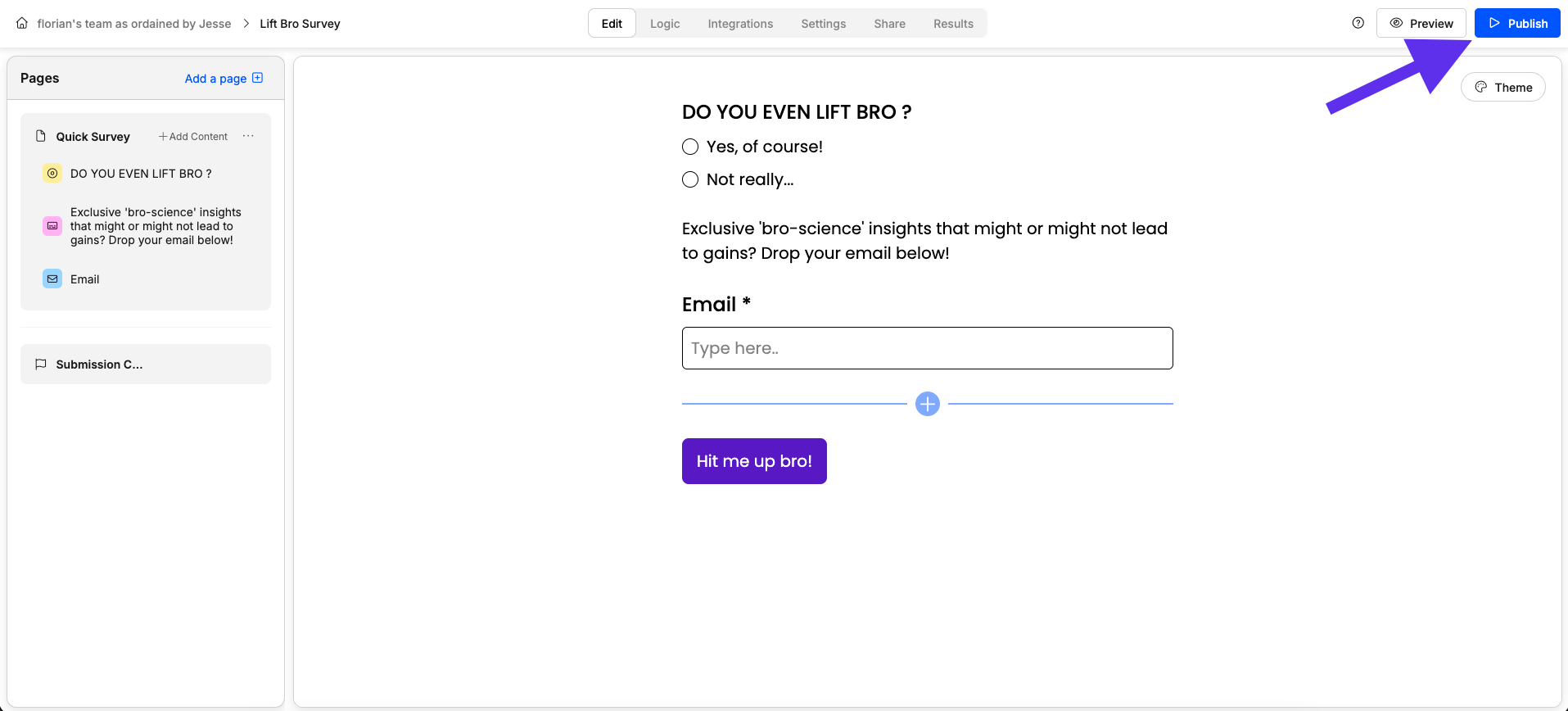
    Once you're happy with your form go ahead and hit *"Publish".*

    <img src="https://mintcdn.com/weavelyai/94_LCtV_jVIJI-Ts/images/Screenshot2025-10-03at15.42.36.png?fit=max&auto=format&n=94_LCtV_jVIJI-Ts&q=85&s=013439ee969ff62a981fa8f526d19370" alt="Screenshot showing how to publish a form in Weavely AI" width="1915" height="868" data-path="images/Screenshot2025-10-03at15.42.36.png" />

    Once your form is published you'll need to copy the code in the *"Embed Form"* section of the *Share* tab.
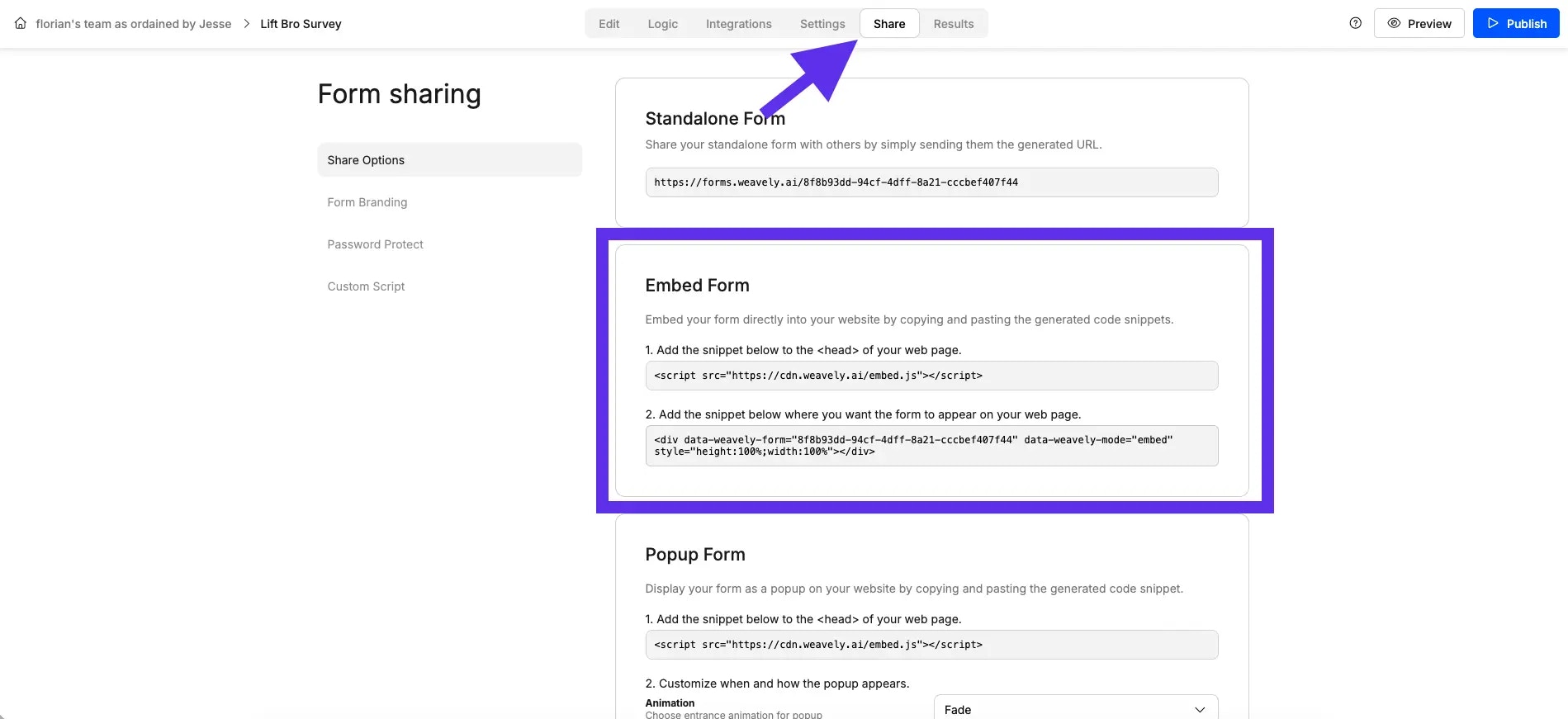
    <img src="https://mintcdn.com/weavelyai/kOb0Bpcbkd5M5KaV/Screenshot2025-10-03at15.57.21.webp?fit=max&auto=format&n=kOb0Bpcbkd5M5KaV&q=85&s=5bc6a651da2b921b4e0bbdee727590aa" alt="Screenshot showing how to embed a Weavely AI form in a website" width="1899" height="871" data-path="Screenshot2025-10-03at15.57.21.webp" />

    <Warning>
      Ignore the code in the Popup form section, as this will only render full-screen popups for now. Unless that's what you're looking for obviously!
    </Warning>
  </Step>

  <Step title="Embed the Code in Figma Sites" icon="gear-code">
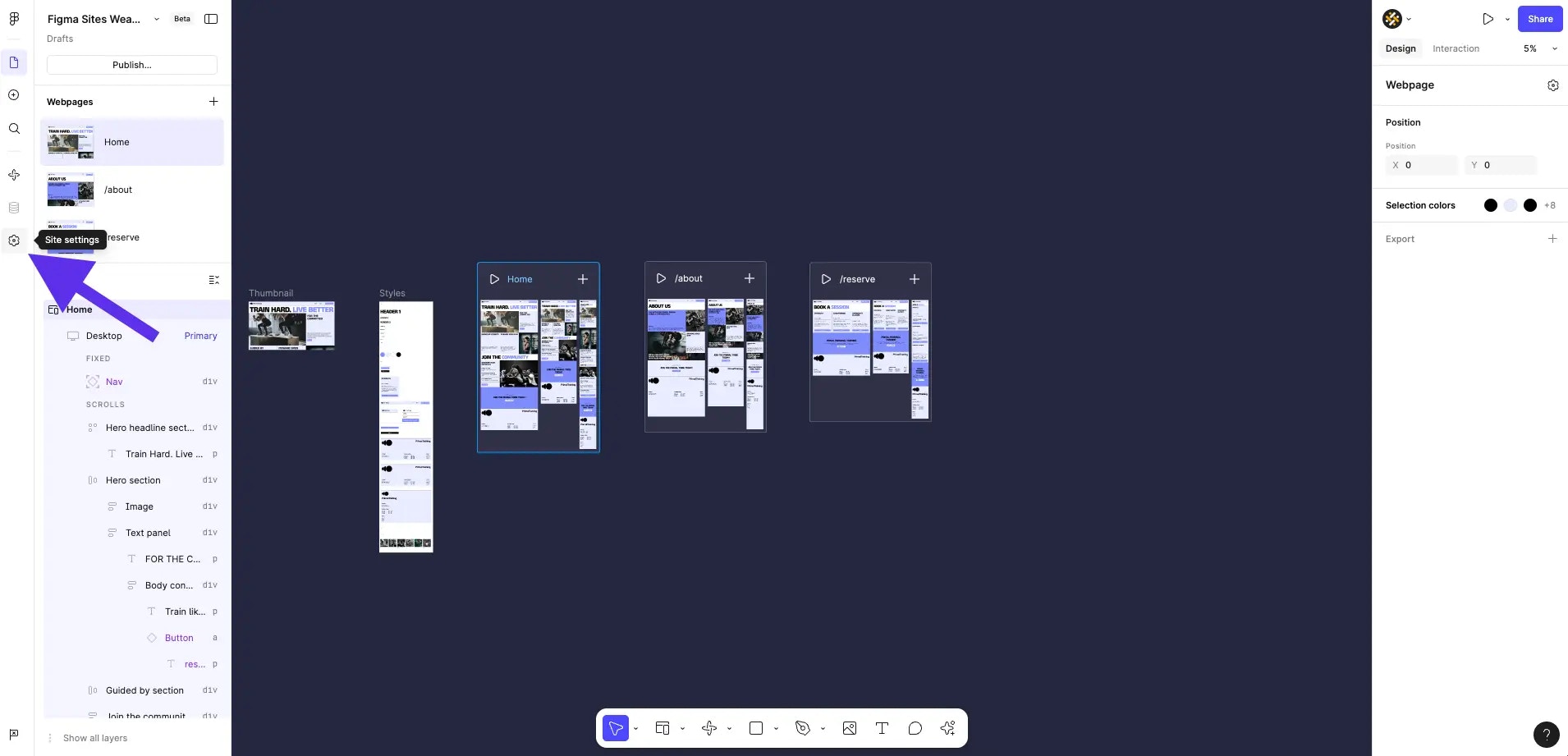
    In Figma Sites, go to your *"Site settings"*.

    <img src="https://mintcdn.com/weavelyai/kOb0Bpcbkd5M5KaV/Screenshot2025-10-03at16.03.14.webp?fit=max&auto=format&n=kOb0Bpcbkd5M5KaV&q=85&s=efbb2f7d44a6189656b3156c2236a0d8" alt="Screenshot showing how to embed a form in a Figma Site " width="1910" height="921" data-path="Screenshot2025-10-03at16.03.14.webp" />

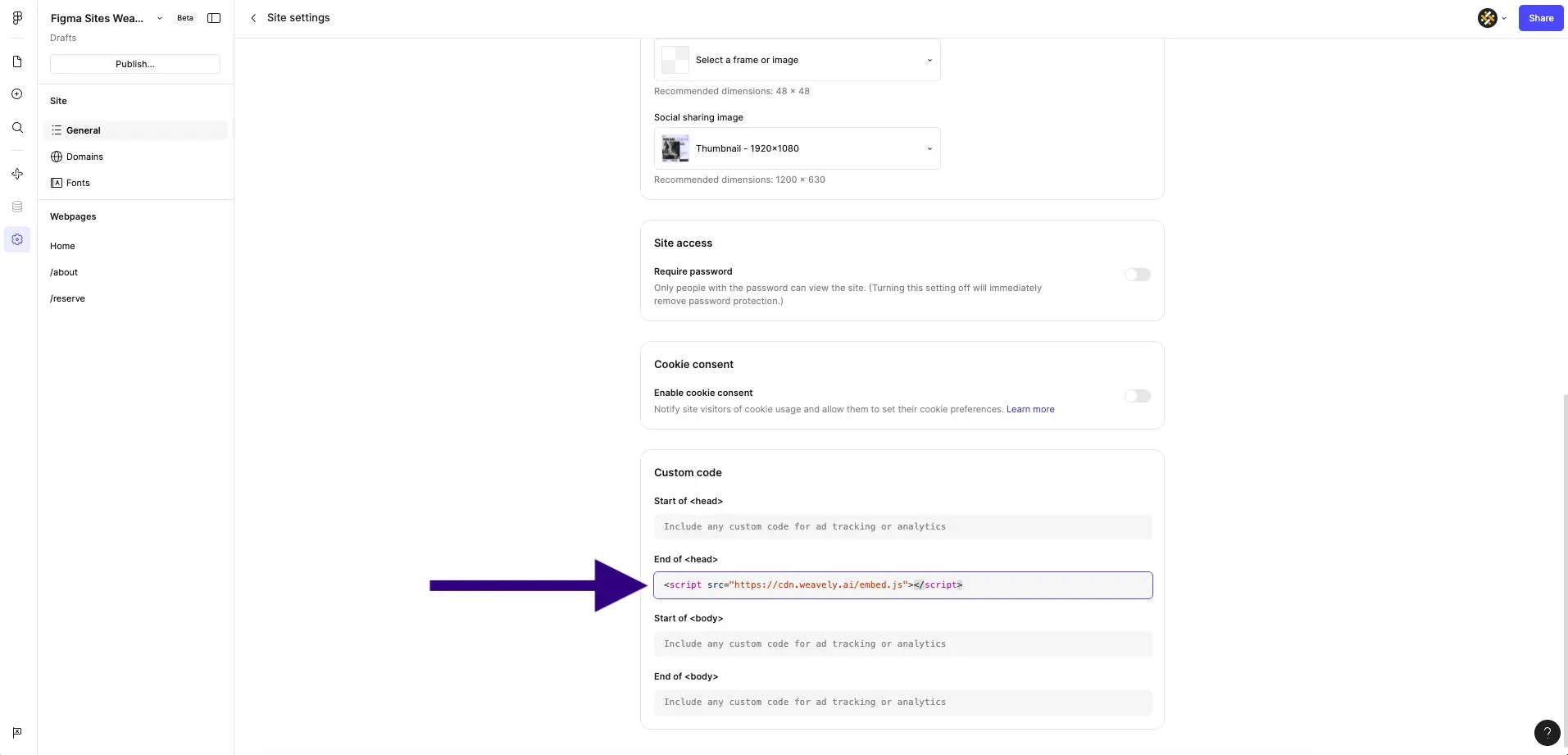
    You'll want to paste code in two seperate sections of your site's settings. First, paste the *Weavely embed script* into the *\<head>* part of the settings.

    <img src="https://mintcdn.com/weavelyai/kOb0Bpcbkd5M5KaV/Screenshot2025-10-03at16.08.11.webp?fit=max&auto=format&n=kOb0Bpcbkd5M5KaV&q=85&s=4a4f7ff3a0dd6ea2a6a6c9e227386668" alt="Screenshot showing how to add a form embed code to the head of a Figma Site " width="1913" height="921" data-path="Screenshot2025-10-03at16.08.11.webp" />

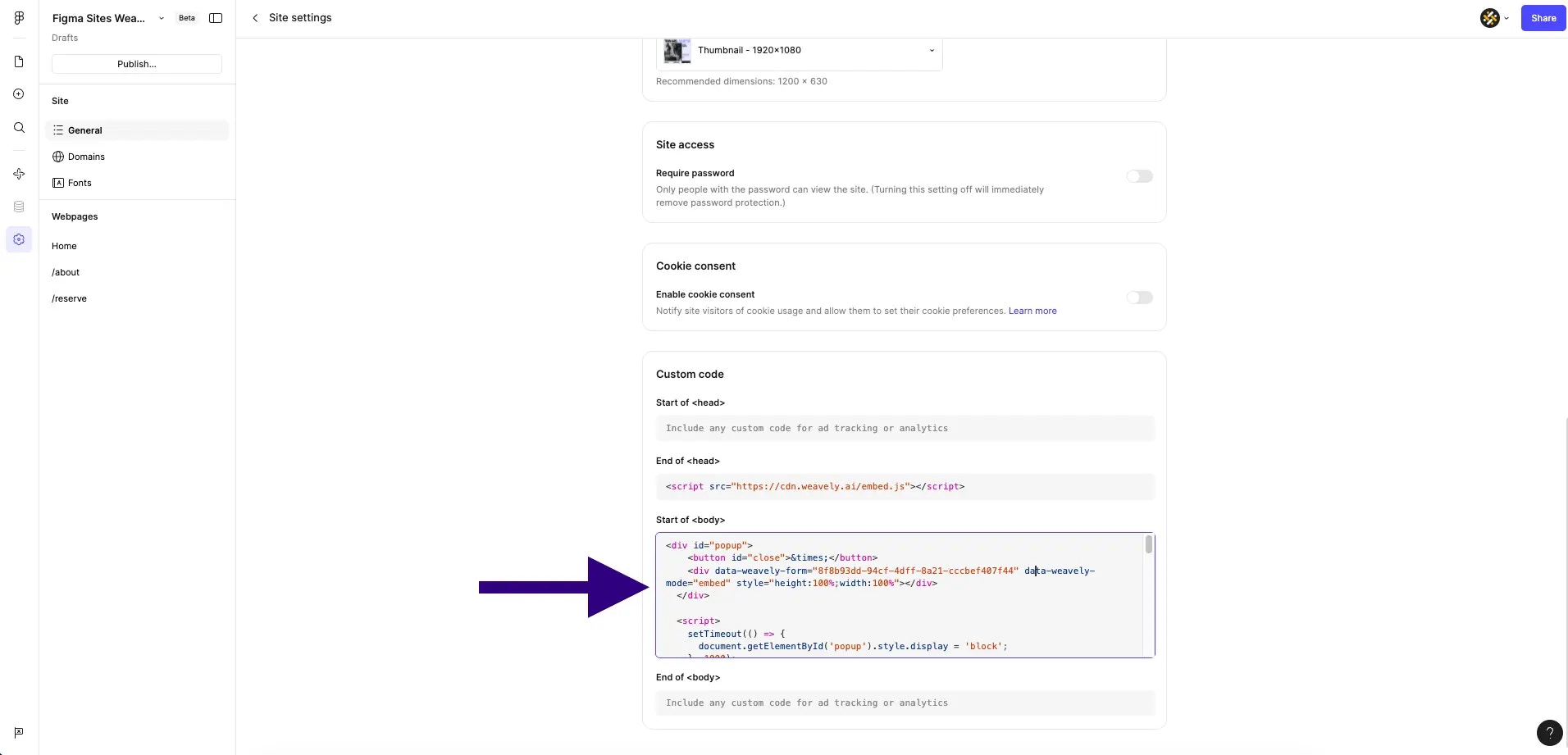
    Second, you'll need to take form \<div> element from Weavely and wrap it in popup logic. For example, if this is your form link: "forms.weavely.ai/8f8b93dd-94cf-4dff-8a21-cccbef407f44". Then the following will create a popup which appears after a second on the bottom right of your site:

    ```html theme={null}
    <div id="popup">
      <button id="close">&times;</button>
      <div data-weavely-form="8f8b93dd-94cf-4dff-8a21-cccbef407f44" data-weavely-mode="embed" style="height:100%;width:100%"></div>
    </div>

    <script>
      setTimeout(() => {
        document.getElementById('popup').style.display = 'block';
      }, 1000);

      document.getElementById('close').onclick = () => {
        document.getElementById('popup').style.display = 'none';
      };
    </script>

    <style>
      #popup {
        display: none;
        position: fixed;
        bottom: 20px;
        right: 20px;
        width: 400px;
        height: 500px;
        border-radius: 8px;
        overflow: hidden;
        box-shadow: 0 4px 12px rgba(0,0,0,0.15);
        z-index: 1000;
      }
      #close {
        position: absolute;
        top: 10px;
        right: 10px;
        background: none;
        border: none;
        font-size: 24px;
        cursor: pointer;
        color: #666;
      }
      @media (max-width: 768px) {
          #popup {
            width: 90%;
            height: 70%;
            bottom: 50%;
            right: 50%;
            transform: translate(50%, 50%);
          }
          #close {
            font-size: 32px;
            padding: 10px;
          }
        }
    </style>
    ```

    You'll need to paste this code into the *\<body>* section of your site's settings.

    <img src="https://mintcdn.com/weavelyai/kOb0Bpcbkd5M5KaV/Screenshot2025-10-03at16.18.26.webp?fit=max&auto=format&n=kOb0Bpcbkd5M5KaV&q=85&s=aba86a06223a36d492c6d89886687a95" alt="Screenshot showing how to add a form embed code to the body of a Figma Site" width="1912" height="921" data-path="Screenshot2025-10-03at16.18.26.webp" />
  </Step>
</Steps>

## Design-Friendly Integration

You don’t need to modify your actual Figma site design. The popup sits on top of your published site and opens after a short delay (or any custom trigger you define). It can match your site’s color scheme, font, and layout with styling from Weavely (which also supports custom CSS).

You can also:

* Match the popup form's colors to your Figma theme
* Trigger the popup on scroll, after inactivity, or on button click
* Set mobile-specific full-screen modes

## What Happens with Responses?

All submissions go straight into your Weavely dashboard. From there, you can:

* View form results in real time
* Trigger automations via Zapier or Make
* Setup [webhooks with our API](/developers/webhooks) for custom backends
* Send data to Google Sheets, Airtable, Mailchimp, and more