> ## Documentation Index
> Fetch the complete documentation index at: https://help.weavely.ai/llms.txt
> Use this file to discover all available pages before exploring further.
# How to Create AI-Powered Lead Generation Forms and Sync Leads into HubSpot Using Weavely.ai
> Looking to streamline your lead generation process with AI? Here's how to generate leads with Weavely.ai and HubSpot.
{`{
"@context": "https://schema.org",
"@graph": [
{
"@type": "WebPage",
"@id": "https://help.weavely.ai/guides/hubspot-lead-gen",
"url": "https://help.weavely.ai/guides/hubspot-lead-gen",
"name": "How to Create AI-Powered Lead Generation Forms and Sync Leads into HubSpot Using Weavely.ai",
"description": "Looking to streamline your lead generation process with AI? Here's how to generate leads with Weavely.ai and HubSpot.",
"inLanguage": "en",
"isPartOf": {
"@type": "WebSite",
"@id": "https://help.weavely.ai/#website",
"name": "Weavely Help Center"
},
"breadcrumb": {
"@type": "BreadcrumbList",
"itemListElement": [
{ "@type": "ListItem", "position": 1, "name": "Guides", "item": "https://help.weavely.ai/guides" },
{ "@type": "ListItem", "position": 2, "name": "How to Create AI-Powered Lead Generation Forms and Sync Leads into HubSpot Using Weavely.ai", "item": "https://help.weavely.ai/guides/hubspot-lead-gen" }
]
},
"publisher": { "@id": "https://www.weavely.ai/#org" }
},
{
"@type": "TechArticle",
"headline": "How to Create AI-Powered Lead Generation Forms and Sync Leads into HubSpot Using Weavely.ai",
"description": "Learn how to use Weavely.ai to generate high-quality AI-powered lead forms and automatically sync leads into your HubSpot CRM.",
"author": { "@id": "https://www.weavely.ai/#org" },
"publisher": { "@id": "https://www.weavely.ai/#org" },
"inLanguage": "en",
"mainEntityOfPage": { "@id": "https://help.weavely.ai/guides/hubspot-lead-gen" }
},
{
"@type": "VideoObject",
"@id": "https://help.weavely.ai/guides/hubspot-lead-gen#video",
"name": "AI Lead Generation Forms in HubSpot",
"description": "Use AI to capture leads and send them straight to HubSpot CRM! In this video, I’ll show you how Weavely works — and how you can use it to build AI-powered lead generation forms that automatically send new leads to HubSpot.",
"thumbnailUrl": [
"https://i.ytimg.com/vi/ypZCkWWuG-E/hqdefault.jpg",
"https://i.ytimg.com/vi/ypZCkWWuG-E/sddefault.jpg"
],
"uploadDate": "2025-05-28T00:00:00Z",
"duration": "PT4M27S",
"embedUrl": "https://www.youtube.com/embed/ypZCkWWuG-E",
"contentUrl": "https://www.youtube.com/watch?v=ypZCkWWuG-E",
"potentialAction": {
"@type": "WatchAction",
"target": "https://www.youtube.com/watch?v=ypZCkWWuG-E"
},
"publisher": { "@id": "https://www.weavely.ai/#org" },
"author": { "@id": "https://www.weavely.ai/#org" }
},
{
"@type": "Organization",
"@id": "https://www.weavely.ai/#org",
"name": "WEAVE.LY BV",
"url": "https://www.weavely.ai",
"address": {
"@type": "PostalAddress",
"streetAddress": "Herbert Hooverlaan 141",
"addressLocality": "Schaarbeek",
"postalCode": "1030",
"addressCountry": "BE"
},
"identifier": "BE0773.878.569",
"sameAs": [
"https://www.instagram.com/weavely.ai/",
"https://www.linkedin.com/company/weave-ly/",
"https://www.youtube.com/@weavely"
]
}
]
}`}
Capturing and managing high-quality leads efficiently can be a challenge. Especially if you're dealing with manual form creation and CRM integrations. In this guide, you'll discover how Weavely.ai lets you effortlessly create powerful, multi-page lead generation forms using AI, and seamlessly integrate those leads directly into your HubSpot CRM.
## Generating Your Lead Generation Form with AI
Start by clearly describing the lead generation form you need. With Weavely.ai, you can either type your description, speak directly to the AI, or even upload supporting documents.
For example:
```
I need a lead generation tool for an AI form builder. I want to know what kind of form builder people are using today—use a dropdown populated with the top players in the field. I'm also interested in what they currently lack as functionality in their current tools. Also, ask any other questions that you think are relevant for a lead generation form. I want it spread across multiple pages.
```
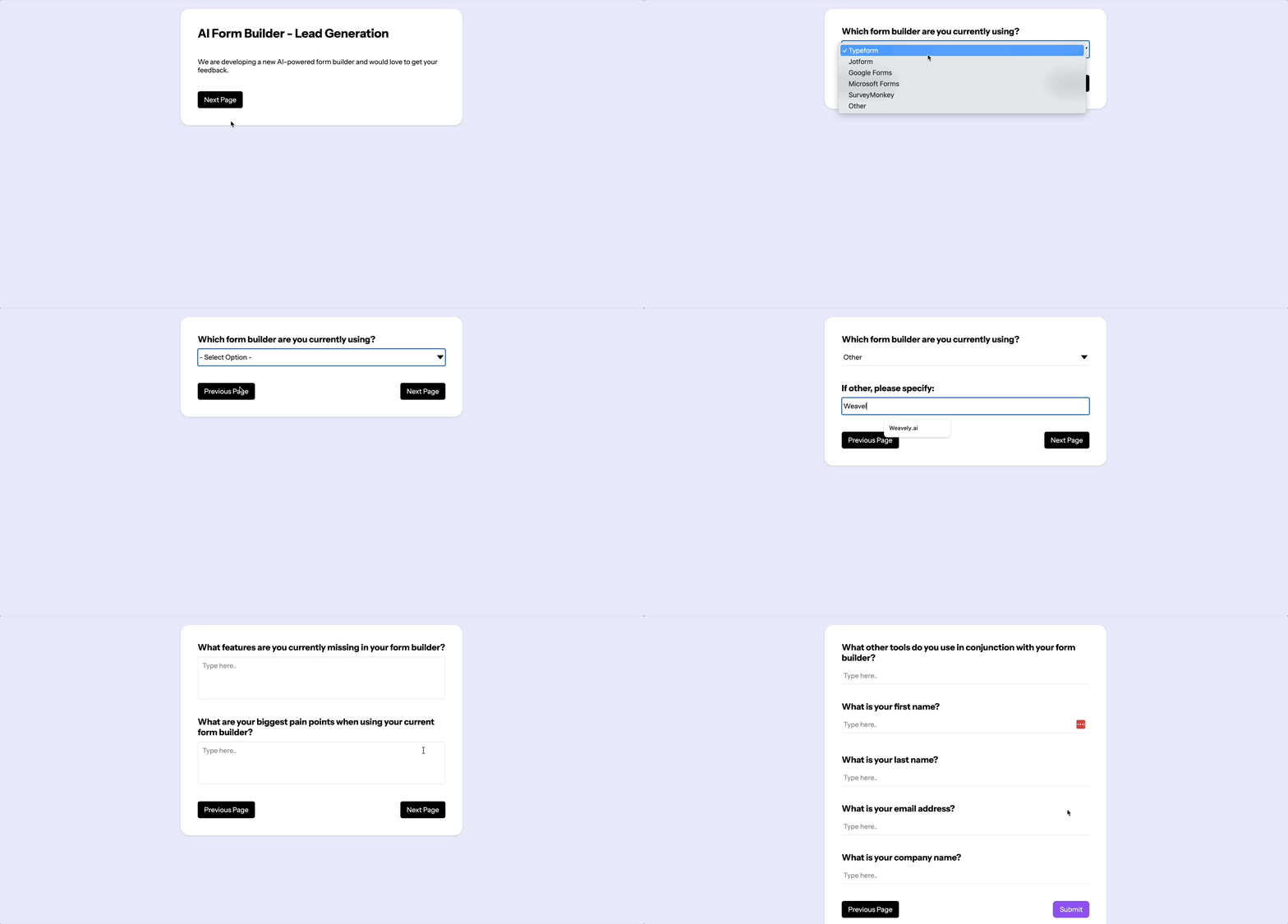
Weavely instantly generates a structured form (see gif below) that includes:
* A dropdown pre-filled with top form builders currently used.
* Questions about missing functionality.
* Additional qualifying questions (e.g., other tools used).
* Essential contact fields like name, email, and company name.
## Further Customize Your Form (Optional)
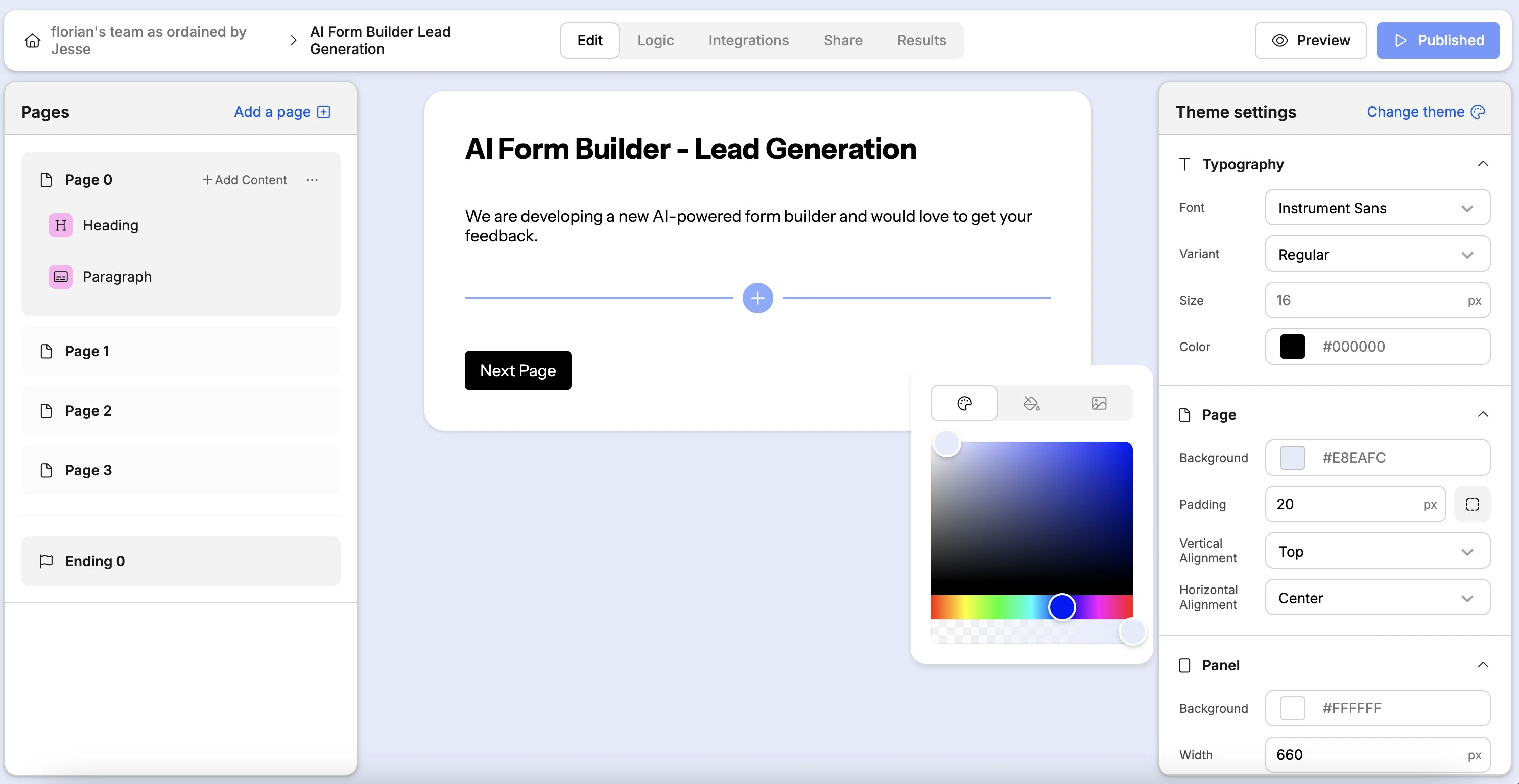
Once the AI-generated form is ready, you can enter the manual editor to further customize it:
* Adjust form questions and page structure.
* Apply your branding (fonts, colors, styles).
* Set up advanced logic to skip or show questions conditionally.
Although powerful, customization is optional. Weavely.ai’s generated forms are ready-to-use immediately.
## Integrate Your Form with HubSpot CRM
Effortlessly sync your form submissions directly into your HubSpot CRM to streamline your lead generation process:
1. Open the **Integrations** tab in Weavely.ai.
2. Select **HubSpot** and sign in (single sign-on available).
3. Choose the HubSpot account you'd like to integrate.
4. Map essential form fields to HubSpot contact properties, such as:
* **First Name**
* **Last Name**
* **Email Address**
You can also map additional fields depending on your HubSpot setup. Check out this dedicated tutorial if you're stuck:
## Publish and Share Your Form
Now you're ready to collect leads:
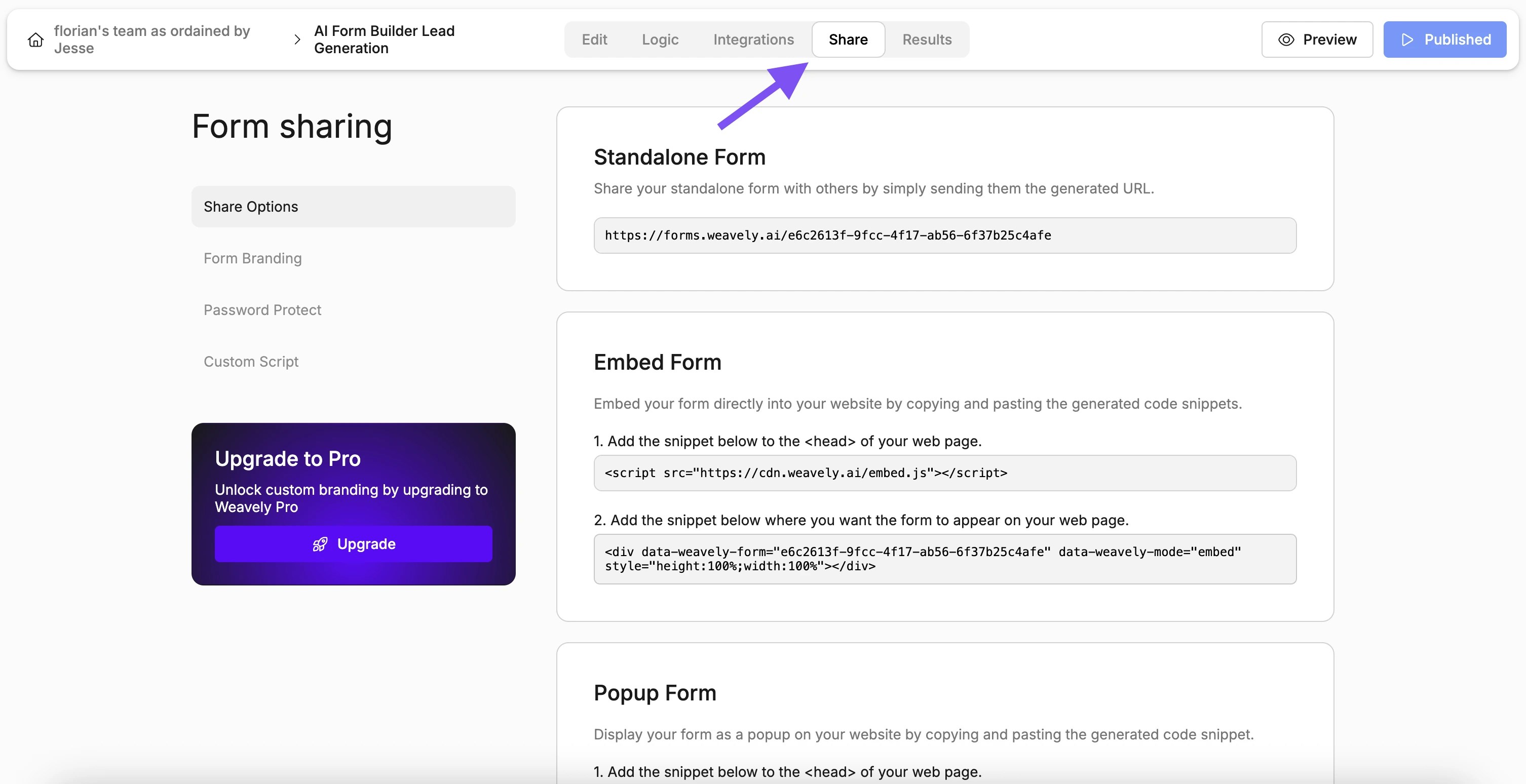
* Click **Publish** to activate your form.
* Share the standalone form via a direct link.
* Embed the form directly onto your website or as a popup.
To ensure everything works smoothly:
* Fill out your form like an actual lead would.
* Submit the form.
* Visit HubSpot and refresh your contacts page.
You’ll instantly see the newly submitted lead created with all the mapped data accurately captured.
## Why Choose Weavely.ai for Lead Generation?
Traditional lead gen workflows can be cumbersome:
* Time-consuming manual form setup.
* Complicated integrations requiring technical skills.
* Manual data entry and synchronization.
With Weavely.ai, you get:
* Rapid, AI-driven form creation tailored exactly to your needs.
* Effortless, automatic HubSpot integration.
* Instant lead capture and management, reducing manual overhead.
This workflow lets you focus on what matters most ... turning leads into customers!
 ## Further Customize Your Form (Optional)
Once the AI-generated form is ready, you can enter the manual editor to further customize it:
* Adjust form questions and page structure.
* Apply your branding (fonts, colors, styles).
* Set up advanced logic to skip or show questions conditionally.
Although powerful, customization is optional. Weavely.ai’s generated forms are ready-to-use immediately.
## Further Customize Your Form (Optional)
Once the AI-generated form is ready, you can enter the manual editor to further customize it:
* Adjust form questions and page structure.
* Apply your branding (fonts, colors, styles).
* Set up advanced logic to skip or show questions conditionally.
Although powerful, customization is optional. Weavely.ai’s generated forms are ready-to-use immediately.
 ## Integrate Your Form with HubSpot CRM
Effortlessly sync your form submissions directly into your HubSpot CRM to streamline your lead generation process:
1. Open the **Integrations** tab in Weavely.ai.
2. Select **HubSpot** and sign in (single sign-on available).
3. Choose the HubSpot account you'd like to integrate.
4. Map essential form fields to HubSpot contact properties, such as:
* **First Name**
* **Last Name**
* **Email Address**
You can also map additional fields depending on your HubSpot setup. Check out this dedicated tutorial if you're stuck:
## Publish and Share Your Form
Now you're ready to collect leads:
* Click **Publish** to activate your form.
* Share the standalone form via a direct link.
* Embed the form directly onto your website or as a popup.
## Integrate Your Form with HubSpot CRM
Effortlessly sync your form submissions directly into your HubSpot CRM to streamline your lead generation process:
1. Open the **Integrations** tab in Weavely.ai.
2. Select **HubSpot** and sign in (single sign-on available).
3. Choose the HubSpot account you'd like to integrate.
4. Map essential form fields to HubSpot contact properties, such as:
* **First Name**
* **Last Name**
* **Email Address**
You can also map additional fields depending on your HubSpot setup. Check out this dedicated tutorial if you're stuck:
## Publish and Share Your Form
Now you're ready to collect leads:
* Click **Publish** to activate your form.
* Share the standalone form via a direct link.
* Embed the form directly onto your website or as a popup.