> ## Documentation Index
> Fetch the complete documentation index at: https://help.weavely.ai/llms.txt
> Use this file to discover all available pages before exploring further.
# How to Generate PDFs from Form Submissions with Orshot
> Automatically generate custom PDF certificates, tickets, and documents from Weavely form submissions using Orshot integration.
{`{
"@context": "https://schema.org",
"@graph": [
{
"@type": "WebPage",
"@id": "https://help.weavely.ai/help-center/integrations/collecting-data-and-responses/orshot",
"url": "https://help.weavely.ai/help-center/integrations/collecting-data-and-responses/orshot",
"name": "How to Generate PDFs from Form Submissions with Orshot",
"description": "Automatically generate custom PDF certificates, tickets, and documents from Weavely form submissions using Orshot integration.",
"inLanguage": "en",
"publisher": {
"@id": "https://www.weavely.ai/#org"
}
},
{
"@type": "TechArticle",
"@id": "https://help.weavely.ai/help-center/integrations/collecting-data-and-responses/orshot#article",
"headline": "How to Generate PDFs from Form Submissions with Orshot",
"description": "Automatically generate custom PDF certificates, tickets, and documents from Weavely form submissions using Orshot integration.",
"inLanguage": "en",
"mainEntityOfPage": {
"@id": "https://help.weavely.ai/help-center/integrations/collecting-data-and-responses/orshot"
},
"author": {
"@id": "https://www.weavely.ai/#org"
},
"publisher": {
"@id": "https://www.weavely.ai/#org"
}
},
{
"@type": "VideoObject",
"@id": "https://help.weavely.ai/help-center/integrations/collecting-data-and-responses/orshot#video",
"name": "How to Generate PDF Certificates from Forms Automatically | Weavely.ai x Orshot Tutorial",
"description": "Learn how to automatically generate PDF certificates of completion from form submissions using Weavely and Orshot.",
"url": "https://youtu.be/kB4wFWqnu7s",
"contentUrl": "https://youtu.be/kB4wFWqnu7s",
"embedUrl": "https://www.youtube.com/embed/kB4wFWqnu7s",
"duration": "PT4M18S",
"uploadDate": "2026-02-02T00:00:00Z",
"thumbnailUrl": [
"https://img.youtube.com/vi/kB4wFWqnu7s/maxresdefault.jpg"
],
"publisher": {
"@id": "https://www.weavely.ai/#org"
},
"potentialAction": {
"@type": "WatchAction",
"target": "https://youtu.be/kB4wFWqnu7s"
}
},
{
"@type": "FAQPage",
"@id": "https://help.weavely.ai/help-center/integrations/collecting-data-and-responses/orshot#faq",
"url": "https://help.weavely.ai/help-center/integrations/collecting-data-and-responses/orshot",
"mainEntity": [
{
"@type": "Question",
"name": "Do I need an Orshot account to use this integration?",
"acceptedAnswer": {
"@type": "Answer",
"text": "Yes, you'll need an active Orshot account and API key. You can sign up at orshot.com."
}
},
{
"@type": "Question",
"name": "Can I customize the PDF design?",
"acceptedAnswer": {
"@type": "Answer",
"text": "Yes, Orshot has pre-made templates and a PDF studio where you can design custom templates with your own branding, colors, and layout."
}
},
{
"@type": "Question",
"name": "Where can I see the generated PDFs?",
"acceptedAnswer": {
"@type": "Answer",
"text": "Generated PDFs appear in your Orshot account under the template's Renders section. Each form submission creates a new render."
}
},
{
"@type": "Question",
"name": "What types of PDFs can I generate?",
"acceptedAnswer": {
"@type": "Answer",
"text": "You can generate any type of PDF document including certificates, event tickets, receipts, reports, invoices, or custom documents designed in Orshot's PDF studio."
}
},
{
"@type": "Question",
"name": "Can I use multiple templates for one form?",
"acceptedAnswer": {
"@type": "Answer",
"text": "Currently, each integration supports one template. To use different templates, you can set up conditional logic in Orshot or create separate forms for each template type."
}
}
]
},
{
"@type": "Organization",
"@id": "https://www.weavely.ai/#org",
"name": "Weavely",
"url": "https://www.weavely.ai"
}
]
}`}
The [Orshot](https://orshot.com/) integration lets you automatically generate PDF documents from form submissions. When someone completes your form, their responses are sent to Orshot to create a personalized PDF based on your template. This works for certificates, tickets, receipts, and any custom document you need.
## Setting Up Orshot in Your Weavely Form
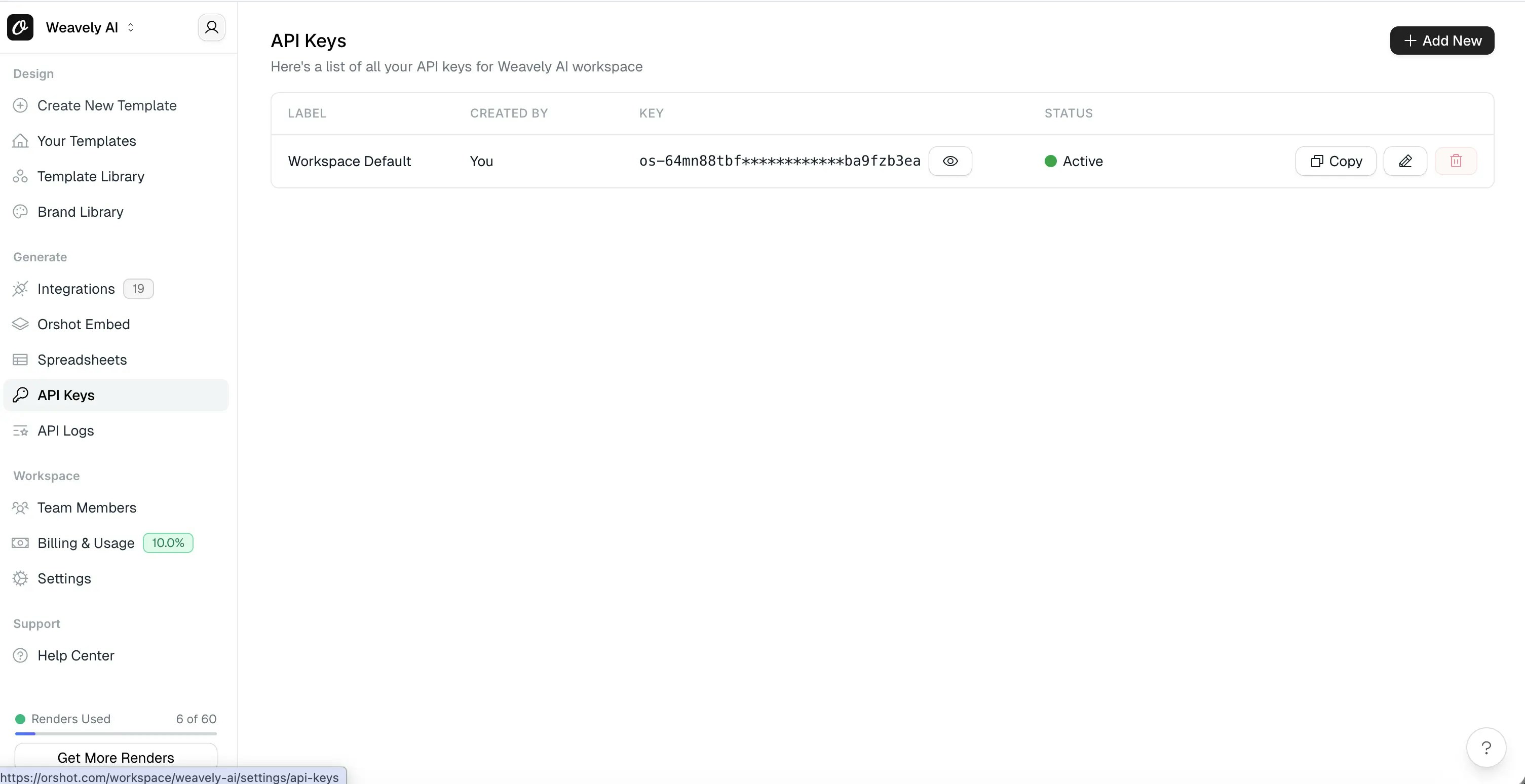
First, you'll need an Orshot account with a PDF template ready. In your Orshot account, go to **API Keys** and copy your API key.
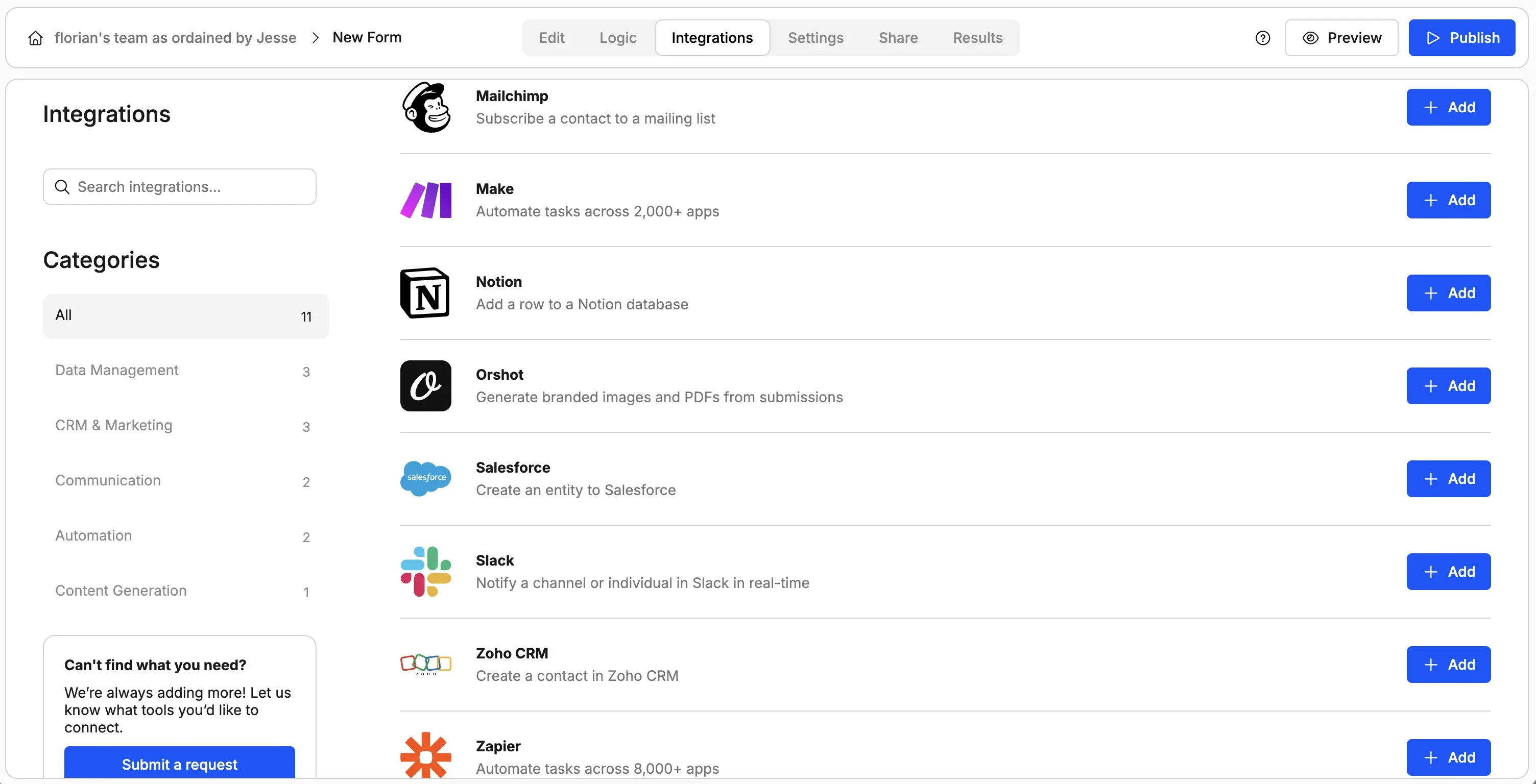
In your Weavely form, navigate to the **Integrations** tab and click **Add** next to Orshot.
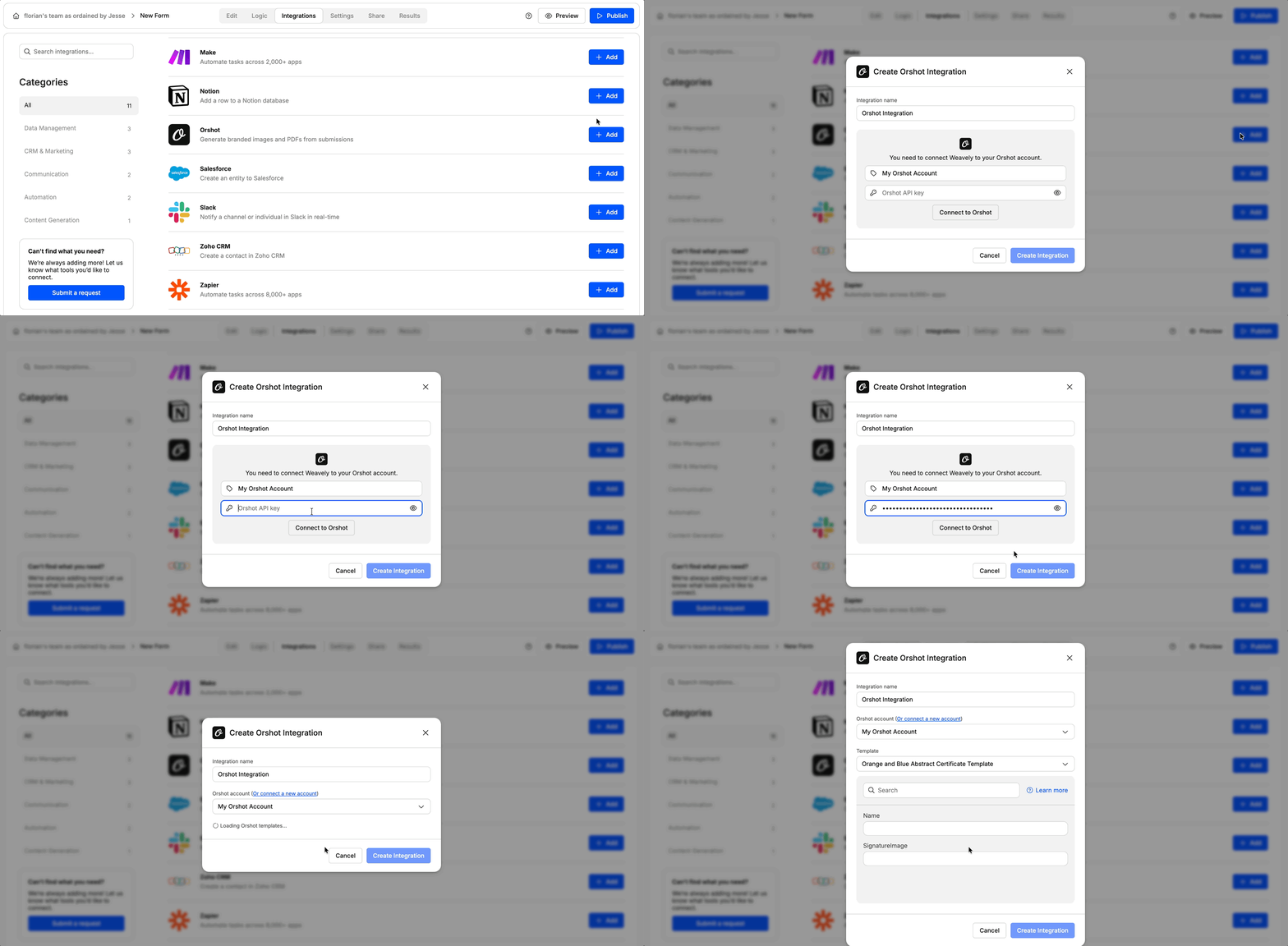
Paste your Orshot API key in the field and click **Connect to Orshot**. Your Orshot templates will automatically load.
## Mapping Form Fields to Your PDF Template
Once connected, select which Orshot template you want to use from the dropdown menu.
For each field in your Orshot template, you'll see a mapping field where you can specify what data to include. Click the **@** symbol to select form fields, or type literal text directly.
You can read more about mapping form fields in [this tutorial](/help-center/integrations/data-mapping).
Click **Create Integration** and republish your form. PDFs will now generate automatically for each new submission.
## Viewing Your Generated PDFs
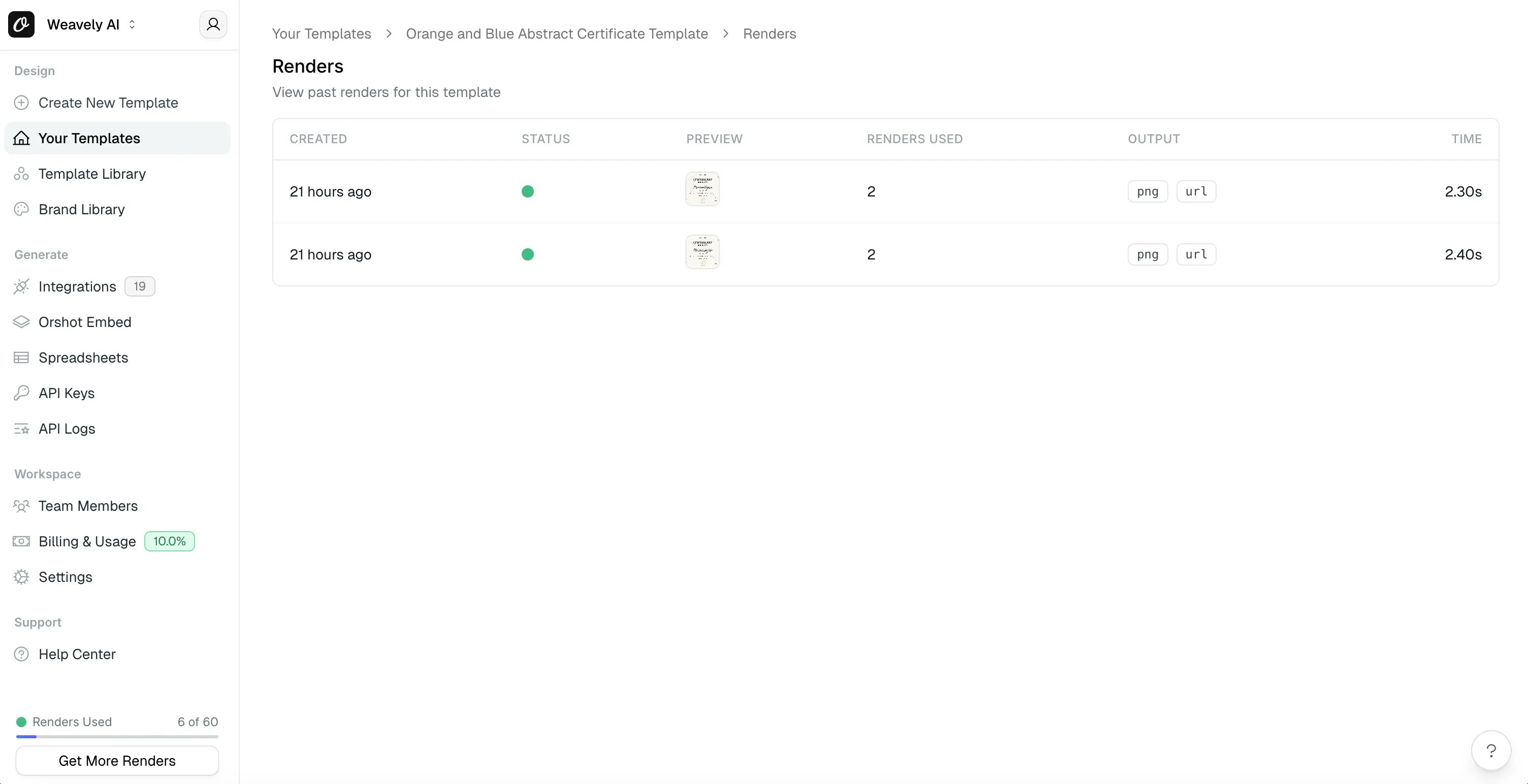
After a form is submitted, the generated PDF appears in your Orshot account. Go to your certificate template and click **Renders** to see all generated PDFs.
## Frequently Asked Questions
**Do I need an Orshot account to use this integration?**
Yes, you'll need an active Orshot account and API key. You can sign up at orshot.com.
**Can I customize the PDF design?**
Yes, Orshot has pre-made templates and a PDF studio where you can design custom templates with your own branding, colors, and layout.
**Where can I see the generated PDFs?**
Generated PDFs appear in your Orshot account under the template's Renders section. Each form submission creates a new render.
**What types of PDFs can I generate?**
You can generate any type of PDF document including certificates, event tickets, receipts, reports, invoices, or custom documents designed in Orshot's PDF studio.
**Can I use multiple templates for one form?**
Currently, each integration supports one template. To use different templates, you can set up conditional logic in Orshot or create separate forms for each template type.
 In your Weavely form, navigate to the **Integrations** tab and click **Add** next to Orshot.
 Paste your Orshot API key in the field and click **Connect to Orshot**. Your Orshot templates will automatically load.
 ## Mapping Form Fields to Your PDF Template
Once connected, select which Orshot template you want to use from the dropdown menu.
For each field in your Orshot template, you'll see a mapping field where you can specify what data to include. Click the **@** symbol to select form fields, or type literal text directly.
You can read more about mapping form fields in [this tutorial](/help-center/integrations/data-mapping).
Click **Create Integration** and republish your form. PDFs will now generate automatically for each new submission.
## Viewing Your Generated PDFs
After a form is submitted, the generated PDF appears in your Orshot account. Go to your certificate template and click **Renders** to see all generated PDFs.
## Mapping Form Fields to Your PDF Template
Once connected, select which Orshot template you want to use from the dropdown menu.
For each field in your Orshot template, you'll see a mapping field where you can specify what data to include. Click the **@** symbol to select form fields, or type literal text directly.
You can read more about mapping form fields in [this tutorial](/help-center/integrations/data-mapping).
Click **Create Integration** and republish your form. PDFs will now generate automatically for each new submission.
## Viewing Your Generated PDFs
After a form is submitted, the generated PDF appears in your Orshot account. Go to your certificate template and click **Renders** to see all generated PDFs.
 ## Frequently Asked Questions
**Do I need an Orshot account to use this integration?**
Yes, you'll need an active Orshot account and API key. You can sign up at orshot.com.
**Can I customize the PDF design?**
Yes, Orshot has pre-made templates and a PDF studio where you can design custom templates with your own branding, colors, and layout.
**Where can I see the generated PDFs?**
Generated PDFs appear in your Orshot account under the template's Renders section. Each form submission creates a new render.
**What types of PDFs can I generate?**
You can generate any type of PDF document including certificates, event tickets, receipts, reports, invoices, or custom documents designed in Orshot's PDF studio.
**Can I use multiple templates for one form?**
Currently, each integration supports one template. To use different templates, you can set up conditional logic in Orshot or create separate forms for each template type.
## Frequently Asked Questions
**Do I need an Orshot account to use this integration?**
Yes, you'll need an active Orshot account and API key. You can sign up at orshot.com.
**Can I customize the PDF design?**
Yes, Orshot has pre-made templates and a PDF studio where you can design custom templates with your own branding, colors, and layout.
**Where can I see the generated PDFs?**
Generated PDFs appear in your Orshot account under the template's Renders section. Each form submission creates a new render.
**What types of PDFs can I generate?**
You can generate any type of PDF document including certificates, event tickets, receipts, reports, invoices, or custom documents designed in Orshot's PDF studio.
**Can I use multiple templates for one form?**
Currently, each integration supports one template. To use different templates, you can set up conditional logic in Orshot or create separate forms for each template type.