> ## Documentation Index
> Fetch the complete documentation index at: https://help.weavely.ai/llms.txt
> Use this file to discover all available pages before exploring further.
# ActiveCampaign
> Send Weavely form responses straight into ActiveCampaign as contacts
{`{
"@context": "https://schema.org",
"@graph": [
{
"@type": "WebPage",
"@id": "https://help.weavely.ai/integrations/active-campaign",
"url": "https://help.weavely.ai/integrations/active-campaign",
"name": "ActiveCampaign",
"description": "Send Weavely form responses straight into ActiveCampaign as contacts",
"inLanguage": "en",
"publisher": { "@id": "https://www.weavely.ai/#org" }
},
{
"@type": "TechArticle",
"@id": "https://help.weavely.ai/integrations/active-campaign#article",
"headline": "ActiveCampaign",
"description": "Send Weavely form responses straight into ActiveCampaign as contacts",
"inLanguage": "en",
"mainEntityOfPage": { "@id": "https://help.weavely.ai/integrations/active-campaign" },
"author": { "@id": "https://www.weavely.ai/#org" },
"publisher": { "@id": "https://www.weavely.ai/#org" }
},
{
"@type": "VideoObject",
"@id": "https://help.weavely.ai/integrations/active-campaign#video",
"name": "How to Connect a Form to ActiveCampaign (Free, No Code)",
"description": "Want to send multi-step forms with conditional logic straight into ActiveCampaign — for free and without touching code? In this tutorial I build an advanced form with AI and connect it to ActiveCampaign in a few minutes. I'm using Weavely, an AI form builder that integrates with ActiveCampaign for free. You just describe the form you want and it builds it — multi-step pages, conditional logic that hides irrelevant questions, and custom branding, no CSS required. Then we walk through the native ActiveCampaign integration: copy your Weavely personal token, add it in ActiveCampaign's app directory, choose your form, map the fields to your contact properties, and you're done. From then on, every submission lands in your ActiveCampaign contacts automatically.",
"url": "https://youtu.be/BLD5-AFeYJU",
"contentUrl": "https://youtu.be/BLD5-AFeYJU",
"embedUrl": "https://www.youtube.com/embed/BLD5-AFeYJU",
"duration": "PT6M16S",
"uploadDate": "2026-07-02T00:00:00+00:00",
"thumbnailUrl": [
"https://i.ytimg.com/vi/BLD5-AFeYJU/maxresdefault.jpg",
"https://i.ytimg.com/vi/BLD5-AFeYJU/hqdefault.jpg"
],
"publisher": { "@id": "https://www.weavely.ai/#org" },
"potentialAction": {
"@type": "WatchAction",
"target": "https://youtu.be/BLD5-AFeYJU"
}
},
{
"@type": "Organization",
"@id": "https://www.weavely.ai/#org",
"name": "Weavely",
"url": "https://www.weavely.ai"
}
]
}`}
{`{
"@context": "https://schema.org",
"@graph": [
{
"@type": "WebPage",
"@id": "https://help.weavely.ai/integrations/active-campaign",
"url": "https://help.weavely.ai/integrations/active-campaign",
"name": "ActiveCampaign",
"description": "Send Weavely form responses straight into ActiveCampaign as contacts",
"inLanguage": "en",
"publisher": { "@id": "https://www.weavely.ai/#org" }
},
{
"@type": "TechArticle",
"@id": "https://help.weavely.ai/integrations/active-campaign#article",
"headline": "ActiveCampaign",
"description": "Send Weavely form responses straight into ActiveCampaign as contacts",
"inLanguage": "en",
"mainEntityOfPage": { "@id": "https://help.weavely.ai/integrations/active-campaign" },
"author": { "@id": "https://www.weavely.ai/#org" },
"publisher": { "@id": "https://www.weavely.ai/#org" }
},
{
"@type": "VideoObject",
"@id": "https://help.weavely.ai/integrations/active-campaign#video",
"name": "How to Connect a Form to ActiveCampaign (Free, No Code)",
"description": "Want to send multi-step forms with conditional logic straight into ActiveCampaign — for free and without touching code? In this tutorial I build an advanced form with AI and connect it to ActiveCampaign in a few minutes. I'm using Weavely, an AI form builder that integrates with ActiveCampaign for free. You just describe the form you want and it builds it — multi-step pages, conditional logic that hides irrelevant questions, and custom branding, no CSS required. Then we walk through the native ActiveCampaign integration: copy your Weavely personal token, add it in ActiveCampaign's app directory, choose your form, map the fields to your contact properties, and you're done. From then on, every submission lands in your ActiveCampaign contacts automatically.",
"url": "https://youtu.be/BLD5-AFeYJU",
"contentUrl": "https://youtu.be/BLD5-AFeYJU",
"embedUrl": "https://www.youtube.com/embed/BLD5-AFeYJU",
"duration": "PT6M16S",
"uploadDate": "2026-07-02T00:00:00+00:00",
"thumbnailUrl": [
"https://i.ytimg.com/vi/BLD5-AFeYJU/maxresdefault.jpg",
"https://i.ytimg.com/vi/BLD5-AFeYJU/hqdefault.jpg"
],
"publisher": { "@id": "https://www.weavely.ai/#org" },
"potentialAction": {
"@type": "WatchAction",
"target": "https://youtu.be/BLD5-AFeYJU"
}
},
{
"@type": "Organization",
"@id": "https://www.weavely.ai/#org",
"name": "Weavely",
"url": "https://www.weavely.ai"
}
]
}`}
Connect Weavely to ActiveCampaign to automatically send form responses into your ActiveCampaign contacts. Once it's set up, every submission is added as a contact, with your form fields mapped to contact properties.
**Before you start**, you'll need:
* A published Weavely form
* An ActiveCampaign account
## Step 1: Generate a personal token in Weavely
A personal token links your Weavely account to third-party tools like ActiveCampaign. if you don't know how to create one, head on over to the [dedicated tutorial](/integrations/personal-tokens) and come back afterwards (only takes a couple of seconds to complete).
## Step 2: Add Weavely in ActiveCampaign
In ActiveCampaign, go to **Settings → Integrations** and click on the **app directory** hyperlink.
Don't press "Add an integration", click on the **app directory** hyperlink instead
Search for **Weavely** and select the Weavely app.
Click **Add an account**. When prompted for a **personal token**, paste the token you copied from Weavely.
## Step 3: Choose your team and form
Once your token is accepted, Weavely and ActiveCampaign are connected. You can now select the team and the form that you want to synchronise with ActiveCampaign.
## Step 4: Map your form fields
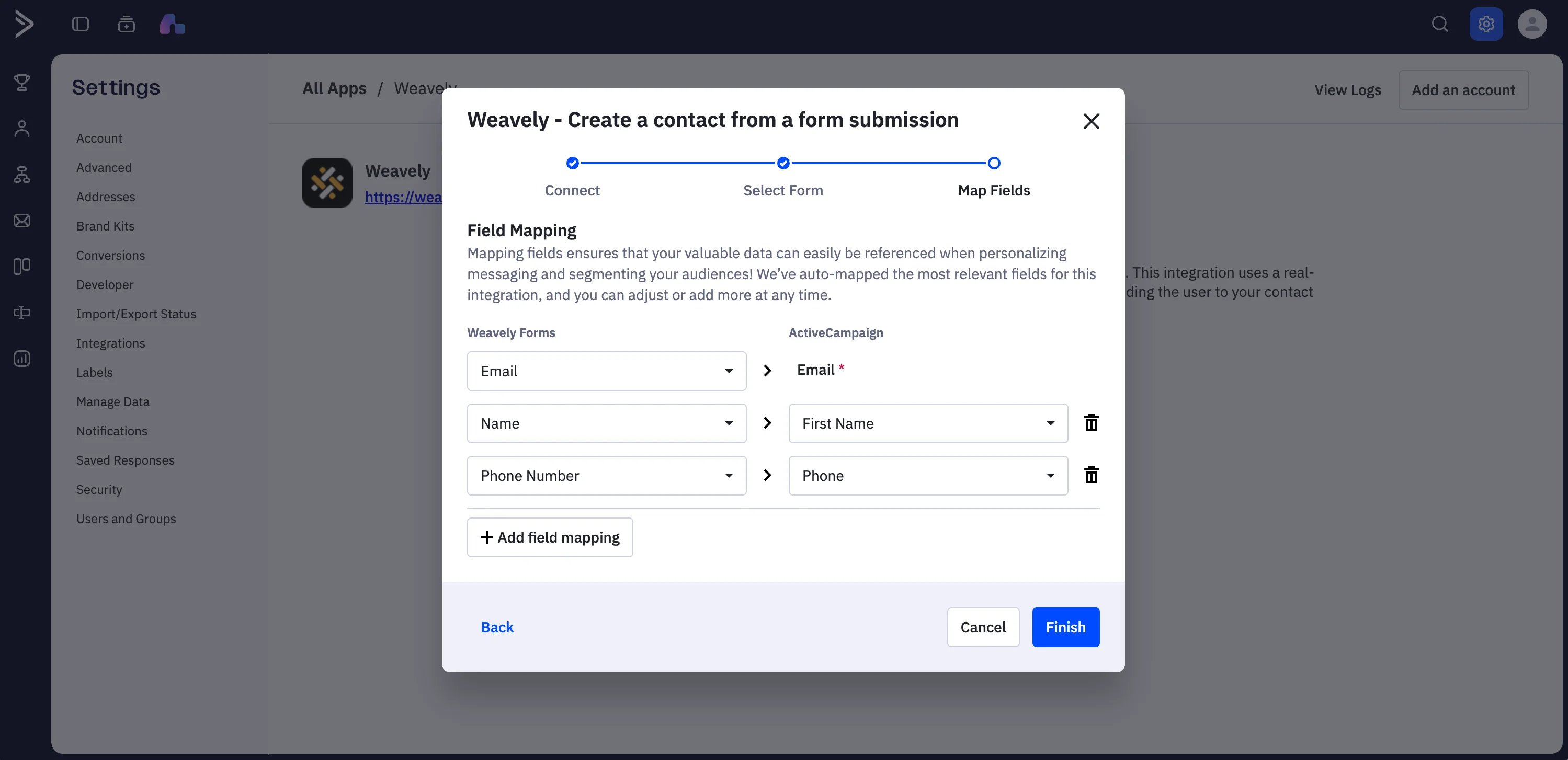
Map each field on your form to an ActiveCampaign contact property. map your form's email field to the ActiveCampaign **Email** property. Other fields (like phone number, subject, or message) are optional. If you want to capture more data, create custom contact properties in ActiveCampaign first. They'll then be available to map to your form fields.
When your mapping looks right, click **Finish**. Your integration is live once the status shows **Connected**.
Your responses are always stored in Weavely too. The integration adds ActiveCampaign as a destination, it doesn't replace Weavely's own response storage.
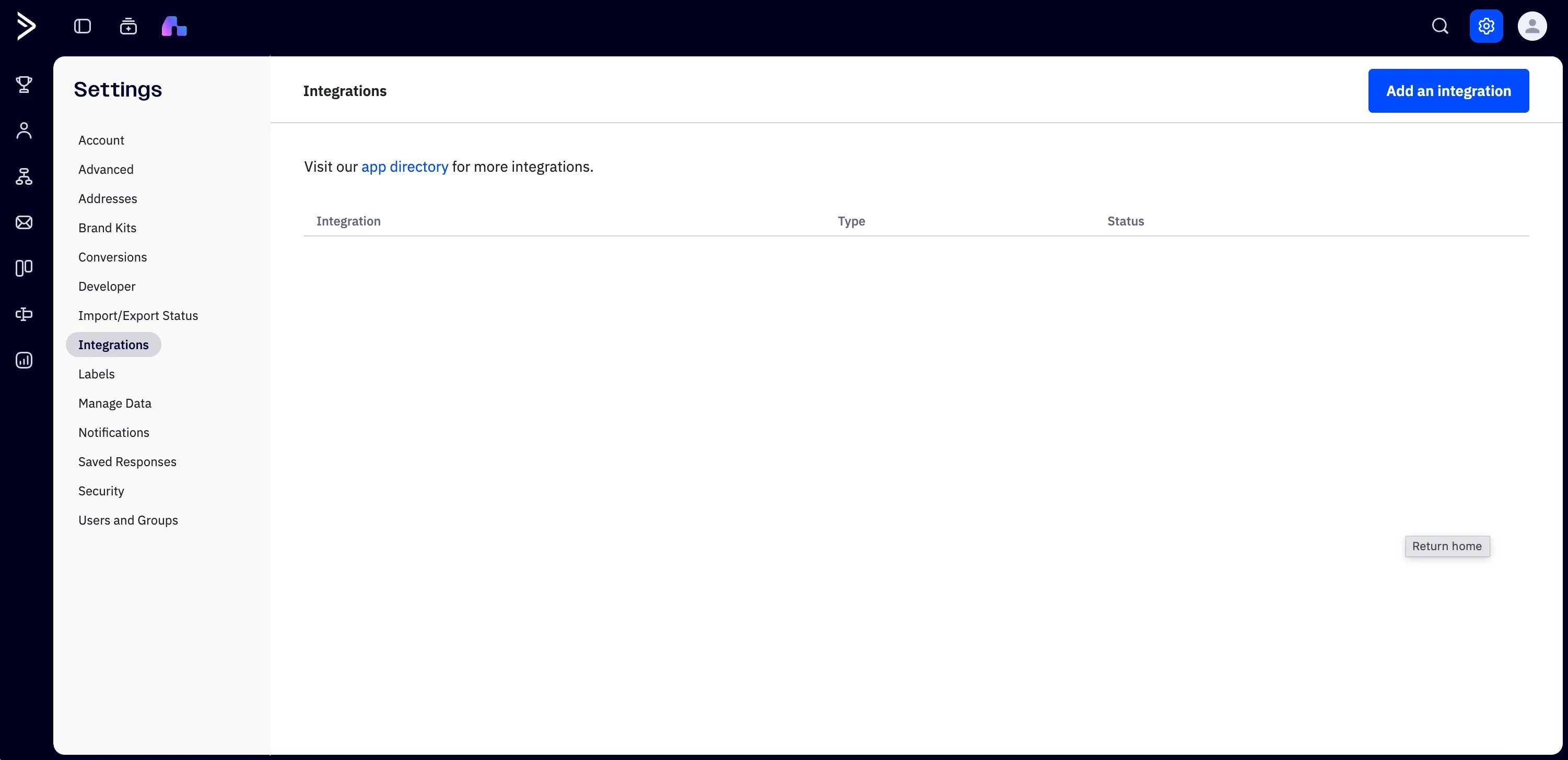 In ActiveCampaign, go to **Settings → Integrations** and click on the **app directory** hyperlink.
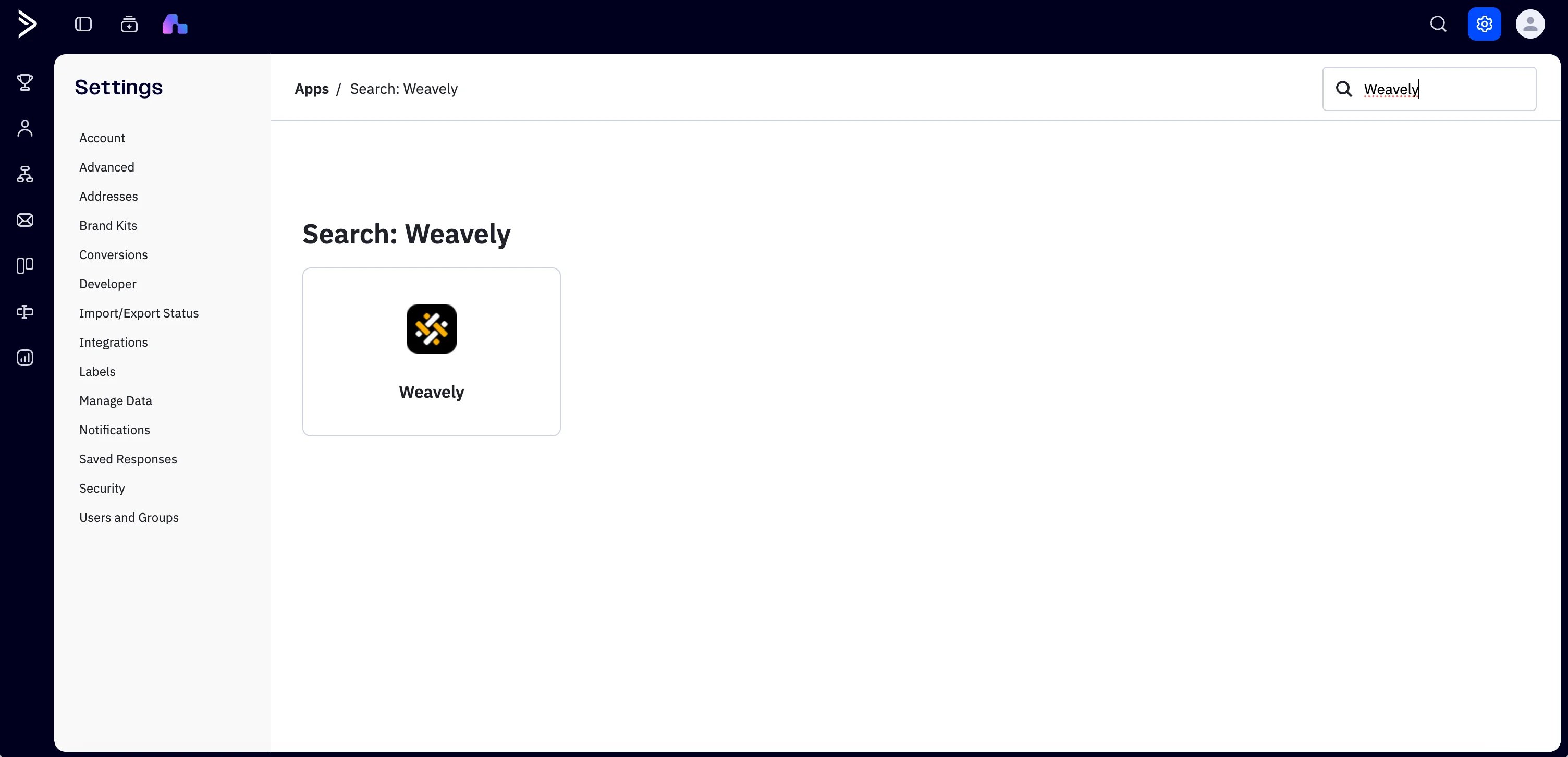
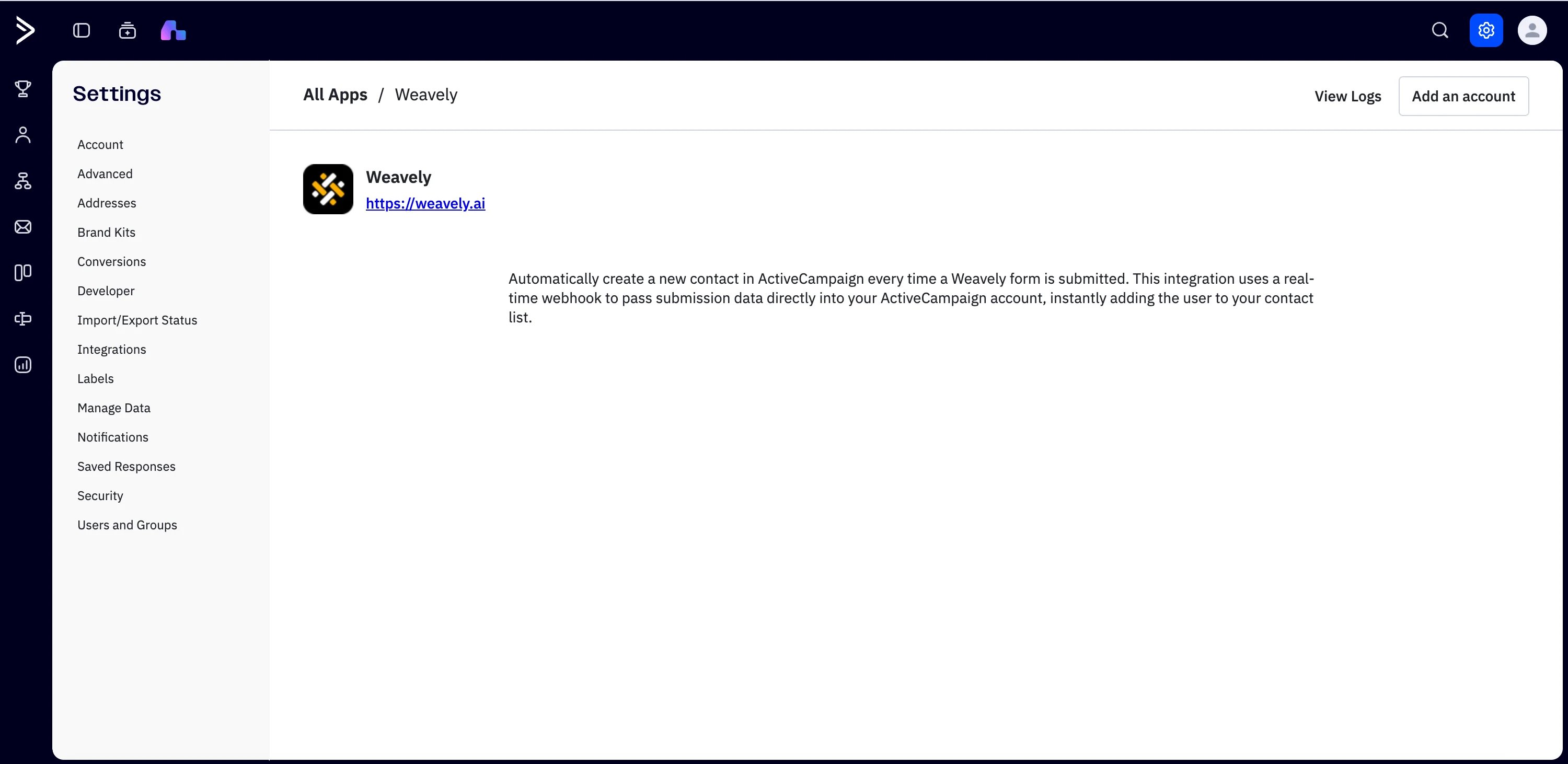 Click **Add an account**. When prompted for a **personal token**, paste the token you copied from Weavely.
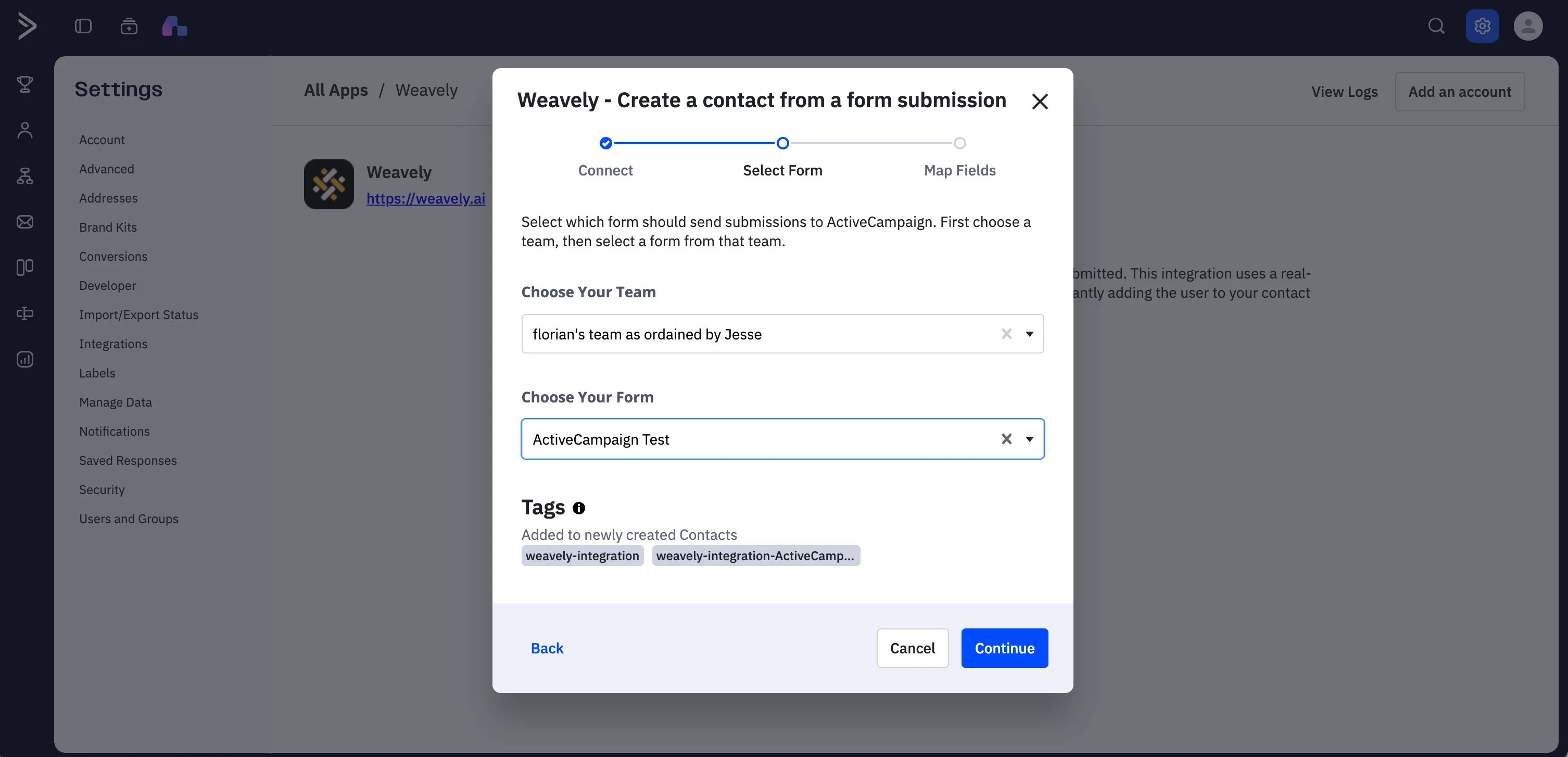 Once your token is accepted, Weavely and ActiveCampaign are connected. You can now select the team and the form that you want to synchronise with ActiveCampaign.
## Step 4: Map your form fields
Map each field on your form to an ActiveCampaign contact property. map your form's email field to the ActiveCampaign **Email** property. Other fields (like phone number, subject, or message) are optional. If you want to capture more data, create custom contact properties in ActiveCampaign first. They'll then be available to map to your form fields.
Once your token is accepted, Weavely and ActiveCampaign are connected. You can now select the team and the form that you want to synchronise with ActiveCampaign.
## Step 4: Map your form fields
Map each field on your form to an ActiveCampaign contact property. map your form's email field to the ActiveCampaign **Email** property. Other fields (like phone number, subject, or message) are optional. If you want to capture more data, create custom contact properties in ActiveCampaign first. They'll then be available to map to your form fields.
 When your mapping looks right, click **Finish**. Your integration is live once the status shows **Connected**.