> ## Documentation Index
> Fetch the complete documentation index at: https://help.weavely.ai/llms.txt
> Use this file to discover all available pages before exploring further.
# Importing Google Forms to Weavely
> Import your Google Forms into Weavely for free and instantly upgrade them with AI-powered customization, smart logic, and beautiful themes.
{`{
"@context": "https://schema.org",
"@graph": [
{
"@type": "WebPage",
"@id": "https://help.weavely.ai/integrations/google-forms",
"url": "https://help.weavely.ai/integrations/google-forms",
"name": "Importing Google Forms to Weavely",
"description": "Import your Google Forms into Weavely for free and instantly upgrade them with AI-powered customization, smart logic, and beautiful themes.",
"inLanguage": "en",
"isPartOf": {
"@type": "WebSite",
"@id": "https://help.weavely.ai/#website",
"name": "Weavely Help Center"
},
"breadcrumb": {
"@type": "BreadcrumbList",
"itemListElement": [
{ "@type": "ListItem", "position": 1, "name": "Integrations", "item": "https://help.weavely.ai/integrations" },
{ "@type": "ListItem", "position": 2, "name": "Google Forms", "item": "https://help.weavely.ai/integrations/google-forms" }
]
},
"publisher": { "@id": "https://www.weavely.ai/#org" }
},
{
"@type": "TechArticle",
"headline": "Importing Google Forms to Weavely",
"description": "Import your Google Forms into Weavely for free and instantly upgrade them with AI-powered customization, smart logic, and beautiful themes.",
"inLanguage": "en",
"author": { "@id": "https://www.weavely.ai/#org" },
"publisher": { "@id": "https://www.weavely.ai/#org" },
"mainEntityOfPage": { "@id": "https://help.weavely.ai/integrations/google-forms" }
},
{
"@type": "VideoObject",
"name": "How to Customise Google Forms for Free: Weavely.ai Tutorial",
"description": "In this tutorial, I’ll show you how to import your existing Google Form into Weavely, where you can freely customize the layout, style, and flow. No design restrictions, no cost.",
"uploadDate": "2025-06-19T00:00:00Z",
"duration": "PT1M38S",
"embedUrl": "https://www.youtube.com/embed/YHjq-43cb3Y",
"contentUrl": "https://www.youtube.com/watch?v=YHjq-43cb3Y",
"thumbnailUrl": [
"https://i.ytimg.com/vi/YHjq-43cb3Y/hqdefault.jpg",
"https://i.ytimg.com/vi/YHjq-43cb3Y/sddefault.jpg"
],
"potentialAction": {
"@type": "WatchAction",
"target": "https://www.youtube.com/watch?v=YHjq-43cb3Y"
},
"publisher": { "@id": "https://www.weavely.ai/#org" },
"author": { "@id": "https://www.weavely.ai/#org" }
},
{
"@type": "Organization",
"@id": "https://www.weavely.ai/#org",
"name": "WEAVE.LY BV",
"url": "https://www.weavely.ai",
"address": {
"@type": "PostalAddress",
"streetAddress": "Herbert Hooverlaan 141",
"addressLocality": "Schaarbeek",
"postalCode": "1030",
"addressCountry": "BE"
},
"identifier": "BE0773.878.569",
"sameAs": [
"https://www.instagram.com/weavely.ai/",
"https://www.linkedin.com/company/weave-ly/",
"https://www.youtube.com/@weavely"
]
}
]
}`}
Weavely makes it effortless to upgrade your existing Google Forms with better design, advanced logic, and powerful integrations. In this guide, we’ll show you how to import a Google Form into Weavely and enhance it with styling, smart logic, and third-party tools.
To import your Google Form, create a new Weavely form. In the AI conversation panel click on "*Import a form*".
Before Weavely can import your Google Form, you'll first need to grant us the right access. Don't worry, it's a simple single sign-on process that you start by pressing *"Connect to Google Forms"* in the *"Import"* modal.
Make sure to connect the Google account which you used to create the form you want to import.
Once connected, you’ll be asked to provide a link to the form you want to import. Make sure you copy the Google Form’s editor URL. This is the one you use when editing the form, not the shareable URL you send to others. The editor URL typically ends with **/edit**. Paste that into the input field and click Import. For example:
```html theme={null}
https://docs.google.com/forms/d/1_s3nDl4TpXRBfWGbaZcZ4iHbgsGX1nvZqltI35aKuBU/edit
```
## **Changing Your Google Forms Account or Resetting Your Connection**
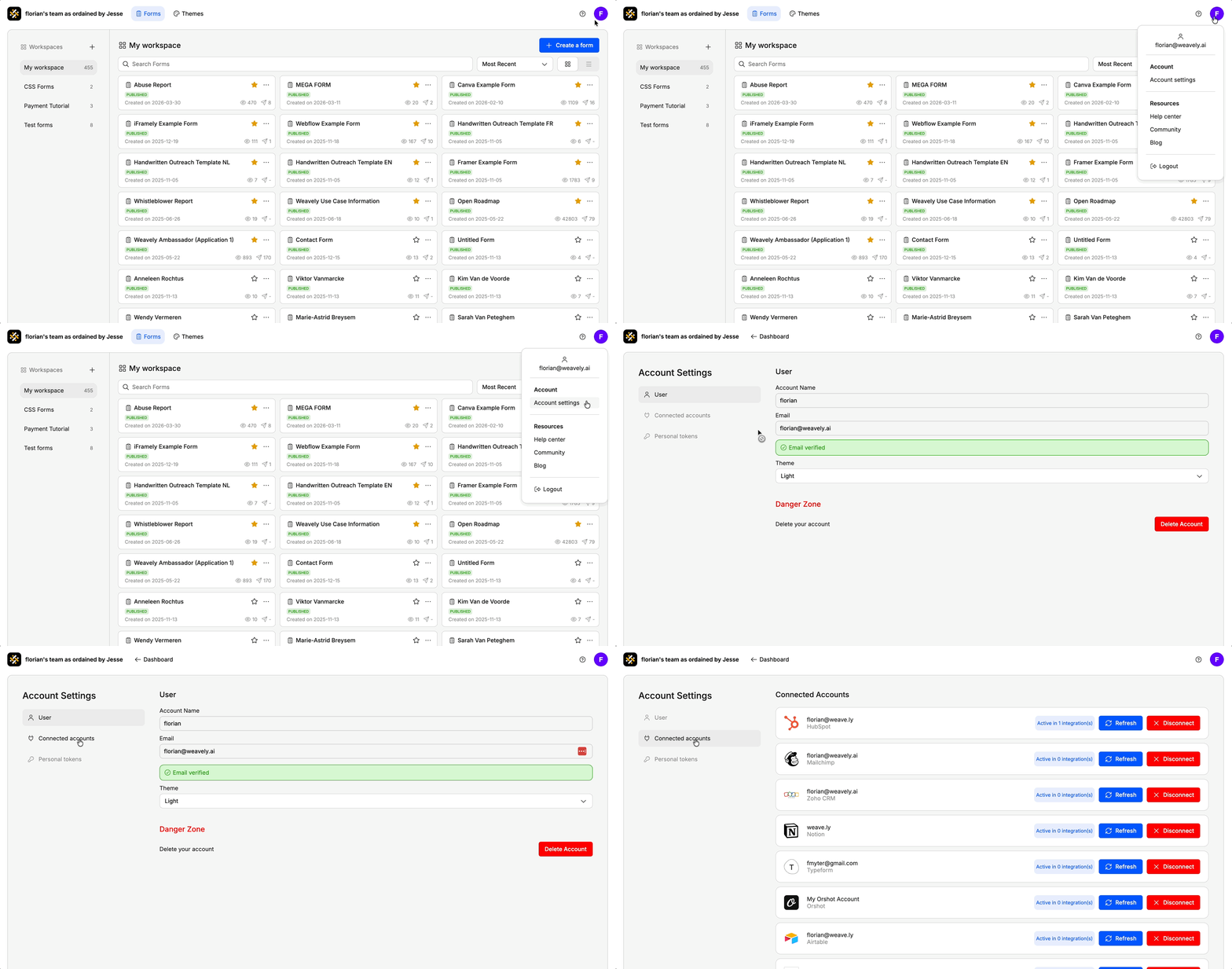
If you ever need to reset your connection with Google Forms, for instance to switch to a different account or reauthorize access, you can do so from your Weavely dashboard. Go to **Settings → Connected Accounts** and click the red **“Disconnect”** button next to Google Forms. You can then reconnect with the correct account.
.webp?fit=max&auto=format&n=5LDq3m291ioK6Ix6&q=85&s=2b9708c92f03458c45fbd3be34cbca0b)