> ## Documentation Index
> Fetch the complete documentation index at: https://help.weavely.ai/llms.txt
> Use this file to discover all available pages before exploring further.
> Use the Weavely MCP server to build, style, and publish forms or surveys directly in Mistral AI (Le Chat) — no coding required.
# How to Create Forms & Surveys with the Weavely MCP Server in Mistral AI
{`{
"@context": "https://schema.org",
"@graph": [
{
"@type": "WebPage",
"@id": "https://help.weavely.ai/integrations/how-to-create-forms-and-surveys-with-the-weavely-mcp-server-in-mistral-ai",
"url": "https://help.weavely.ai/integrations/how-to-create-forms-and-surveys-with-the-weavely-mcp-server-in-mistral-ai",
"name": "How to Create Forms & Surveys with the Weavely MCP Server in Mistral AI",
"description": "Use the Weavely MCP server to build, style, and publish forms or surveys directly in Mistral AI (Le Chat) — no coding required.",
"inLanguage": "en",
"publisher": { "@id": "https://www.weavely.ai/#org" }
},
{
"@type": "TechArticle",
"@id": "https://help.weavely.ai/integrations/how-to-create-forms-and-surveys-with-the-weavely-mcp-server-in-mistral-ai#article",
"headline": "How to Create Forms & Surveys with the Weavely MCP Server in Mistral AI",
"description": "Use the Weavely MCP server to build, style, and publish forms or surveys directly in Mistral AI (Le Chat) — no coding required.",
"inLanguage": "en",
"mainEntityOfPage": { "@id": "https://help.weavely.ai/integrations/how-to-create-forms-and-surveys-with-the-weavely-mcp-server-in-mistral-ai" },
"author": { "@id": "https://www.weavely.ai/#org" },
"publisher": { "@id": "https://www.weavely.ai/#org" }
},
{
"@type": "VideoObject",
"@id": "https://help.weavely.ai/integrations/how-to-create-forms-and-surveys-with-the-weavely-mcp-server-in-mistral-ai#video",
"name": "Build Forms & Surveys in Mistral AI for Free (MCP Tutorial)",
"description": "Build forms and surveys directly inside Mistral AI completely free using the Weavely MCP connector. No authentication needed, just paste the server URL and you are up and running in seconds. In this tutorial you will learn how to connect Weavely to Mistral AI via MCP server, create a lead generation form using a simple chat prompt, tweak fields, design and conditional logic inside Mistral, publish your form and collect responses in Weavely, and set up integrations like Google Sheets.",
"url": "https://youtu.be/GlGcnbX1xkk",
"contentUrl": "https://youtu.be/GlGcnbX1xkk",
"embedUrl": "https://www.youtube.com/embed/GlGcnbX1xkk",
"duration": "PT5M9S",
"uploadDate": "2026-04-16T00:00:00+00:00",
"thumbnailUrl": [
"https://img.youtube.com/vi/GlGcnbX1xkk/maxresdefault.jpg"
],
"publisher": { "@id": "https://www.weavely.ai/#org" },
"potentialAction": {
"@type": "WatchAction",
"target": "https://youtu.be/GlGcnbX1xkk"
}
},
{
"@type": "Organization",
"@id": "https://www.weavely.ai/#org",
"name": "Weavely",
"url": "https://www.weavely.ai"
}
]
}`}
## What Is the Weavely MCP Server?
The **Weavely MCP server** turns Le Chat Mistral into a free AI form builder, letting you create, style, and publish forms and surveys through conversation without leaving your chat. Describe what you need, and Mistral builds it step by step. You get a **live preview URL** to follow along in your browser and a shareable link once you publish.
The Model Context Protocol (MCP) is an open standard that connects AI assistants to external tools. The Weavely MCP connector extends Le Chat Mistral with full form-building capabilities, including 25 element types, multi-page layouts, custom themes, and conditional logic, completely free with no coding required.
## How to Connect the Weavely MCP Server to Mistral
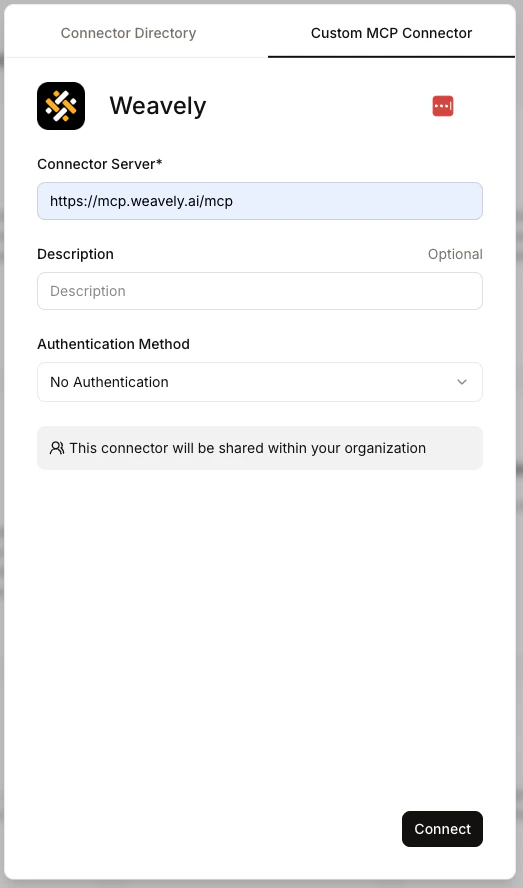
1. Open [Le Chat](https://chat.mistral.ai) and navigate to **Intelligence > Connectors**.
2. Click **"Add connector"**, select the "**Custom MCP Connector**" tab and paste the following server URL:
```text theme={null}
https://mcp.weavely.ai/mcp
```
3. Leave the authentication field empty. No authentication is required.
4. The description field is optional. Click **Connect**.
Weavely will appear in your connectors list and is ready to use straight away.
## How to Build Forms and Surveys with Mistral AI
Start a new chat and select the **Weavely connector** from your connector list. Then simply describe the form or survey you need and Mistral handles the rest. This MCP tutorial walks through a B2B lead generation form, but the same steps apply to any form or survey type.
Mistral will ask for your permission before creating anything outside the chat, then build the form and share a **live preview URL**. Open it in your browser and refresh at any point to see the latest version.
You can iterate naturally:
* **"I need a lead generation form for my B2B marketing agency"** - Mistral creates the form and suggests fields like company name, contact person, industry, and email
* **"Add those fields to the form"** - Mistral updates the form with the suggested elements
* **"Change the dropdown to a radio button"** - Mistral swaps the field type
* **"Add conditional logic"** - Mistral applies it to the relevant fields
* **"Can you come up with a nicer colour scheme?"** - Mistral reskins the form; just refresh the preview to see the result
The preview URL stays the same throughout. Refresh it anytime to see changes as Mistral makes them.
The more specific your initial prompt, the more tailored the form. A generic prompt like "a lead gen form" gives you a solid starting point; adding details like industry, audience, or specific fields gives you something closer to finished.
## Publishing Your Form
When you're happy with the form, either:
* Ask Mistral in the chat: **"Publish my form"**, or
* Click the **publish button** directly on the preview link
You'll be prompted to create a **free Weavely account** if you don't have one. Once inside the Weavely editor, Weavely's free AI form builder, you can:
* **Share your form** via a unique URL and start collecting responses
* **View and manage responses** in your Weavely dashboard
* **Set up integrations** - Google Sheets, Make, Zapier, n8n, HubSpot, Notion, and more
* **Further customise** the form with AI or manually using the Weavely editor
* **Embed the form** on your website or share it as a pop-up
The preview URL you use while building is temporary. It cannot be shared or used to collect responses. Always go through the publish step to get your permanent, shareable form URL.
 1. Open [Le Chat](https://chat.mistral.ai) and navigate to **Intelligence > Connectors**.
2. Click **"Add connector"**, select the "**Custom MCP Connector**" tab and paste the following server URL:
```text theme={null}
https://mcp.weavely.ai/mcp
```
3. Leave the authentication field empty. No authentication is required.
4. The description field is optional. Click **Connect**.
Weavely will appear in your connectors list and is ready to use straight away.
## How to Build Forms and Surveys with Mistral AI
Start a new chat and select the **Weavely connector** from your connector list. Then simply describe the form or survey you need and Mistral handles the rest. This MCP tutorial walks through a B2B lead generation form, but the same steps apply to any form or survey type.
Mistral will ask for your permission before creating anything outside the chat, then build the form and share a **live preview URL**. Open it in your browser and refresh at any point to see the latest version.
You can iterate naturally:
* **"I need a lead generation form for my B2B marketing agency"** - Mistral creates the form and suggests fields like company name, contact person, industry, and email
* **"Add those fields to the form"** - Mistral updates the form with the suggested elements
* **"Change the dropdown to a radio button"** - Mistral swaps the field type
* **"Add conditional logic"** - Mistral applies it to the relevant fields
* **"Can you come up with a nicer colour scheme?"** - Mistral reskins the form; just refresh the preview to see the result
The preview URL stays the same throughout. Refresh it anytime to see changes as Mistral makes them.
1. Open [Le Chat](https://chat.mistral.ai) and navigate to **Intelligence > Connectors**.
2. Click **"Add connector"**, select the "**Custom MCP Connector**" tab and paste the following server URL:
```text theme={null}
https://mcp.weavely.ai/mcp
```
3. Leave the authentication field empty. No authentication is required.
4. The description field is optional. Click **Connect**.
Weavely will appear in your connectors list and is ready to use straight away.
## How to Build Forms and Surveys with Mistral AI
Start a new chat and select the **Weavely connector** from your connector list. Then simply describe the form or survey you need and Mistral handles the rest. This MCP tutorial walks through a B2B lead generation form, but the same steps apply to any form or survey type.
Mistral will ask for your permission before creating anything outside the chat, then build the form and share a **live preview URL**. Open it in your browser and refresh at any point to see the latest version.
You can iterate naturally:
* **"I need a lead generation form for my B2B marketing agency"** - Mistral creates the form and suggests fields like company name, contact person, industry, and email
* **"Add those fields to the form"** - Mistral updates the form with the suggested elements
* **"Change the dropdown to a radio button"** - Mistral swaps the field type
* **"Add conditional logic"** - Mistral applies it to the relevant fields
* **"Can you come up with a nicer colour scheme?"** - Mistral reskins the form; just refresh the preview to see the result
The preview URL stays the same throughout. Refresh it anytime to see changes as Mistral makes them.