> ## Documentation Index
> Fetch the complete documentation index at: https://help.weavely.ai/llms.txt
> Use this file to discover all available pages before exploring further.
# Send Form Responses to HubSpot
> Weavely's HubSpot integration lets you automatically create contacts in HubSpot upon form submissions.
{`{
"@context": "https://schema.org",
"@graph": [
{
"@type": "WebPage",
"@id": "https://help.weavely.ai/integrations/hubspot",
"url": "https://help.weavely.ai/integrations/hubspot",
"name": "Send Form Responses to HubSpot",
"description": "Weavely's HubSpot integration lets you automatically create contacts in HubSpot upon form submissions.",
"inLanguage": "en",
"isPartOf": {
"@type": "WebSite",
"@id": "https://help.weavely.ai/#website",
"name": "Weavely Help Center"
},
"breadcrumb": {
"@type": "BreadcrumbList",
"itemListElement": [
{ "@type": "ListItem", "position": 1, "name": "Integrations", "item": "https://help.weavely.ai/integrations" },
{ "@type": "ListItem", "position": 2, "name": "HubSpot", "item": "https://help.weavely.ai/integrations/hubspot" }
]
},
"publisher": { "@id": "https://www.weavely.ai/#org" }
},
{
"@type": "TechArticle",
"headline": "Send Form Responses to HubSpot",
"description": "Weavely's HubSpot integration lets you automatically create contacts in HubSpot upon form submissions.",
"inLanguage": "en",
"author": { "@id": "https://www.weavely.ai/#org" },
"publisher": { "@id": "https://www.weavely.ai/#org" },
"mainEntityOfPage": { "@id": "https://help.weavely.ai/integrations/hubspot" }
},
{
"@type": "VideoObject",
"name": "AI Form Data to HubSpot: Weave.ly Tutorial",
"description": "Want to collect lead information directly into HubSpot, without copy-pasting anything? In this quick tutorial, I show you how to connect Weavely.ai to HubSpot.",
"uploadDate": "2025-05-12T00:00:00Z",
"duration": "PT1M56S",
"embedUrl": "https://www.youtube.com/embed/SjFrxnSkuQ8",
"contentUrl": "https://www.youtube.com/watch?v=SjFrxnSkuQ8",
"thumbnailUrl": [
"https://i.ytimg.com/vi/SjFrxnSkuQ8/hqdefault.jpg",
"https://i.ytimg.com/vi/SjFrxnSkuQ8/sddefault.jpg"
],
"potentialAction": {
"@type": "WatchAction",
"target": "https://www.youtube.com/watch?v=SjFrxnSkuQ8"
},
"publisher": { "@id": "https://www.weavely.ai/#org" },
"author": { "@id": "https://www.weavely.ai/#org" }
},
{
"@type": "Organization",
"@id": "https://www.weavely.ai/#org",
"name": "WEAVE.LY BV",
"url": "https://www.weavely.ai",
"address": {
"@type": "PostalAddress",
"streetAddress": "Herbert Hooverlaan 141",
"addressLocality": "Schaarbeek",
"postalCode": "1030",
"addressCountry": "BE"
},
"identifier": "BE0773.878.569",
"sameAs": [
"https://www.instagram.com/weavely.ai/",
"https://www.linkedin.com/company/weave-ly/",
"https://www.youtube.com/@weavely"
]
}
]
}`}
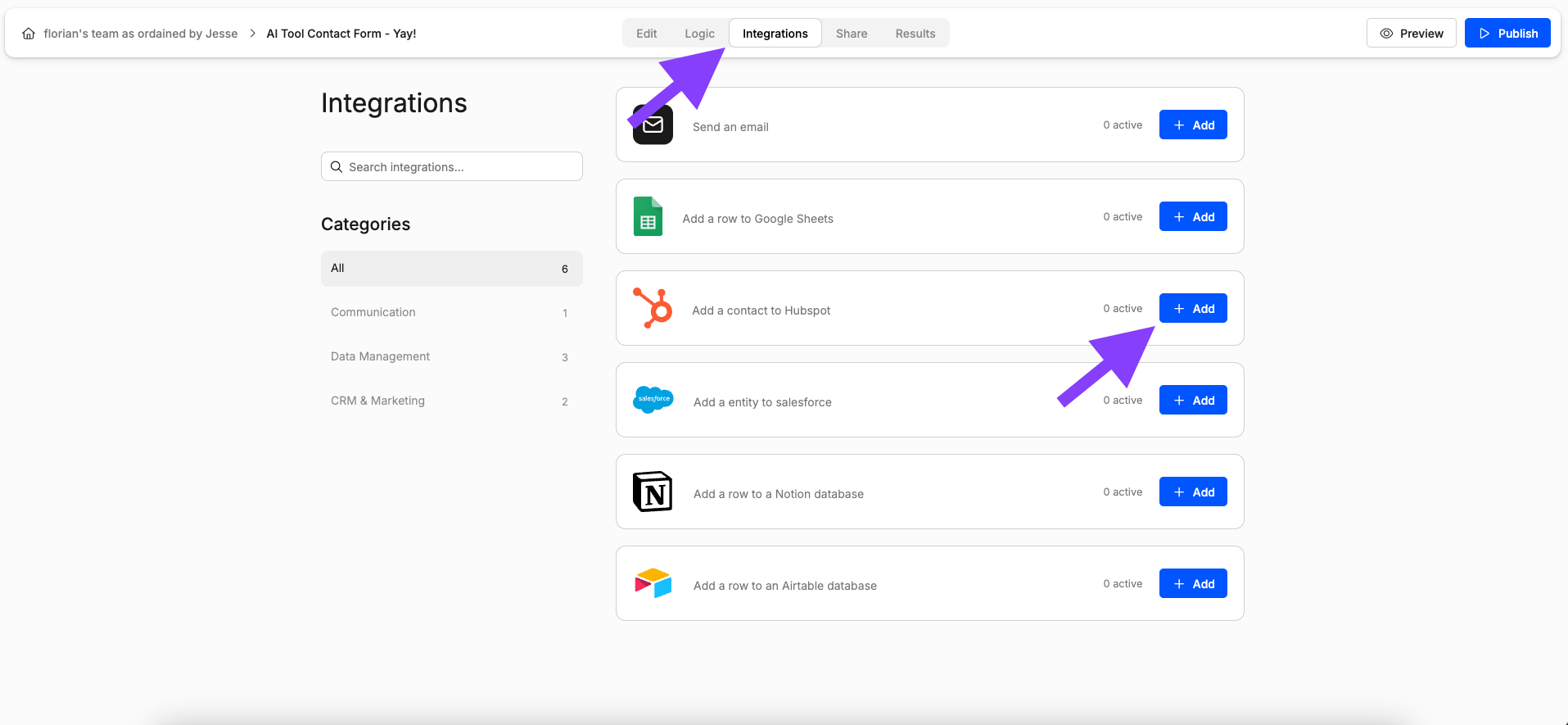
## Step 1: Open the Integrations Tab
With the editor open, navigate to the *Integrations* tab and select the *HubSpot* integration as shown below.
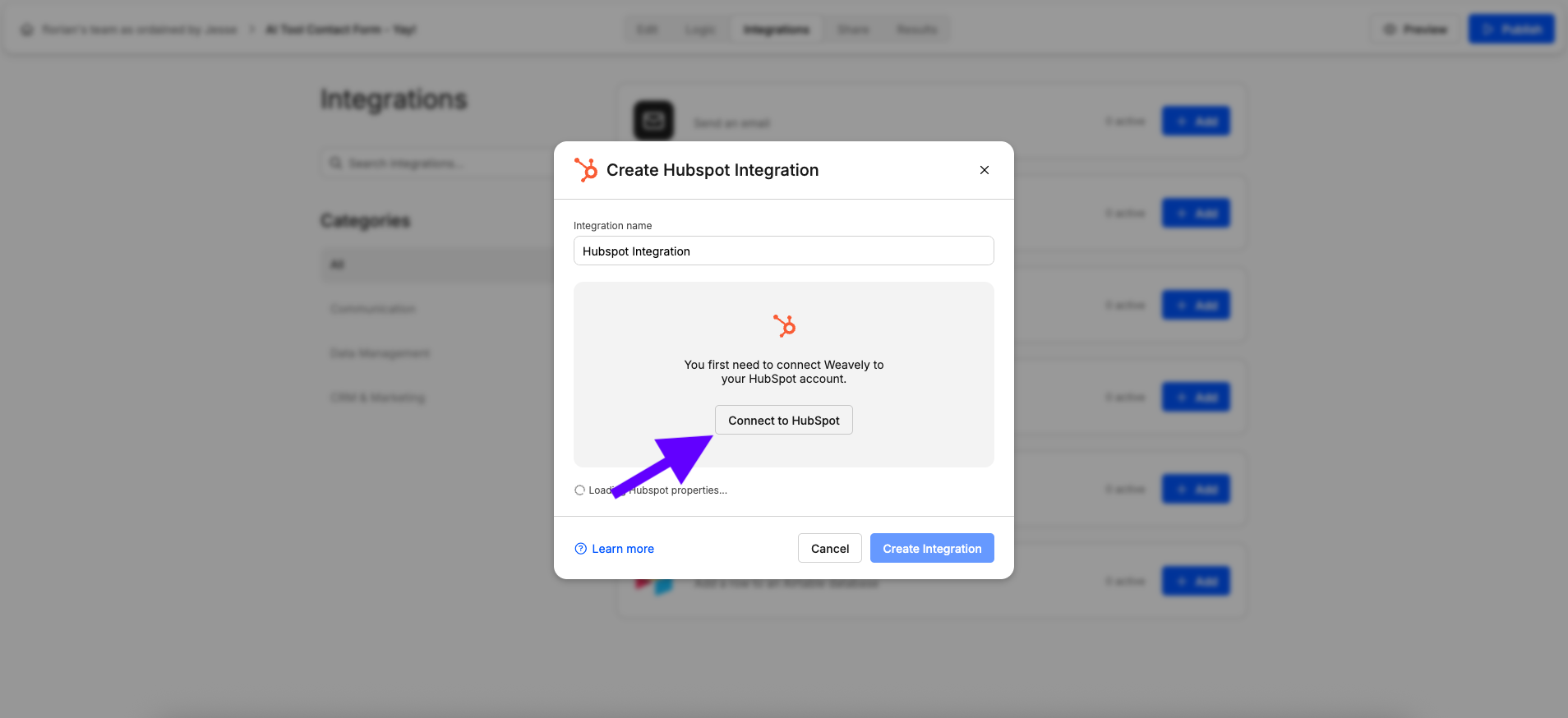
## Step 2: Link Your HubSpot Account
Is this the first time you set up a HubSpot integration? Then Weavely will first guide you through the steps to connect your HubSpot account to Weavely. Just press *"Connect to HubSpot"* to get started.
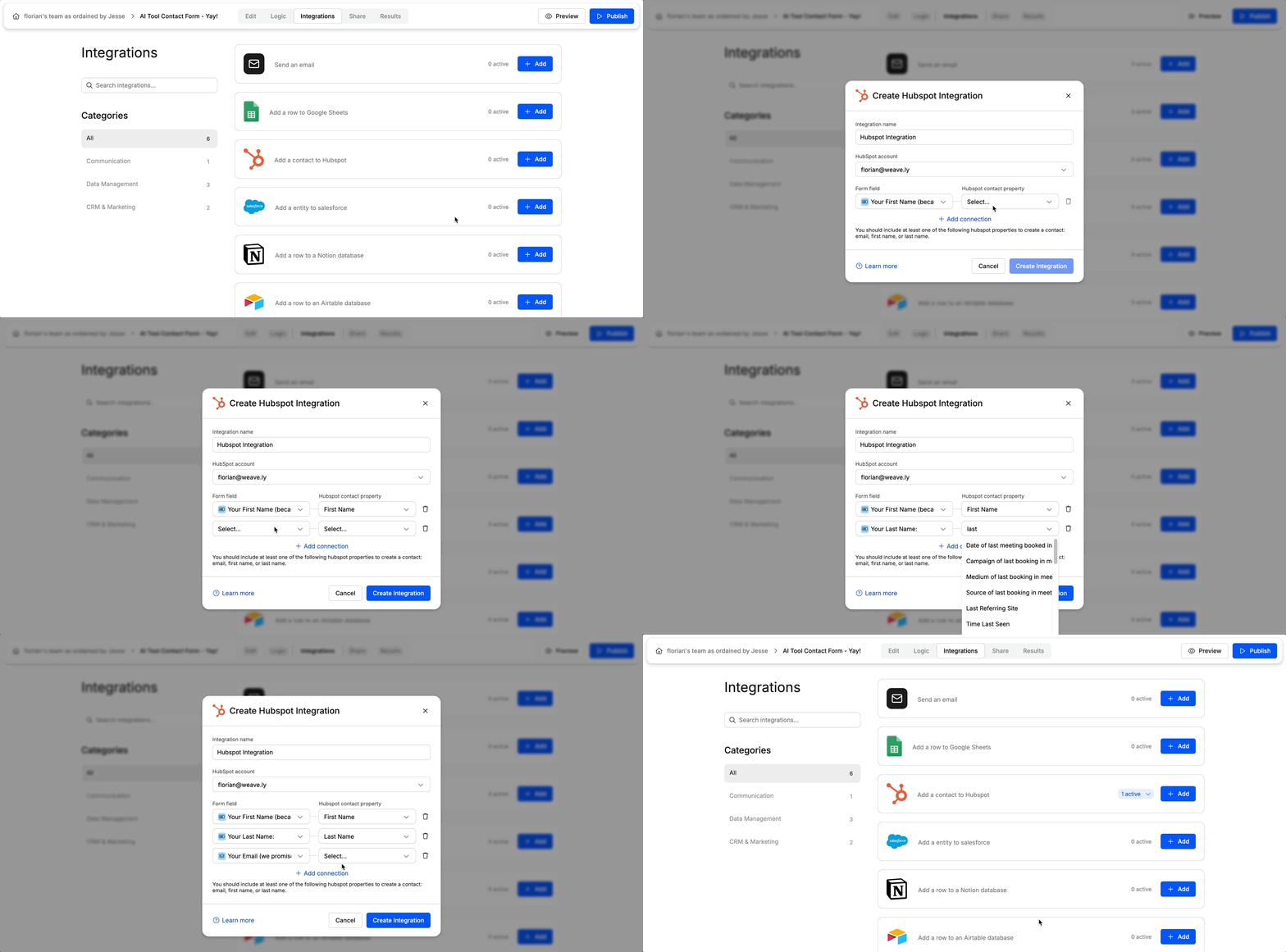
## Step 3: Map Form Fields to Contact Properties
Once you've connected your HubSpot account you'll be able to set up the integration for your form. You can specify which fields of your form should be used to create the new contact in HubSpot as shown in the gif below. At the time of writing you can only create new contacts after a form submission. Looking to do something else? Reach out to [florian@weavely.ai](mailto:florian@weavely.ai) to tell us your use case and we'll add it to the roadmap!
## **Changing Your HubSpot Account or Resetting Your Connection**
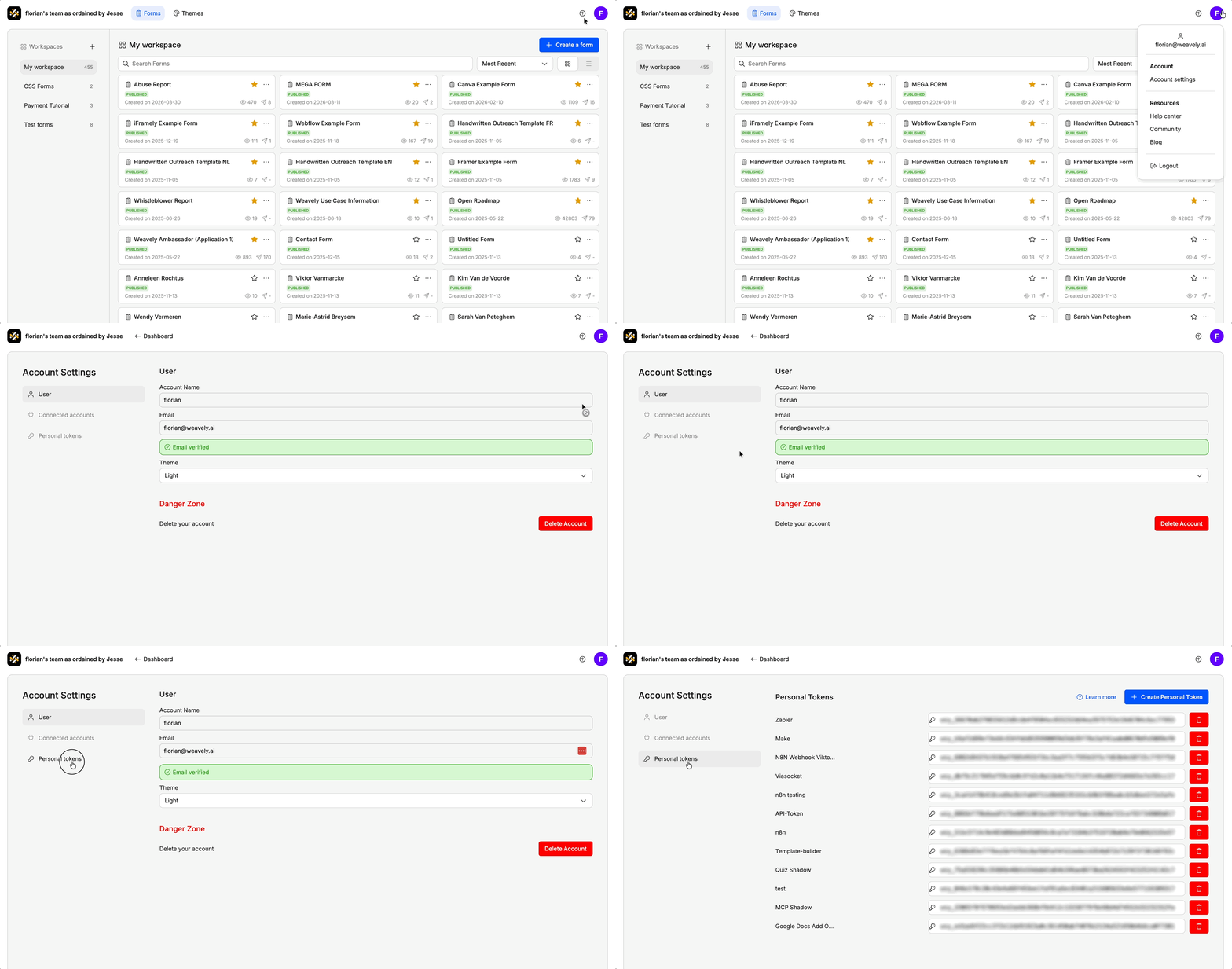
If you ever need to reset your connection with HubSpot, for instance to switch to a different account or reauthorize access, you can do so from your Weavely dashboard. Go to **Settings → Connected Accounts** and click the red **“Disconnect”** button next to HubSpot. You can then reconnect with the correct account.
 ## Step 2: Link Your HubSpot Account
Is this the first time you set up a HubSpot integration? Then Weavely will first guide you through the steps to connect your HubSpot account to Weavely. Just press *"Connect to HubSpot"* to get started.
## Step 2: Link Your HubSpot Account
Is this the first time you set up a HubSpot integration? Then Weavely will first guide you through the steps to connect your HubSpot account to Weavely. Just press *"Connect to HubSpot"* to get started.
 ## Step 3: Map Form Fields to Contact Properties
Once you've connected your HubSpot account you'll be able to set up the integration for your form. You can specify which fields of your form should be used to create the new contact in HubSpot as shown in the gif below. At the time of writing you can only create new contacts after a form submission. Looking to do something else? Reach out to [florian@weavely.ai](mailto:florian@weavely.ai) to tell us your use case and we'll add it to the roadmap!
## Step 3: Map Form Fields to Contact Properties
Once you've connected your HubSpot account you'll be able to set up the integration for your form. You can specify which fields of your form should be used to create the new contact in HubSpot as shown in the gif below. At the time of writing you can only create new contacts after a form submission. Looking to do something else? Reach out to [florian@weavely.ai](mailto:florian@weavely.ai) to tell us your use case and we'll add it to the roadmap!
 ## **Changing Your HubSpot Account or Resetting Your Connection**
If you ever need to reset your connection with HubSpot, for instance to switch to a different account or reauthorize access, you can do so from your Weavely dashboard. Go to **Settings → Connected Accounts** and click the red **“Disconnect”** button next to HubSpot. You can then reconnect with the correct account.
## **Changing Your HubSpot Account or Resetting Your Connection**
If you ever need to reset your connection with HubSpot, for instance to switch to a different account or reauthorize access, you can do so from your Weavely dashboard. Go to **Settings → Connected Accounts** and click the red **“Disconnect”** button next to HubSpot. You can then reconnect with the correct account.