> ## Documentation Index
> Fetch the complete documentation index at: https://help.weavely.ai/llms.txt
> Use this file to discover all available pages before exploring further.
# Connect Your Weavely Form to Make for Workflow Automation
> Make (formerly Integromat) is an automation platform that lets you connect your Weavely form to hundreds of other apps like Slack, Gmail, Airtable, and more.
{`{
"@context": "https://schema.org",
"@graph": [
{
"@type": "WebPage",
"@id": "https://help.weavely.ai/integrations/make",
"url": "https://help.weavely.ai/integrations/make",
"name": "Connect Your Weavely Form to Make for Workflow Automation",
"description": "Make (formerly Integromat) is an automation platform that lets you connect your Weavely form to hundreds of other apps like Slack, Gmail, Airtable, and more.",
"inLanguage": "en",
"isPartOf": {
"@type": "WebSite",
"@id": "https://help.weavely.ai/#website",
"name": "Weavely Help Center"
},
"breadcrumb": {
"@type": "BreadcrumbList",
"itemListElement": [
{ "@type": "ListItem", "position": 1, "name": "Integrations", "item": "https://help.weavely.ai/integrations" },
{ "@type": "ListItem", "position": 2, "name": "Make", "item": "https://help.weavely.ai/integrations/make" }
]
},
"publisher": { "@id": "https://www.weavely.ai/#org" }
},
{
"@type": "TechArticle",
"headline": "Connect Your Weavely Form to Make for Workflow Automation",
"description": "Make (formerly Integromat) is a powerful automation platform that lets you connect your Weavely form to hundreds of other apps like Slack, Gmail, Airtable, and more. With this integration, you can trigger automations whenever someone submits a form.",
"inLanguage": "en",
"author": { "@id": "https://www.weavely.ai/#org" },
"publisher": { "@id": "https://www.weavely.ai/#org" },
"mainEntityOfPage": { "@id": "https://help.weavely.ai/integrations/make" }
},
{
"@type": "VideoObject",
"name": "AI Form Data to Make: Weavely.ai Tutorial",
"description": "Connect your Weavely form to thousands of apps with Make! In this step-by-step tutorial, I’ll show you how to integrate Weavely AI forms with Make, so you can send form responses anywhere: from Google Sheets to Slack, Notion, CRMs, and more.",
"uploadDate": "2025-06-12T00:00:00Z",
"duration": "PT3M47S",
"embedUrl": "https://www.youtube.com/embed/mYY2mP3SXbA",
"contentUrl": "https://www.youtube.com/watch?v=mYY2mP3SXbA",
"thumbnailUrl": [
"https://i.ytimg.com/vi/mYY2mP3SXbA/hqdefault.jpg",
"https://i.ytimg.com/vi/mYY2mP3SXbA/sddefault.jpg"
],
"potentialAction": {
"@type": "WatchAction",
"target": "https://www.youtube.com/watch?v=mYY2mP3SXbA"
},
"publisher": { "@id": "https://www.weavely.ai/#org" },
"author": { "@id": "https://www.weavely.ai/#org" }
},
{
"@type": "Organization",
"@id": "https://www.weavely.ai/#org",
"name": "WEAVE.LY BV",
"url": "https://www.weavely.ai",
"address": {
"@type": "PostalAddress",
"streetAddress": "Herbert Hooverlaan 141",
"addressLocality": "Schaarbeek",
"postalCode": "1030",
"addressCountry": "BE"
},
"identifier": "BE0773.878.569",
"sameAs": [
"https://www.instagram.com/weavely.ai/",
"https://www.linkedin.com/company/weave-ly/",
"https://www.youtube.com/@weavely"
]
}
]
}`}
Here’s how to connect your Weavely form to Make in just a few minutes.
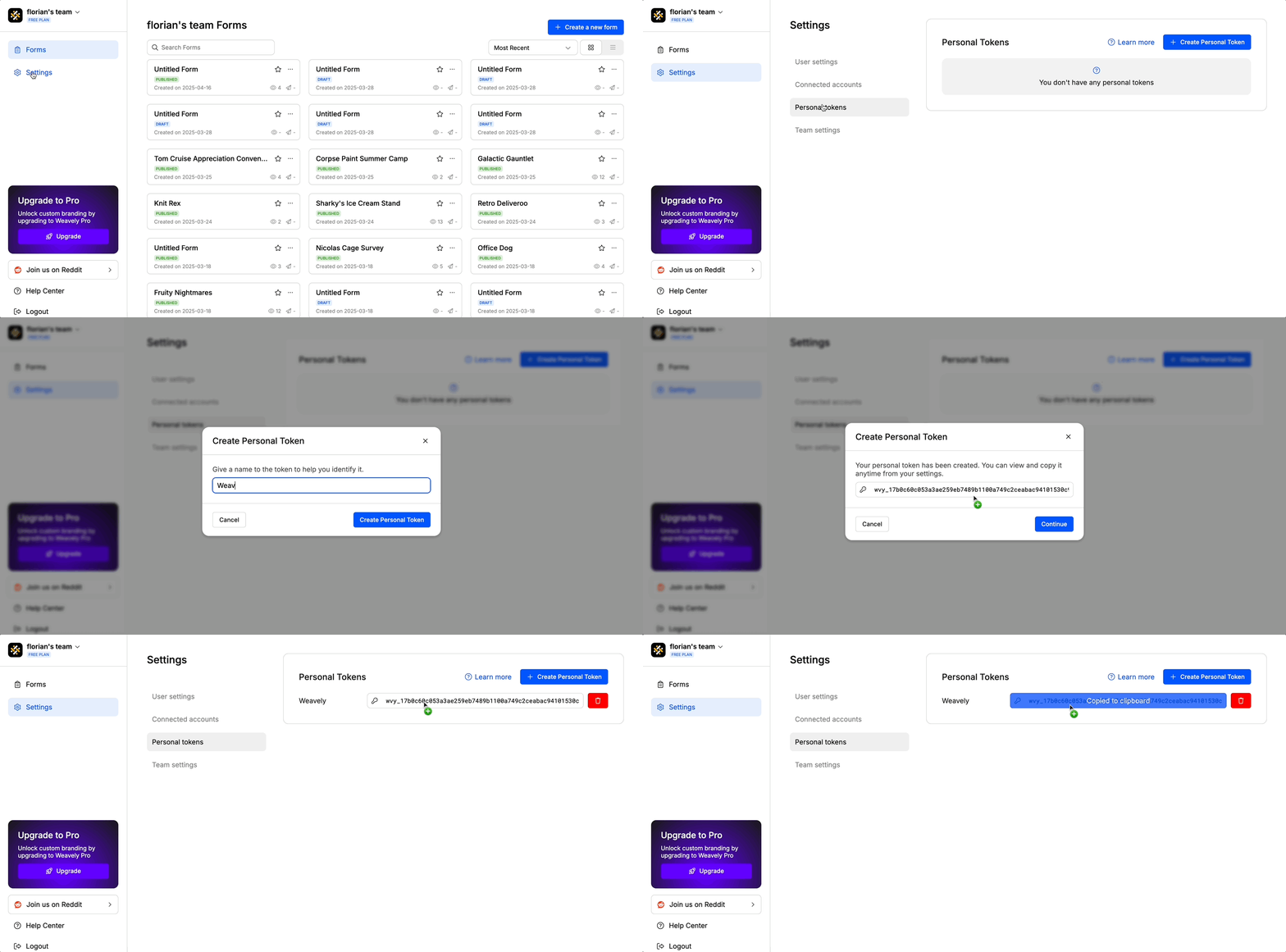
You'll need something called a *"personal token"* to connect you Weavely account to Make. To create this token, navigate to *Settings->Personal Tokens* in the dashboard. Once created you'll be able to copy and paste this token (i.e. a string of text) to Make in step 3.
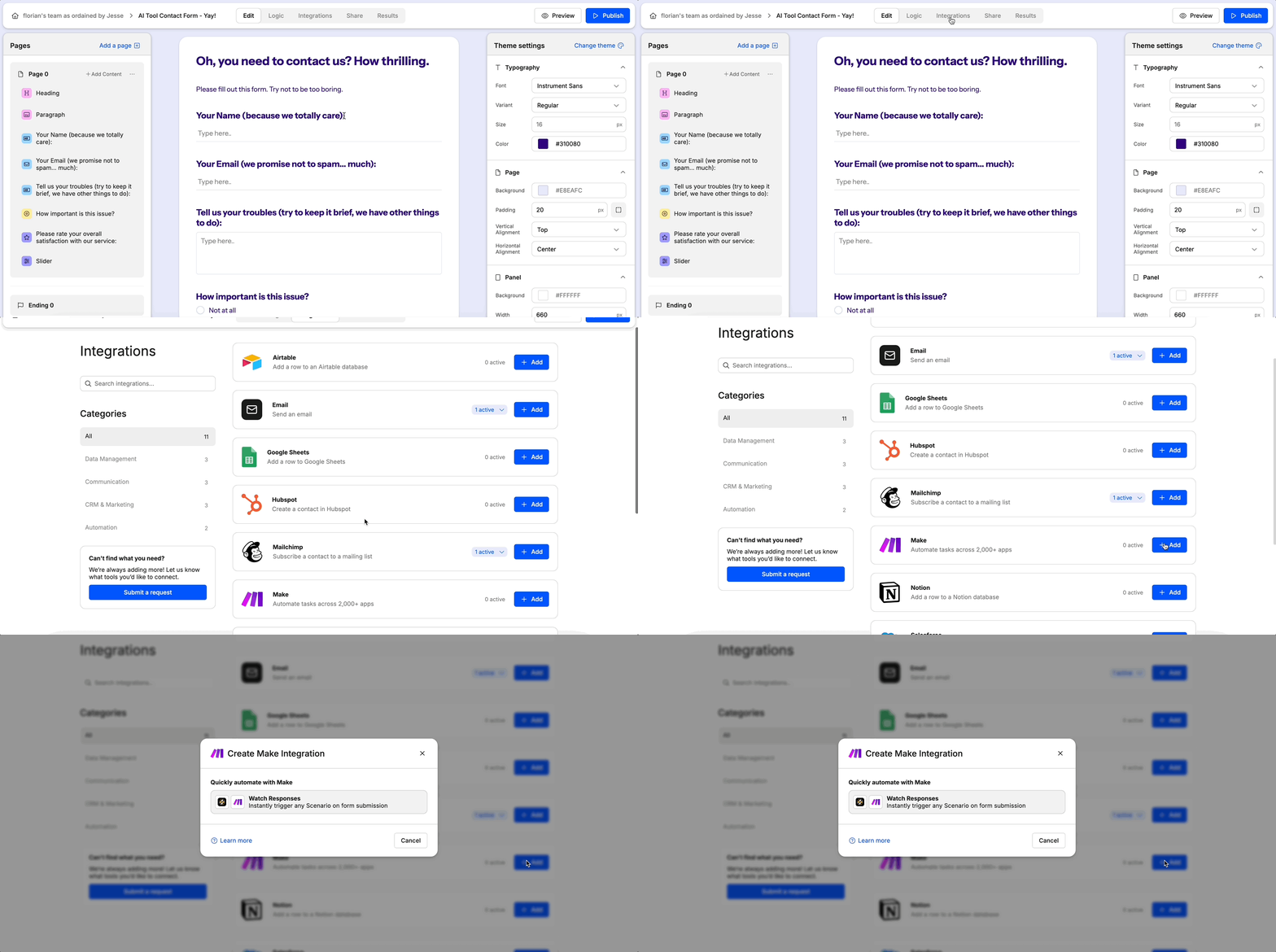
To begin, open the Weavely form you want to automate and navigate to the **Integrations** tab. From there, select **Make** and click **Add**. This will open Make, where you’ll be prompted to install the Weavely connection. Simply select your organization and follow the steps to complete the setup wizard.
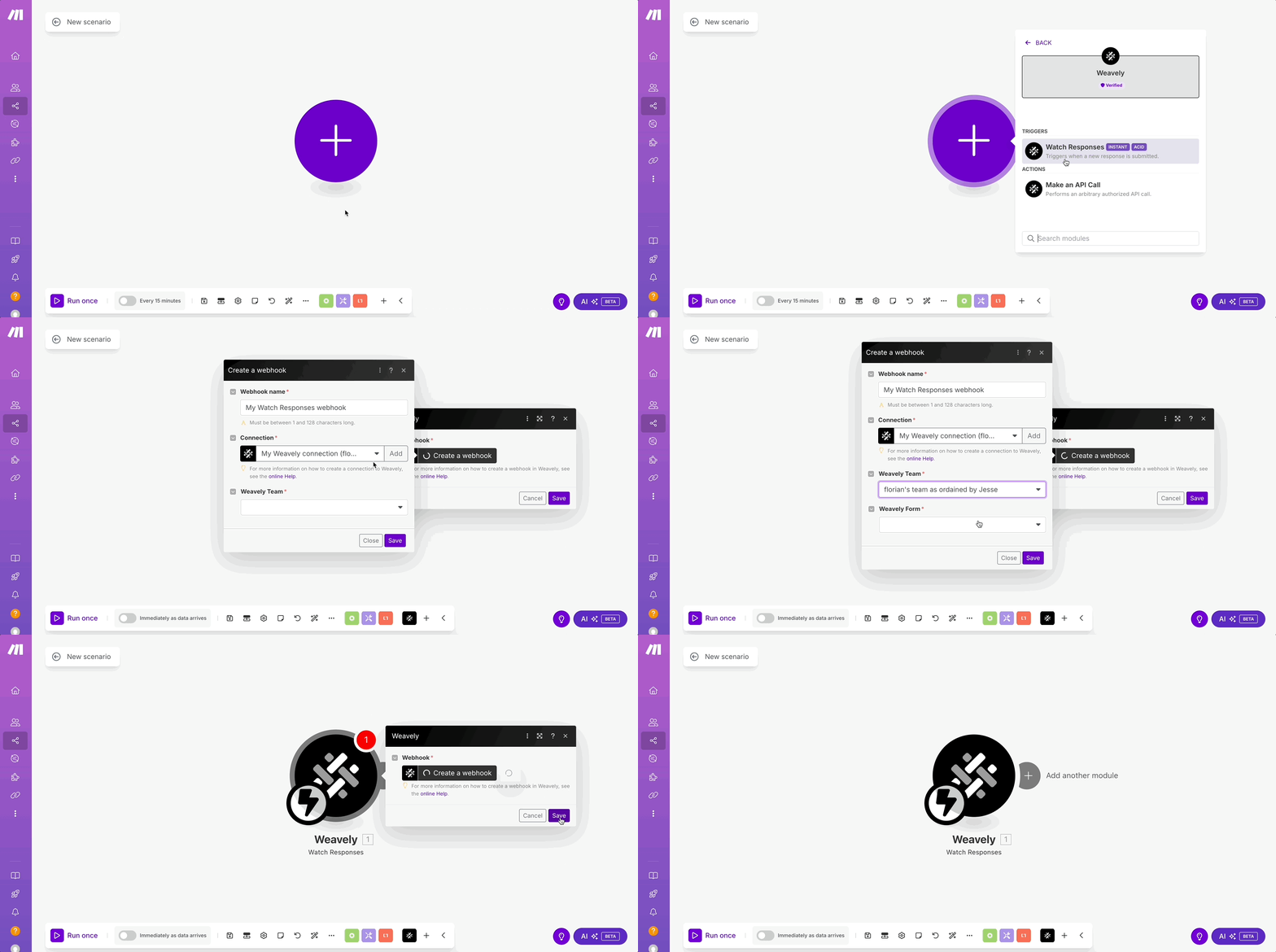
Start by creating a new scenario in Make. Add the **Weavely** module and choose the **Watch Form Submission** trigger. When prompted, create a new connection by pasting your personal token from Step 1. Then, select your Weavely team and specify the form you want to monitor. Once set up, your Make scenario will automatically listen for new form submissions.
Now that Make is listening for new form data, you can add any actions you like using one of Make’s many available integrations. For example, you might choose to send a message, create a record, or trigger an automation in a third-party tool when a form is submitted.
To personalize those actions, you can reference form responses (e.g. the respondent’s name or email) using dynamic values.
And that’s it! You’ve successfully connected Weavely to Make and automated your first workflow 🎉