> ## Documentation Index
> Fetch the complete documentation index at: https://help.weavely.ai/llms.txt
> Use this file to discover all available pages before exploring further.
# Connect Your Weavely Form to n8n for Workflow Automation
> n8n is an open-source automation platform that lets you connect your Weavely form to hundreds of other apps and services. Trigger any n8n workflow automatically when someone submits a form.
{`{
"@context": "https://schema.org",
"@graph": [
{
"@type": "WebPage",
"@id": "https://help.weavely.ai/integrations/n8n",
"url": "https://help.weavely.ai/integrations/n8n",
"name": "Connect Your Weavely Form to n8n for Workflow Automation",
"description": "n8n is an open-source automation platform that lets you connect your Weavely form to hundreds of other apps and services. Trigger any n8n workflow automatically when someone submits a form.",
"inLanguage": "en",
"publisher": { "@id": "https://www.weavely.ai/#org" }
},
{
"@type": "TechArticle",
"@id": "https://help.weavely.ai/integrations/n8n#article",
"headline": "Connect Your Weavely Form to n8n for Workflow Automation",
"description": "n8n is an open-source automation platform that lets you connect your Weavely form to hundreds of other apps and services. Trigger any n8n workflow automatically when someone submits a form.",
"inLanguage": "en",
"mainEntityOfPage": { "@id": "https://help.weavely.ai/integrations/n8n" },
"author": { "@id": "https://www.weavely.ai/#org" },
"publisher": { "@id": "https://www.weavely.ai/#org" }
},
{
"@type": "VideoObject",
"@id": "https://help.weavely.ai/integrations/n8n#video",
"name": "How to Connect Forms to n8n with Weavely (Form Builder + n8n Integration)",
"description": "Learn how to connect Weavely forms to your n8n workflows in minutes. Weavely is a free AI-powered form builder that integrates directly with n8n through a community node — so you can trigger any workflow automatically when someone submits a form.",
"url": "https://youtu.be/gxrmQWG6zW0",
"contentUrl": "https://youtu.be/gxrmQWG6zW0",
"embedUrl": "https://www.youtube.com/embed/gxrmQWG6zW0",
"duration": "PT2M59S",
"uploadDate": "2026-02-12T00:00:00+00:00",
"thumbnailUrl": [
"https://i.ytimg.com/vi/gxrmQWG6zW0/maxresdefault.jpg"
],
"publisher": { "@id": "https://www.weavely.ai/#org" },
"potentialAction": {
"@type": "WatchAction",
"target": "https://youtu.be/gxrmQWG6zW0"
}
},
{
"@type": "Organization",
"@id": "https://www.weavely.ai/#org",
"name": "Weavely",
"url": "https://www.weavely.ai"
}
]
}`}
Here's how to connect your Weavely form to n8n in just a few minutes using the Weavely community node.
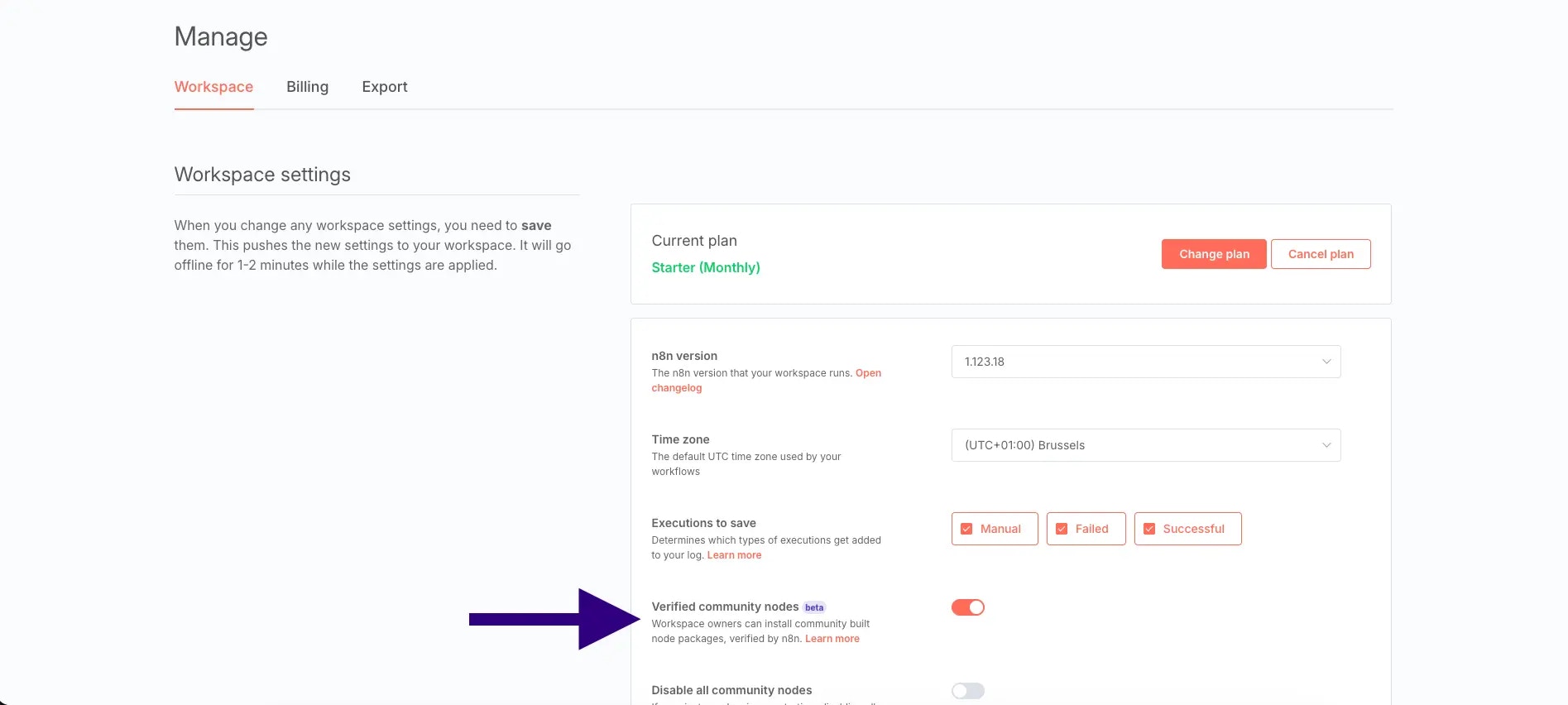
Weavely connects to n8n through a verified community node. Before you can install it, you'll need to enable community nodes in your n8n instance. Navigate to your **Admin Panel** and make sure **Verified Community Nodes** are enabled.
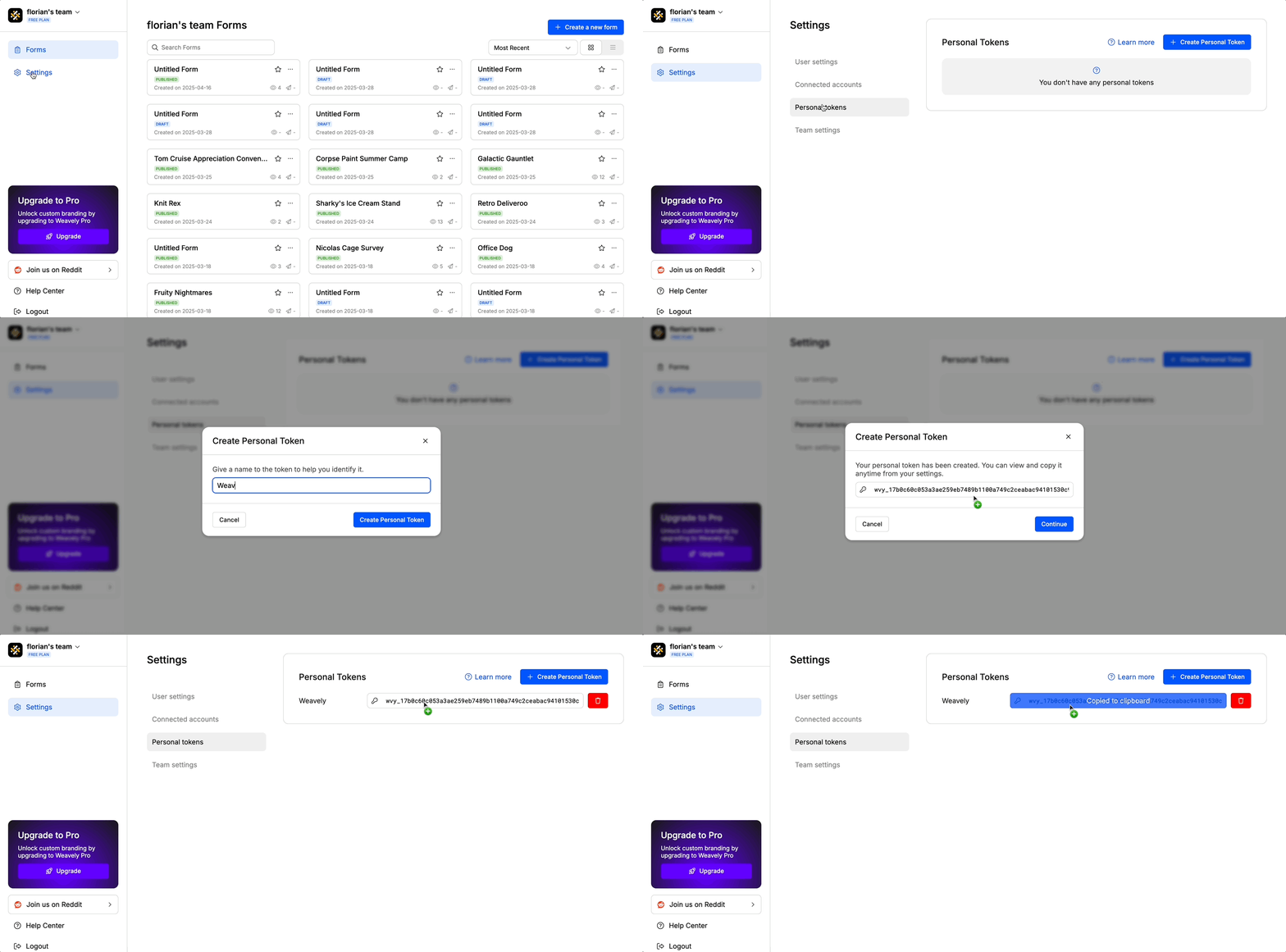
You'll need a *"personal token"* to connect your Weavely account to n8n. To create one, navigate to *Settings->Personal Tokens* in the Weavely dashboard, give your token a name (e.g. "n8n"), and click create. Once generated, copy the token — you'll paste it into n8n in the next step.
Create a new workflow in n8n and search for **Weavely** under the available triggers. Install the Weavely community node, then add it to your workflow. When prompted to set up credentials, paste the personal token you copied from Weavely and hit **Save** — n8n will test the connection to confirm everything is working.
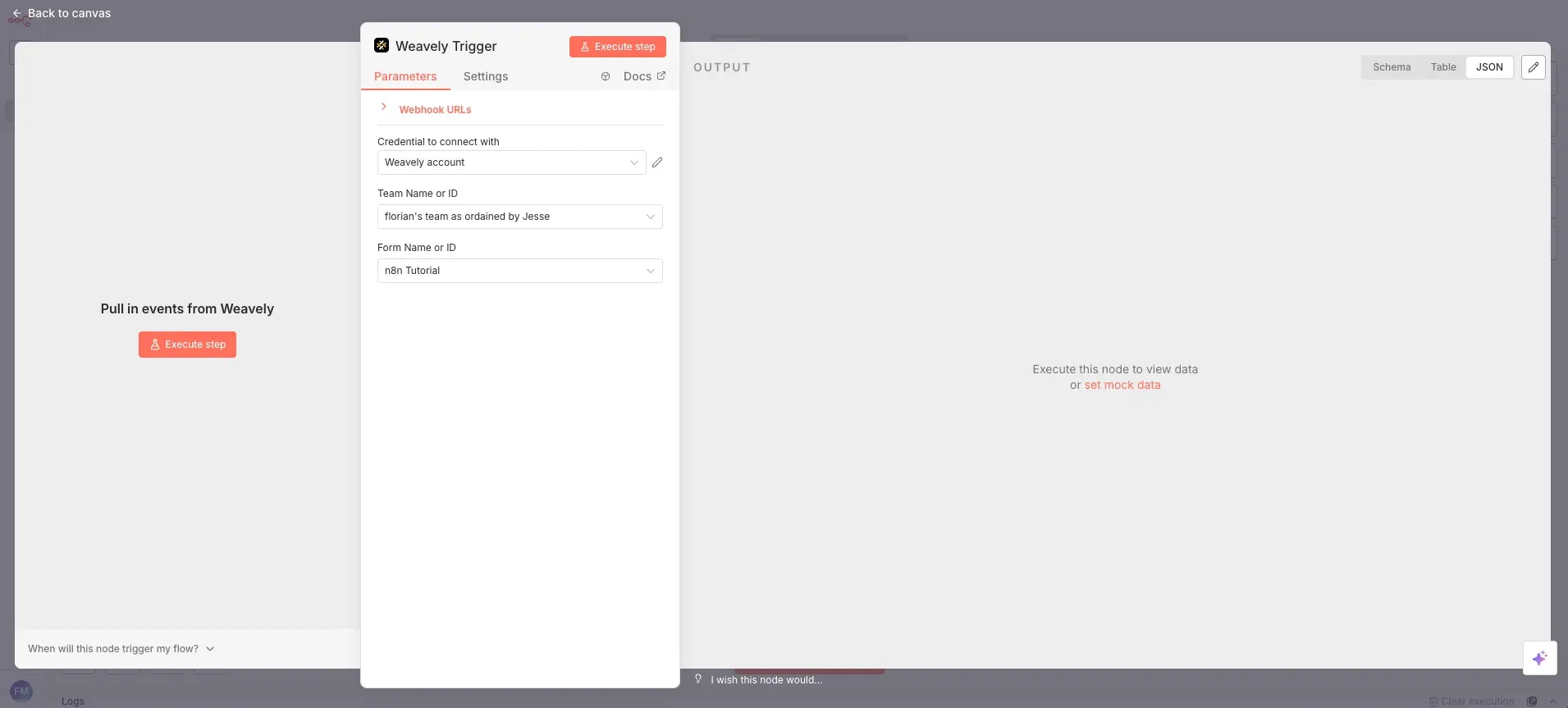
Once your credentials are saved, select the **team** you want to listen to and then choose the specific **form** you want to trigger the workflow. The form needs to be published in Weavely for it to appear in the dropdown. If you've just published a form, you may need to close and reopen the node settings for it to show up.
When you press **Execute Step**, n8n will start listening for new submissions. Submit a test response to your form and you'll see the output data in n8n — including the form ID, response ID, creation timestamp, and all your answers with their question labels, values, and question IDs.
And that's it! From here, you can connect the Weavely trigger to any other nodes in your n8n workflow — whether that's sending data to Google Sheets, Notion, a CRM, Slack, or any of n8n's hundreds of available integrations.