> ## Documentation Index
> Fetch the complete documentation index at: https://help.weavely.ai/llms.txt
> Use this file to discover all available pages before exploring further.
# Send Form Responses to Salesforce
> Weavely's Salesforce integration lets you automatically create objects in Salesforce upon form submissions.
{`{
"@context": "https://schema.org",
"@graph": [
{
"@type": "WebPage",
"@id": "https://help.weavely.ai/integrations/salesforce",
"url": "https://help.weavely.ai/integrations/salesforce",
"name": "Send Form Responses to Salesforce",
"description": "Weavely's Salesforce integration lets you automatically create objects in Salesforce upon form submissions.",
"inLanguage": "en",
"isPartOf": {
"@type": "WebSite",
"@id": "https://help.weavely.ai/#website",
"name": "Weavely Help Center"
},
"breadcrumb": {
"@type": "BreadcrumbList",
"itemListElement": [
{ "@type": "ListItem", "position": 1, "name": "Integrations", "item": "https://help.weavely.ai/integrations" },
{ "@type": "ListItem", "position": 2, "name": "Salesforce", "item": "https://help.weavely.ai/integrations/salesforce" }
]
},
"publisher": { "@id": "https://www.weavely.ai/#org" }
},
{
"@type": "TechArticle",
"headline": "Send Form Responses to Salesforce",
"description": "Weavely's Salesforce integration lets you automatically create objects in Salesforce upon form submissions.",
"inLanguage": "en",
"author": { "@id": "https://www.weavely.ai/#org" },
"publisher": { "@id": "https://www.weavely.ai/#org" },
"mainEntityOfPage": { "@id": "https://help.weavely.ai/integrations/salesforce" }
},
{
"@type": "VideoObject",
"name": "AI Form Data to Salesforce: Weave.ly Tutorial",
"description": "Want to collect lead information directly into Salesforce, without copy-pasting anything? In this quick tutorial, I show you how to connect Weavely.ai to Salesforce.",
"uploadDate": "2025-05-12T00:00:00Z",
"duration": "PT1M55S",
"embedUrl": "https://www.youtube.com/embed/ItADoOSQHNA",
"contentUrl": "https://www.youtube.com/watch?v=ItADoOSQHNA",
"thumbnailUrl": [
"https://i.ytimg.com/vi/ItADoOSQHNA/hqdefault.jpg",
"https://i.ytimg.com/vi/ItADoOSQHNA/sddefault.jpg"
],
"potentialAction": {
"@type": "WatchAction",
"target": "https://www.youtube.com/watch?v=ItADoOSQHNA"
},
"publisher": { "@id": "https://www.weavely.ai/#org" },
"author": { "@id": "https://www.weavely.ai/#org" }
},
{
"@type": "Organization",
"@id": "https://www.weavely.ai/#org",
"name": "WEAVE.LY BV",
"url": "https://www.weavely.ai",
"address": {
"@type": "PostalAddress",
"streetAddress": "Herbert Hooverlaan 141",
"addressLocality": "Schaarbeek",
"postalCode": "1030",
"addressCountry": "BE"
},
"identifier": "BE0773.878.569",
"sameAs": [
"https://www.instagram.com/weavely.ai/",
"https://www.linkedin.com/company/weave-ly/",
"https://www.youtube.com/@weavely"
]
}
]
}`}
## Step 1: Open the Integrations Tab
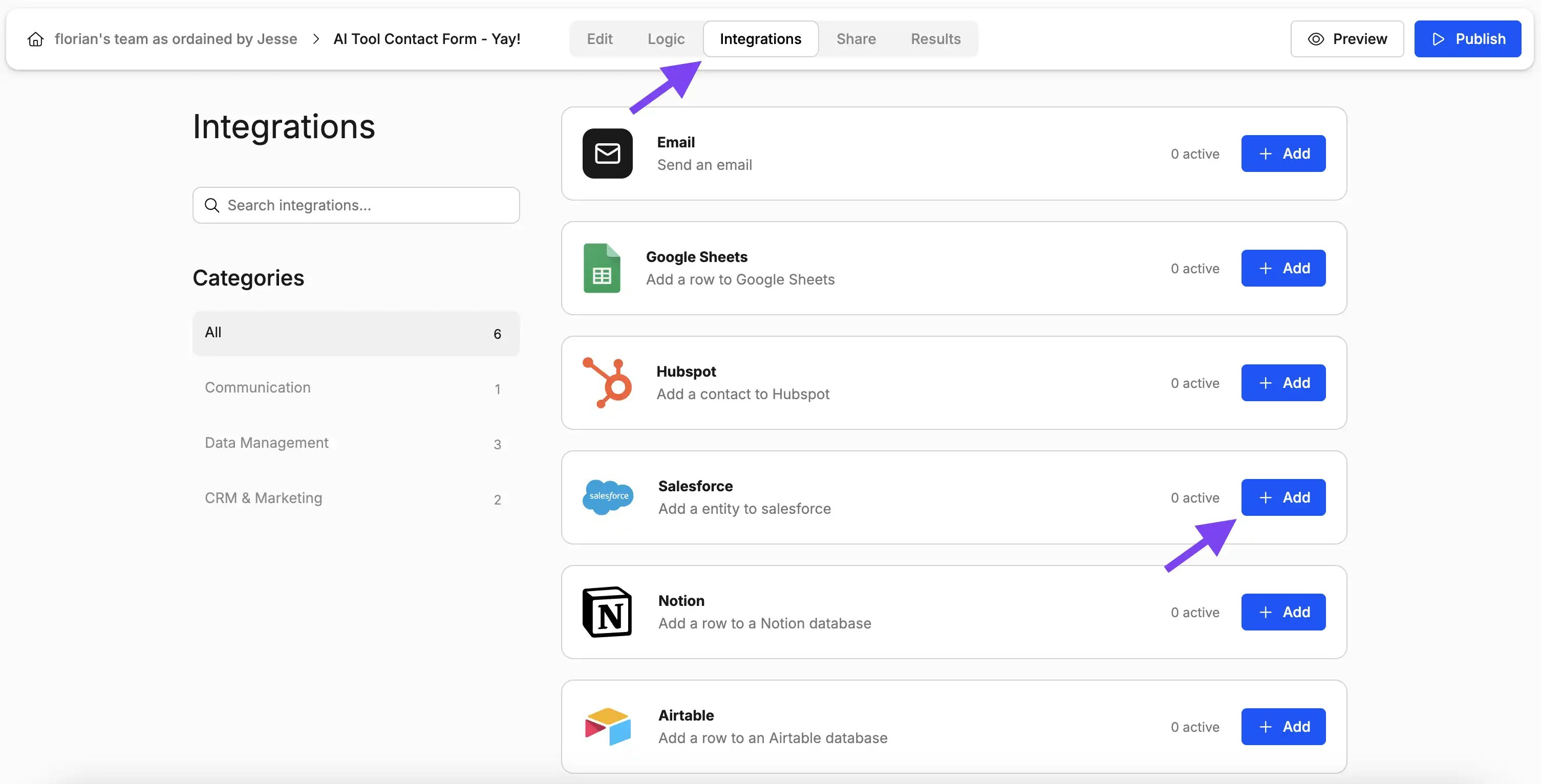
With the editor open, navigate to the *Integrations* tab and select the *Salesforce* integration as shown below.
## Step 2: Link Your Salesforce Account
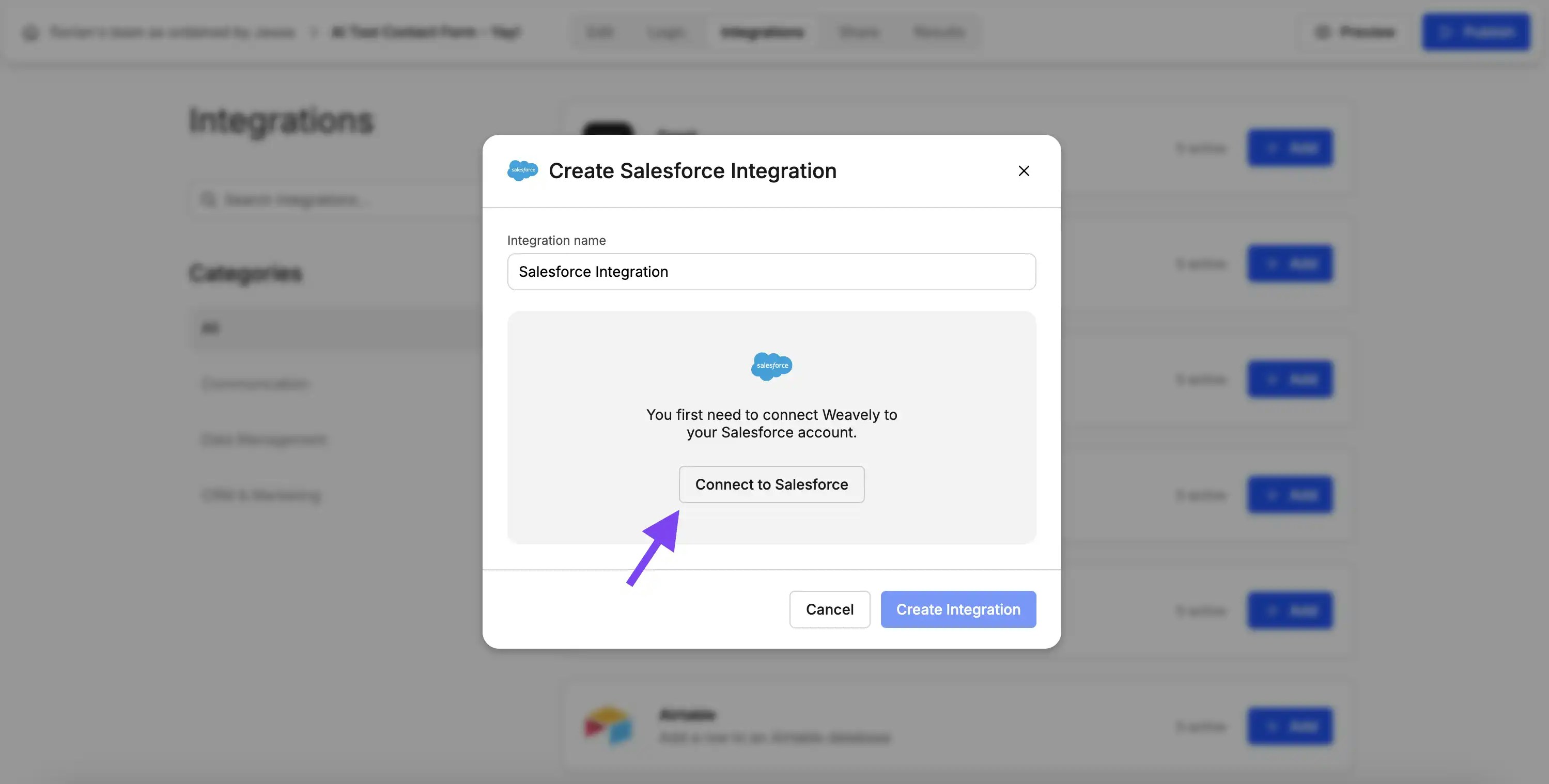
Is this the first time you set up a Salesforce integration? Then Weavely will first guide you through the steps to connect your Salesforce account to Weavely. Just press *"Connect to Salesforce"* to get started.
## Step 3: Map Form Fields to Object Properties
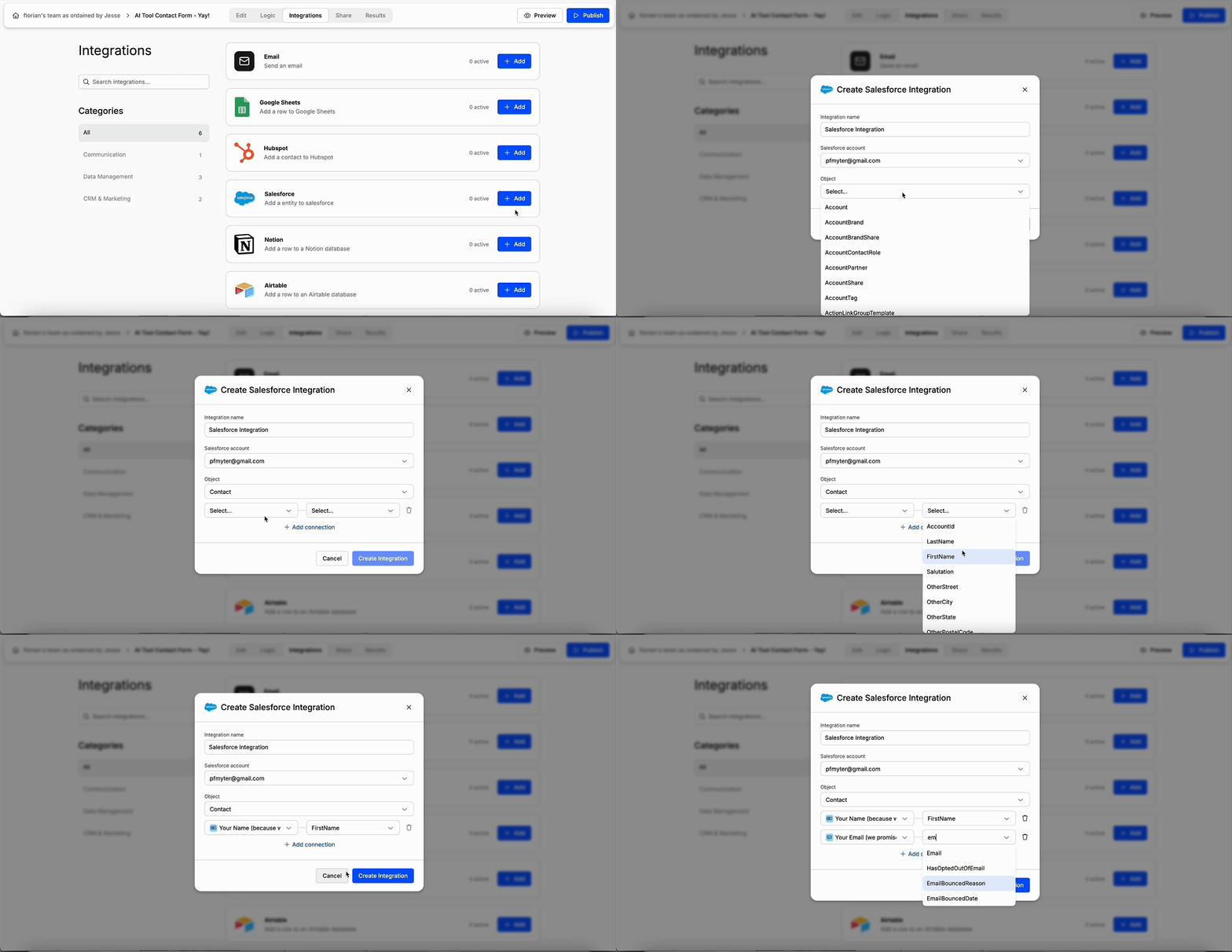
Once you've connected your Salesforce account you'll be able to set up the integration for your form. In a first step you'll need to select which Salesforce object you want to create upon form submission. In a second step you can specify how fields of your form correspond to properties of your Salesforce object. The gif below showcases both these steps.
## **Changing Your Salesforce Account or Resetting Your Connection**
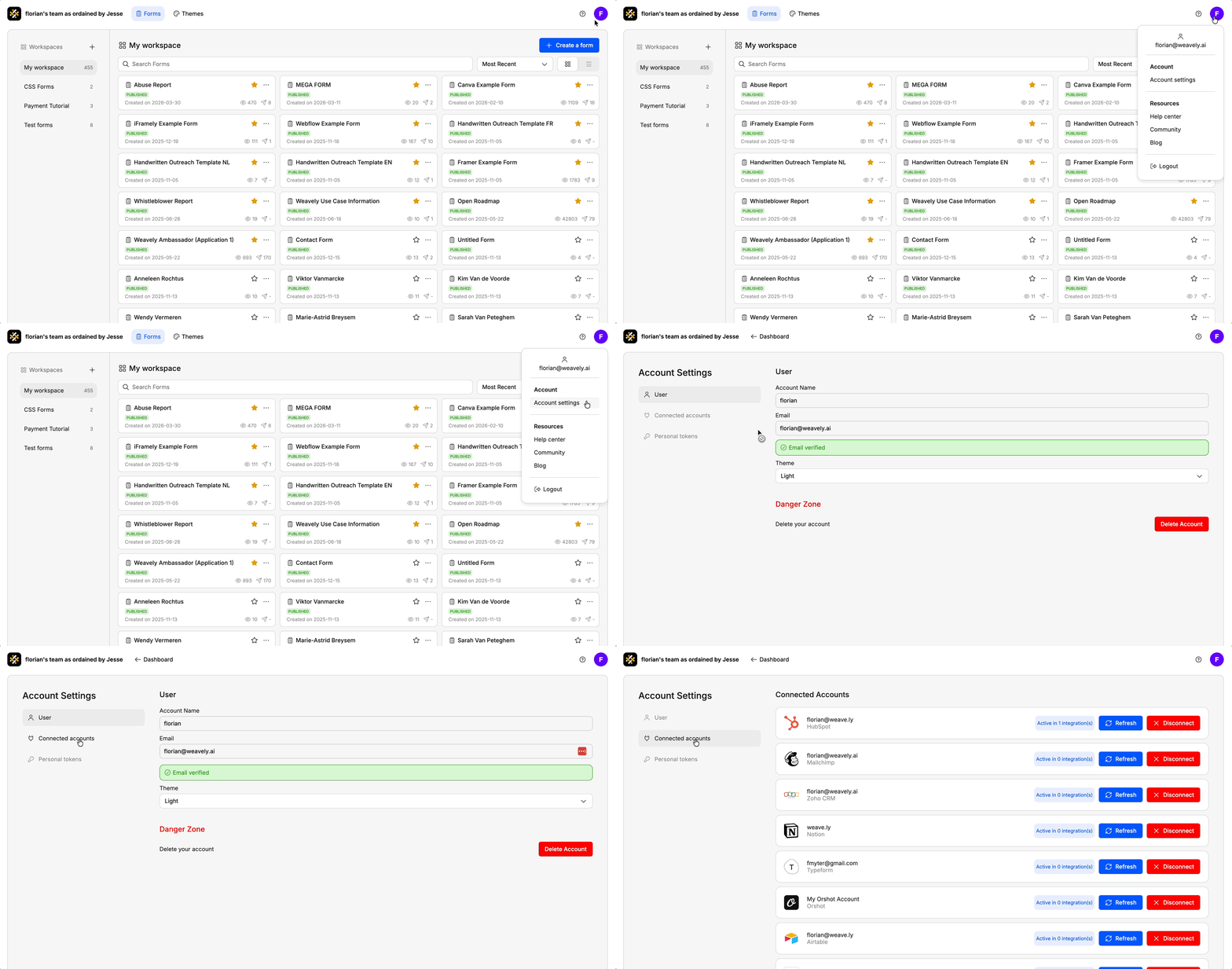
If you ever need to reset your connection with Salesforce, for instance to switch to a different account or reauthorize access, you can do so from your Weavely dashboard. Go to **Settings → Connected Accounts** and click the red **“Disconnect”** button next to Salesforce. You can then reconnect with the correct account.
 ## Step 2: Link Your Salesforce Account
Is this the first time you set up a Salesforce integration? Then Weavely will first guide you through the steps to connect your Salesforce account to Weavely. Just press *"Connect to Salesforce"* to get started.
## Step 2: Link Your Salesforce Account
Is this the first time you set up a Salesforce integration? Then Weavely will first guide you through the steps to connect your Salesforce account to Weavely. Just press *"Connect to Salesforce"* to get started.
 ## Step 3: Map Form Fields to Object Properties
Once you've connected your Salesforce account you'll be able to set up the integration for your form. In a first step you'll need to select which Salesforce object you want to create upon form submission. In a second step you can specify how fields of your form correspond to properties of your Salesforce object. The gif below showcases both these steps.
## Step 3: Map Form Fields to Object Properties
Once you've connected your Salesforce account you'll be able to set up the integration for your form. In a first step you'll need to select which Salesforce object you want to create upon form submission. In a second step you can specify how fields of your form correspond to properties of your Salesforce object. The gif below showcases both these steps.
 ## **Changing Your Salesforce Account or Resetting Your Connection**
If you ever need to reset your connection with Salesforce, for instance to switch to a different account or reauthorize access, you can do so from your Weavely dashboard. Go to **Settings → Connected Accounts** and click the red **“Disconnect”** button next to Salesforce. You can then reconnect with the correct account.
## **Changing Your Salesforce Account or Resetting Your Connection**
If you ever need to reset your connection with Salesforce, for instance to switch to a different account or reauthorize access, you can do so from your Weavely dashboard. Go to **Settings → Connected Accounts** and click the red **“Disconnect”** button next to Salesforce. You can then reconnect with the correct account.